Brake System Argo Service Manual
BR-24
Ontario Drive & Gear Limited www.argoutv.com
PH.(519)- 662-2840 FAX (519)- 662-2421
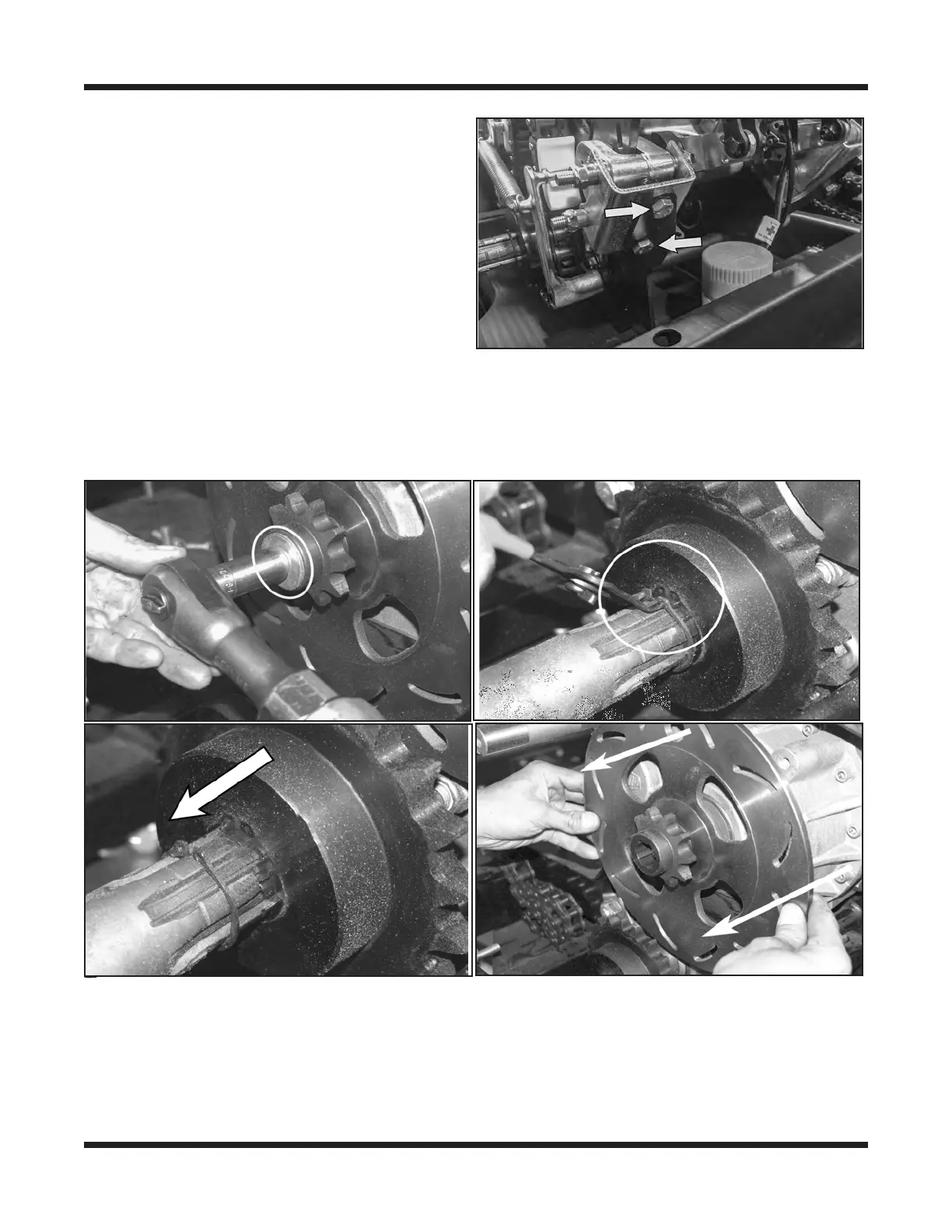
3. Remove the Parking Brake Caliper from
the caliper bracket using a 1/2" socket and
a 1/2" open end wrench.
4. Perform the servicing procedure, Remov-
ing The Idler Chain (Frontier Models
- Auto Idler Chain Adjust).
5. Using a 9/16" socket, remove the HHCS
3/8-24x1.25 Gr5 Zn securing the Steer-
ing Brake Disc with lockwasher and at
washer.
6. Pull back the retaining ring on the idler shaft drive sprocket. Slide the sprocket back
against the retaining ring to allow clearance for slipping the Steering Brake Disc o the
output shaft.
7. Remove the Steering Brake Disc.
Lide
8. Perform the servicing procedure, Brake Disc Inspection.
Installing The Steering Brake Disc (Frontier Models - Auto Idler Chain Adjust).
1. Before installing the Steering Brake Disc, inspect the splines of the output shaft for any
damage.







 To Next Page