Clutch System Argo Service Manual
Ontario Drive & Gear Limited www.argoutv.com
PH.(519)- 662-2840 FAX (519)- 662-2421
CS-17
3. Perform the servicing procedure, Removing the Drive Belt (ITDS Clutch System)
4. Remove the fastener securing the Driver Clutch to the PTO and slide the clutch from the
shaft.
NOTE
The driver clutch must be slid from the PTO with the mounting bolt hardware within the
clutch. The mounting bolt is too long to remove rst.
The driver clutch may contact the lower body rst before completely being free of the
PTO, however the lower body will ex enough in that area to free the clutch.
5. Remove the clutch to a clean work area for further disassembly.
Driver Clutch Disassembly (ITDS)
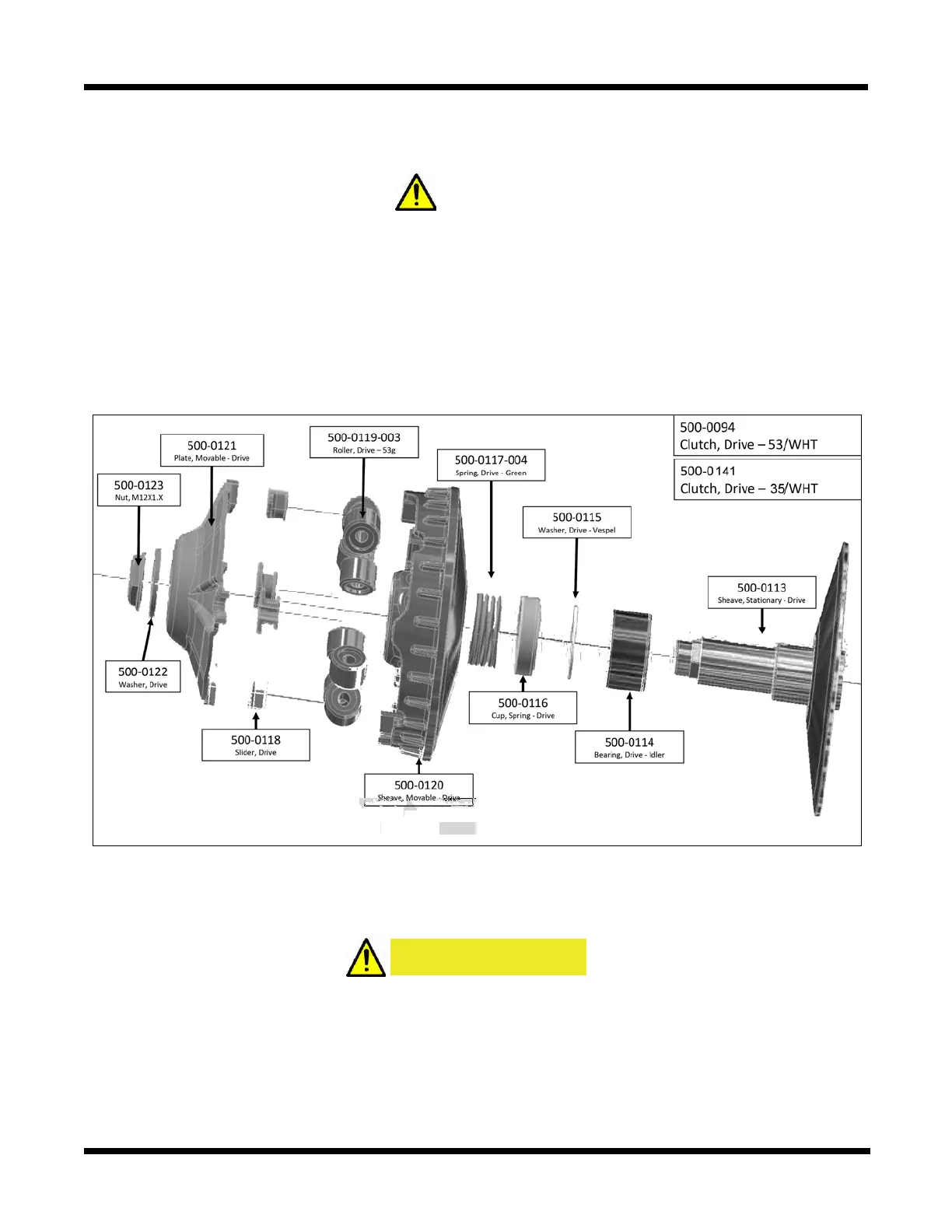
6. Using a 1-5/16" impact socket, remove the 500-0123 Nut and 500-0122 Washer from
clutch. See following page.
CAUTION
Clutch is under spring tension. Proceed with care ensuring downward pressure is
held on the cap when removing the hardware.









 To Next Page