ES-18
Electrical System Argo Service Manual
Ontario Drive & Gear Limited www.argoutv.com
PH.(519)- 662-2840 FAX (519)- 662-2421
Calibrating the Digital Gauge Package
Aurora Digital Gauge Package
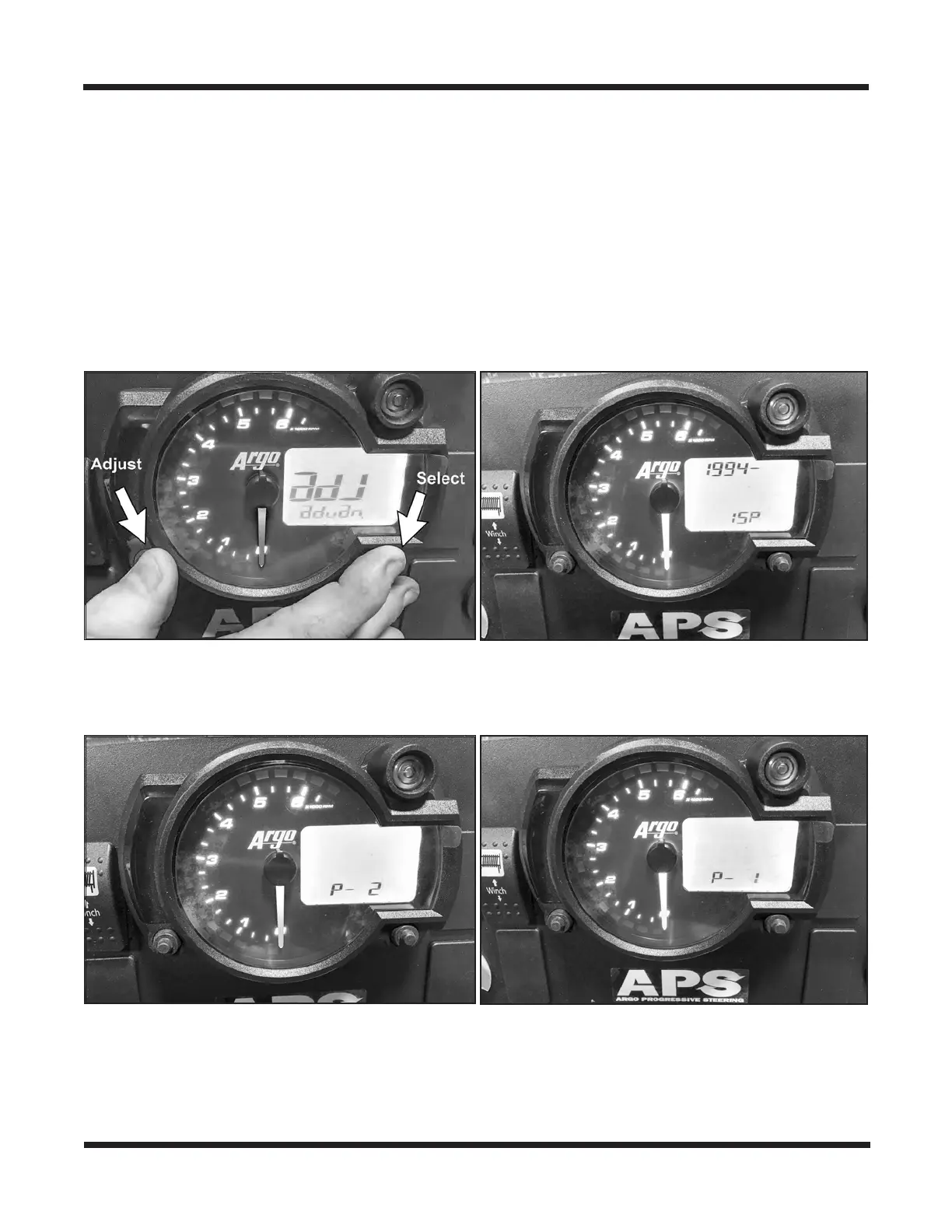
1. With key switch o, hold both “Select” and “Adjust” buttons down simultaneously.
2. Turn the key to the run position until you see the letter “adj” and then release both but-
tons.
3. Using the “Adjust” button, change the top ashing numbers to read 1994 (for 25"tires).
Cycle to the next number using the “Select” button.
4. Set the lower number to 15P for correct speedometer reading. Push Select button.
5. Set to P-2 for 800 Model Aurora (tach setting).
6. Set to P-1 for all models except Aurora 800 models (tach setting). Push Select button.
7. Set to F-1 for fuel gauge setting. Push Select button.





 To Next Page