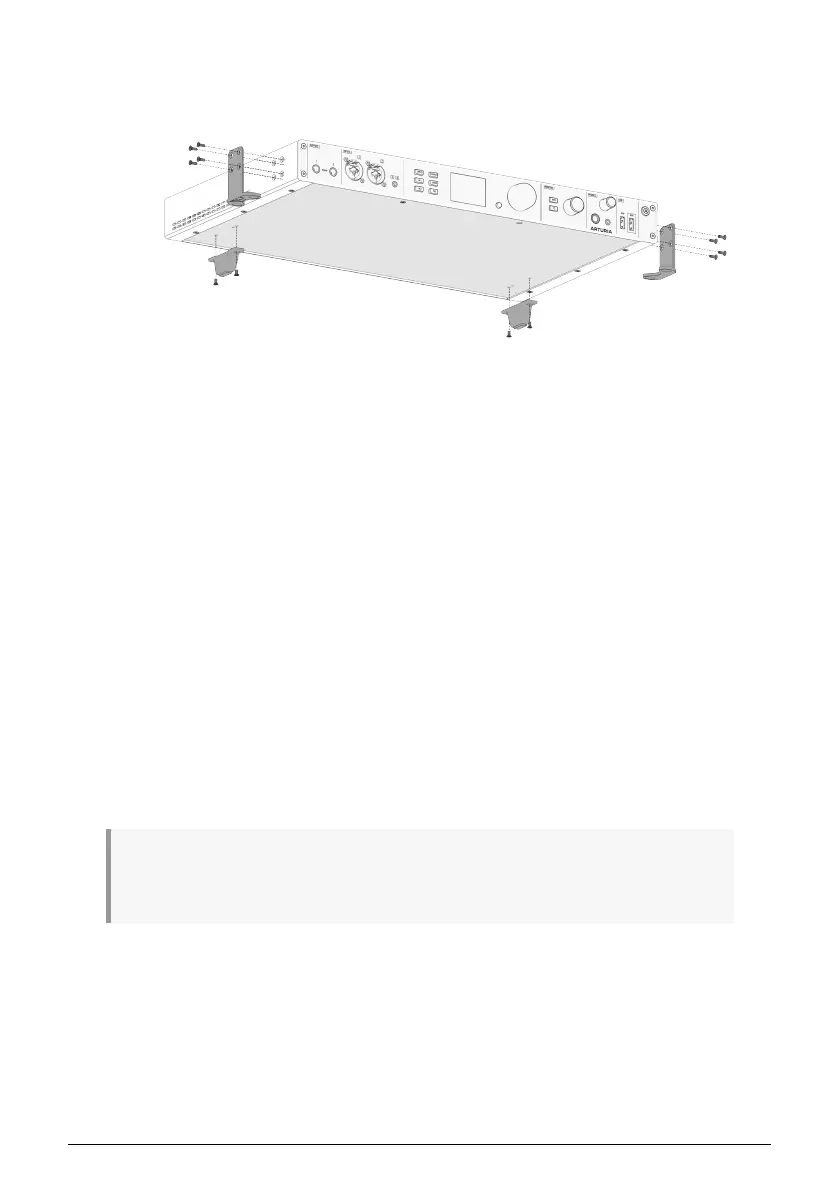
2.2.1. Configuring the AudioFuse 16Rig for Tabletop Use
In addition to the rack ears and screws, your AudioFuse 16Rig should also have a pair of
rectangular black plastic feet for the rear of the box, and a set of two semi-circular rubber
pads. You'll need these for tabletop use.
1. Stick the rubber pads onto the rack ears at the spot that will become the "feet".
This will keep the feet from scratching whatever you rest them on.
2. Attach the rubber pads so that the straight edge aligns with the 90º bend in the
rack ear, and then press the circular portion of the pad firmly onto the rack ear
in the direction of the two large screw holes. (See the diagram above or on the
box lid.)
3. Be sure to mount the rack ears so they are pointing under the AudioFuse 16Rig
(toward its center), not pointing away.
4. The two rear feet have tiny plastic guide pins that help them seat properly on the
bottom panel. Once you line those up with the guide holes in the bottom of the
unit, it will be easy to fasten the feet into place with the provided screws.
5. When the feet are properly installed, the AudioFuse 16Rig will be supported in
four places: the left and right rack ears (under the front) and the left and right
feet (under the back).
Now your unit is elevated above the tabletop and perfectly level and solid, so you could
place other gear on it, such as a small controller or tablet.
Keep in mind that the AudioFuse 16Rig does generate heat that needs to be able to escape the
chassis. Don't block the vents and leave room for air circulation, and don't stack another item that
generates heat on top of it (such as a laptop).
AudioFuse 16Rig configured for tabletop use
6 Arturia - User Manual AudioFuse 16Rig - Setting Up The Hardware












 To Next Page