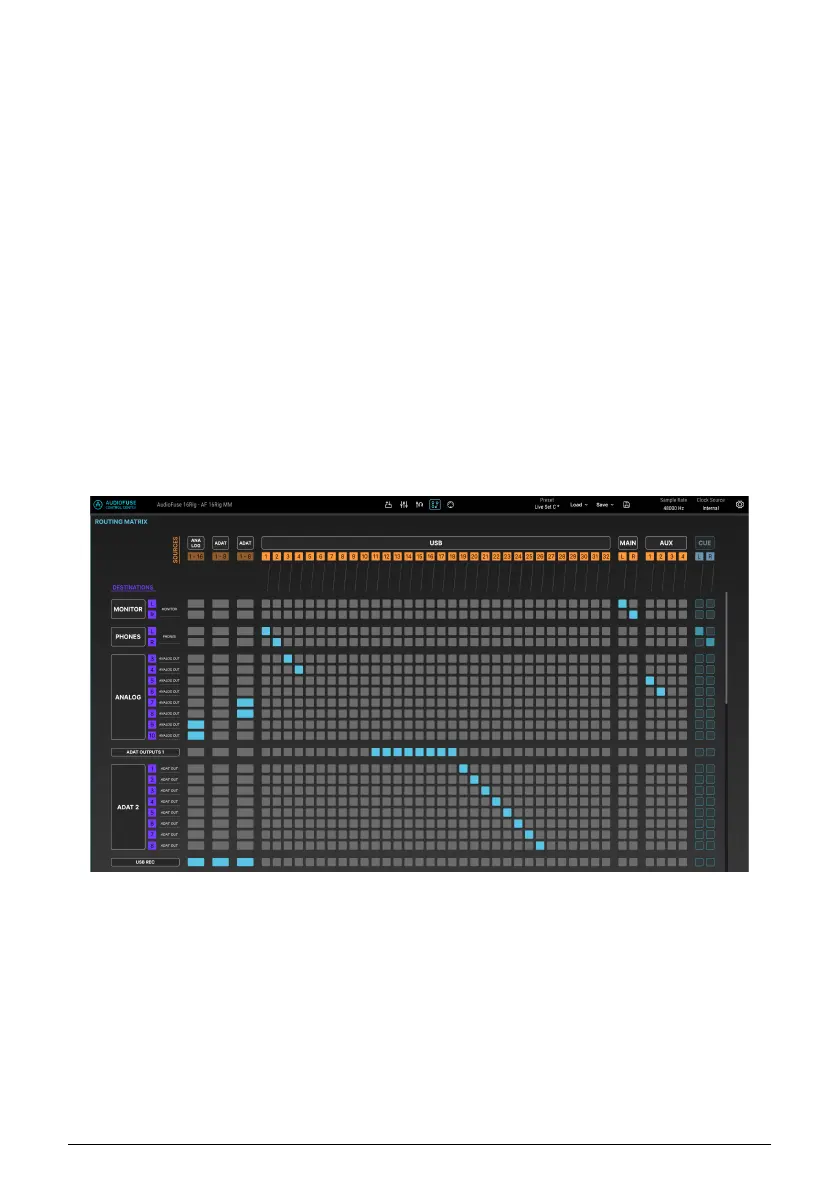
8.6.1. Sources
From left to right, the available Sources are:
• ANALOG: 16 input channels
• ADAT 1: 8 input channels
• ADAT 2: 8 input channels
• USB: 32 channels of audio playing back from your DAW
• MAIN: the stereo output of the Main mixer
• AUX: the four Aux outputs of the Main mixer
• CUE: the stereo output of the Cue mixer
Because there are so many sources, it is impossible to show them all at once on the screen.
As a result, half of the sources are minimized (or "collapsed") while the other half is being
shown, and you switch between them by clicking on the name of any minimized group of
sources.
In the screenshot above, the ANALOG, ADAT 1, and ADAT 2 sources are displayed, and the
USB sources have been collapsed into a single column. If a connection exists between
any
of the USB sources and a particular destination, that row will have a blue rectangle.
If you click on any of the black boxes with group labels (e.g. ANALOG or ADAT 2), the screen
will switch to the following view:
Here, the USB sources are displayed individually while the other three groups of sources
have been collapsed into single columns.
Arturia - User Manual AudioFuse 16Rig - AudioFuse Control Center 59












 To Next Page