Note that the only clickable items in this view are the channel selectors. If you want to
change something like volume, mute or solo, click on any channel number to select it for
adjustment.
If the mixer appears empty, it's because no channels have been added yet. You can add channels
by going to the MAIN CHANNELS selectors (pages 3 and 4 in the MIXER section) and adding whichever
channels you would like to have available in the mixer.
7.3.1. MIXER CHANNEL SETTINGS
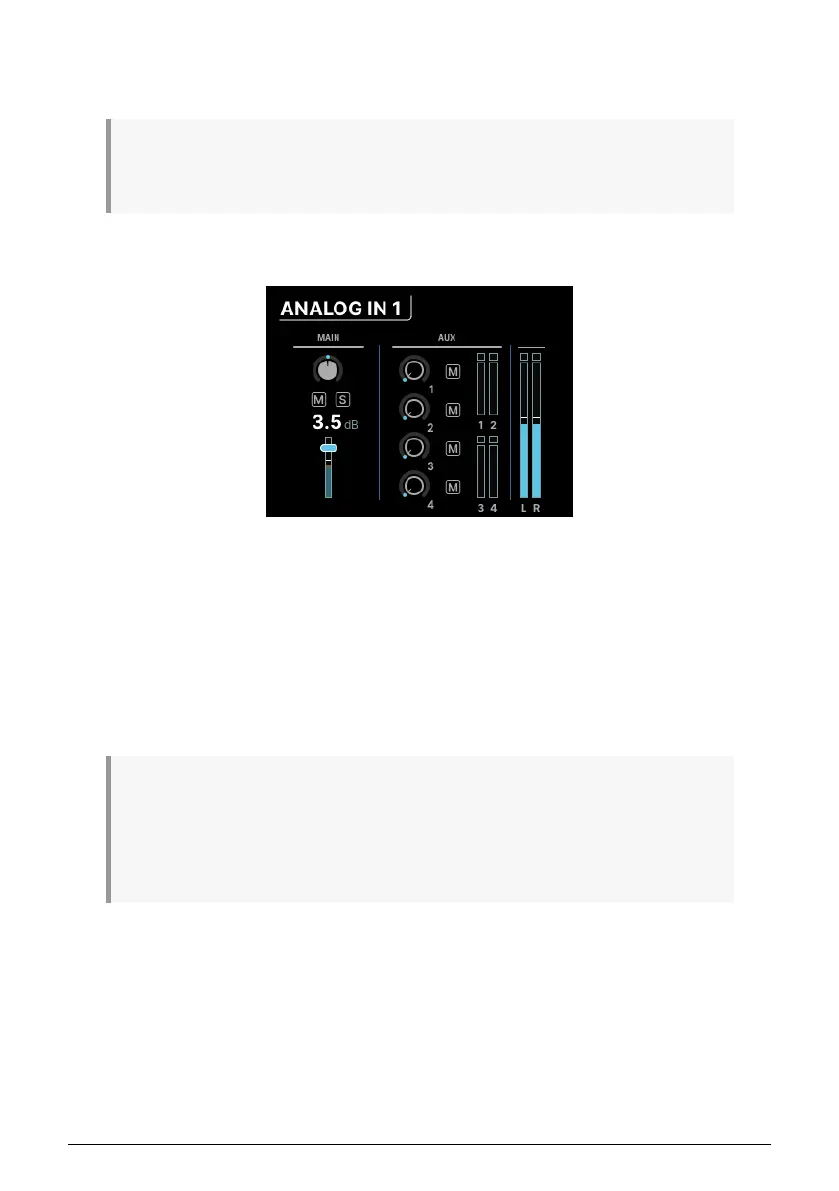
These screens are labeled by the input type and channel numbers, e.g. ANALOG 3–4 or USB
5-6.
On the left, you'll find the usual channel fader controls: pan, mute, solo, and fader level.
If two channels have been stereo linked, there will be two pan controls for individual
adjustment.
On the right is the Aux section, where the send amount and muting for the four Aux sends
can be adjusted. Finally there are meters for the Auxes and Main mix.
Press the Back button to return to the MAIN MIXER page.
Remember that if you hold the MIXER button while turning the encoder while on a particular mixer
channel's page, you'll jump to the next channel's corresponding page. This lets you quickly scroll through
channels to check or adjust parameters like pan position or Aux send levels. When you're holding down
the MIXER button, the MONITOR knob directly controls the channel level. That means you can rapidly
jump from channel to channel and tweak levels, just by holding down the MIXER button and going back
and forth between the Encoder and the MONITOR knob!
36 Arturia - User Manual AudioFuse 16Rig - Menus and Functions












 To Next Page