These drop-down menus let you select the Sample Rate, from 44.1 to 192 kHz, and Clock
Source, whether Internal, ADAT, or Word Clock.
NOTE: Selecting a sample rate higher than 48 kHz will limit the capabilities of the AudioFuse 16Rig.
See the section on Clock Settings [p.40] for more information.
8.2. Global Settings
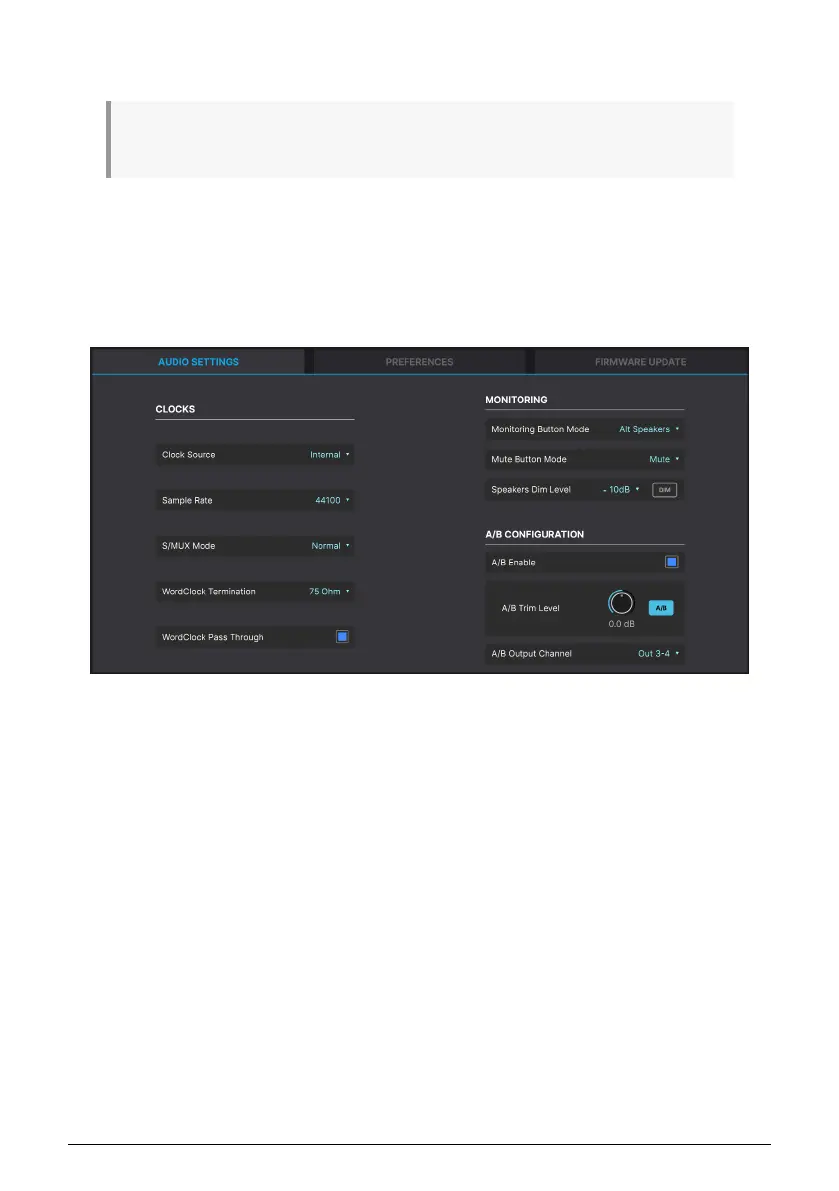
The last icon in the Upper Toolbar, the gear, opens a pop-up Settings menu with three tabs.
8.2.1. Audio Settings
These settings cover clocking, monitoring, and configuration of the A/B Speakers. They
include:
• Clock Source
• Sample Rate
• Force S/MUX
• WordClock Termination
• WordClock Pass Through
• Monitoring Button Mode
• Speakers Dim Level and DIM button
• A/B Enable
• A/B Trim Level
• A/B Output Channel
These features are identical to, and offer the same options as, their corresponding hardware
settings as described in the hardware CLOCK SETTINGS [p.40] and MONITOR SETTINGS
[p.42] pages under the SETTINGS menu, as well as the A/B CONF settings in the MONITOR
[p.34] menu.
Arturia - User Manual AudioFuse 16Rig - AudioFuse Control Center 49












 To Next Page