EasyManua.ls Logo

AudioCodes 450HD - User Manual

AudioCodes 450HD
132 pages
Print Icon
To Next Page IconTo Next Page
Loading...
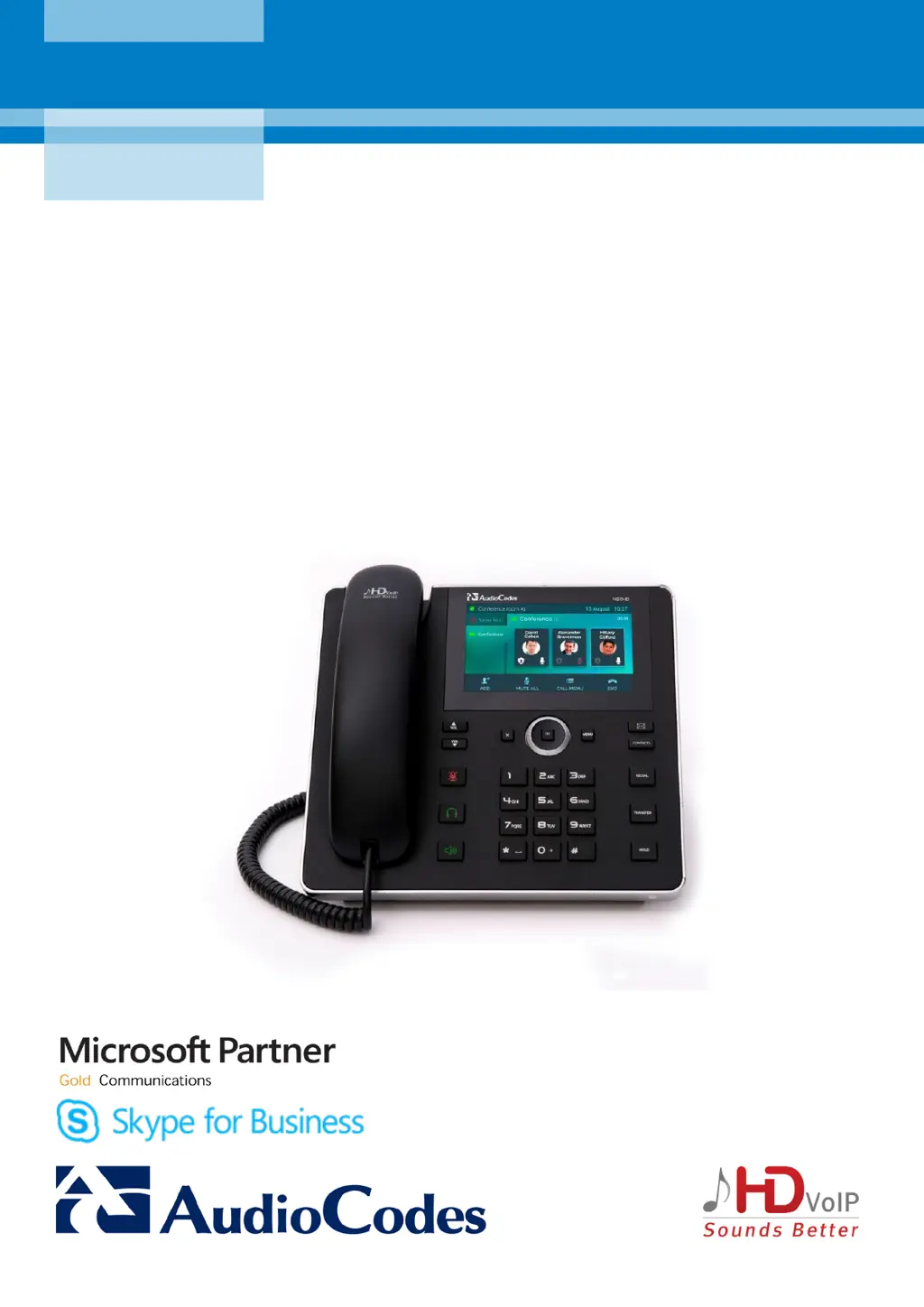
AudioCodes 400HD Series of High Definition IP Phones
HD VoIP 450HD IP Phone
User’s Manual
450HD IP Phone for Microsoft
®
Skype
for Business
Version 3.0.1

Table of Contents

Other manuals for AudioCodes 450HD

Questions and Answers

  • D
    davidmccarthyAug 30, 2025
    What to do if AudioCodes 450HD IP Phone shows 'PIN account disabled'?
    • E
      Eric BoyleAug 30, 2025
      If your AudioCodes IP Phone displays 'PIN account disabled', make sure the account is enabled in the Skype for Business server interface. If it isn't, enable it.
  • B
    Bryan GonzalezAug 29, 2025
    What to do if AudioCodes IP Phone shows 'PIN expired'?
    • T
      Tyler KruegerAug 29, 2025
      If your AudioCodes IP Phone displays 'PIN expired', renew the PIN expiration policy in the Skype for Business server interface.
  • K
    Kelsey JohnstonAug 28, 2025
    How to fix AudioCodes 450HD IP Phone if it is not initializing?
    • C
      Christine MyersAug 28, 2025
      If your AudioCodes IP Phone is not initializing, make sure DHCP is enabled.
  • K
    kathleenyoderAug 27, 2025
    What to do if AudioCodes 450HD IP Phone shows 'PIN not set'?
    • B
      brian18Aug 27, 2025
      If your AudioCodes IP Phone shows 'PIN not set', make sure a PIN was configured for the user account in the Skype for Business server interface. If not, create a PIN for the account.
  • L
    laurenhopkinsAug 26, 2025
    How to fix 'Cannot find SIP server' error on AudioCodes 450HD IP Phone?
    • W
      William MedinaAug 26, 2025
      If your AudioCodes IP Phone can't find the SIP server, make sure at least one of the following is enabled in the DNS server: _sipinternaltls._tcp. (for TLS), DHCP results (Option 120) (for TLS), _sipinternal._tcp. (for TCP), DHCP results (Option 120) (for TCP), _sip._tls. (for TLS), or _sip._tcp. (for TCP).
  • N
    Nathan HallAug 25, 2025
    What to do if AudioCodes 450HD shows 'PIN invalid phone info'?
    • R
      Robert WilliamsAug 26, 2025
      If your AudioCodes IP Phone displays this notification, ensure the information entered on the phone screen and in the Skype for Business server interface is correct and matches. Also, verify in the Skype for Business server interface that the PIN is enabled; if not, enable it.
  • M
    Margaret FranklinAug 25, 2025
    What to do if AudioCodes 450HD IP Phone shows 'Failed to validate certificate' or 'Failed to obtain user certificate'?
    • T
      Tonya MendozaAug 25, 2025
      If your AudioCodes IP Phone displays a certificate error, first ensure that DHCP Option 43, sub-option 5, is enabled on your DHCP server. Also, verify you can access the Skype for Business Web service URL: https://lyncsvrWebPoolFQDN:443/CertProv/CertProvisioningService.svc. Finally, check that querying the LDAP server (_ldap._tcp.) is enabled to obtain the root certificate.

Summary

Introduction to the 450 HD IP Phone

Key Features of the 450 HD Model

Highlights of the 450HD IP Phone, including touch screen and UC capabilities.

Unified Communications Integration

How the phone integrates with UC environments like Skype for Business.

Phone Setup and Hardware

Unpacking and Device Overview

Contents of the package and identification of phone components.

Phone Cabling and Connection

Steps for connecting the phone's cables for power and network.

Phone Mounting Options

Procedures for mounting the phone on a desk or wall.

Getting Started with the Phone

Touch Screen Interface

Understanding the phone's touch screen interface and idle state display.

Softkeys and Menu Navigation

Explains softkeys and how to navigate through phone menus.

Alphanumeric Input Methods

Procedures for entering numbers, letters, and symbols using the keypad.

User Sign-in and Sign-out

Steps for signing into and out of the phone for user access.

Phone Customization

Call Management Settings

Configuring language, ring tones, call waiting, and call forwarding.

Volume and Display Settings

Adjusting phone volume and screen brightness for user preference.

Directories and Contacts Management

Managing personal and corporate directories, adding, searching, and editing contacts.

Function Key Configuration

Customizing function keys for speed dial, BLF, and key events.

Presence Status and Calendar Integration

Managing presence status and viewing calendar integration.

Basic Phone Operations

Making and Answering Calls

Core functions of making, answering, ending, and rejecting calls.

Call History and Voicemail Access

Reviewing call logs and managing voicemail messages.

Advanced Operations and Features

Call Handling Features

Managing waiting calls, call hold, and multiple incoming calls.

Call Transfer and Conferencing

Performing various call transfer types and setting up conferences.

BToE Integration and Usage

Setting up and using Better Together over Ethernet for PC/phone integration.

Skype for Business Client Interaction

Using BToE functions for enhanced Skype for Business client features.

Troubleshooting

Common Issues and Solutions

Guidance for resolving typical phone operational problems.

AudioCodes 450HD Specifications

General IconGeneral
Resolution480 x 272 pixels
Audio QualityHD voice
SIP AccountsUp to 6
SpeakerphoneFull-duplex
Supported LanguagesMultiple languages
Number of Lines6
Display4.3 inch color LCD
Ethernet Ports2 (10/100/1000 Mbps)
USB Ports1 (USB 2.0)
Headset Connection3.5mm jack
PoEYes (802.3af)
CodecsG.711, G.722, G.729, Opus
Protocols SupportedSIP, RTP
BluetoothOptional via USB

Related product manuals