USER’S MANUAL / bit Tune /
38
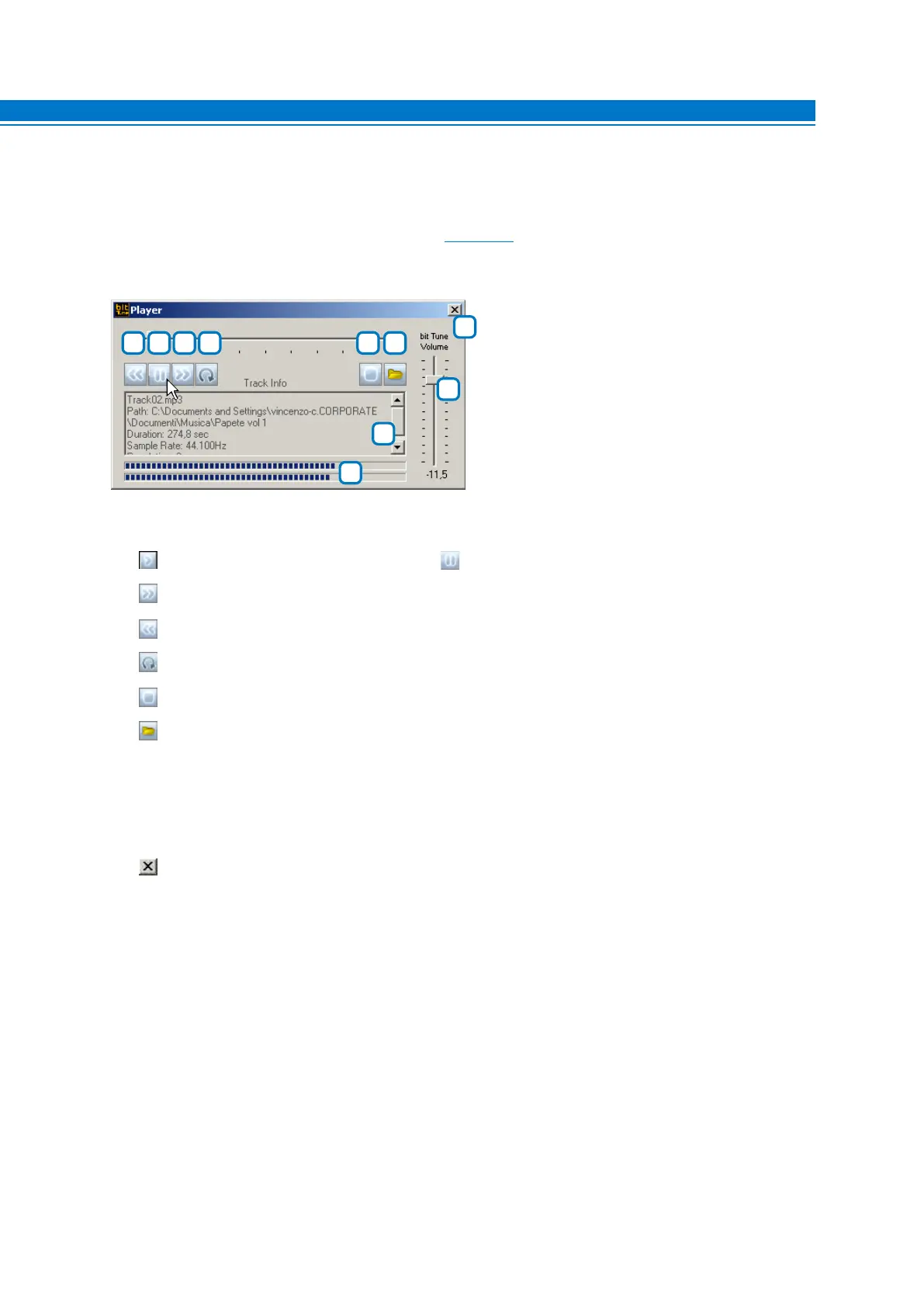
Description of functions:
1. Play: Starts the playback of the selected file / PAUSE: Pauses the playback of a track.
2. Fast Forward: Fast-forwards a track.
3. Fast Rewind: Fast return to the start of the selected track.
4. Repeat: Repeats the track from the start.
5. Stop: Stops the playback of the current track.
6. Open Folder: Open files saved on your PC.
7. Track Info: Window containing information about the selected track.
8. bit Tune Volume: Sets the output volume of the player with the exception of the OPTICAL OUT output.
9. Bar Graph: VU meter, active during playback.
10.
Close: Closes the Player window.
4. PLAYER
The bit Tune has an audio interface for playing back music files with extension *.Wav, *.Wma, *.Mp3, *.Flv,
*.Flac. The active outputs of the generator are:
PRE OUT L - R, SPEAKER L - R and OPTICAL OUT
(see sect. 3.1.).
OPTICAL OUT can provide an optical digital signal with a frequency of 192 kHz/24 bit that allows to leave any
music file unchanged.
1 2 4 5 6
8
9
7
3
10
6



 To Next Page