USER’S MANUAL / bit Tune /
63
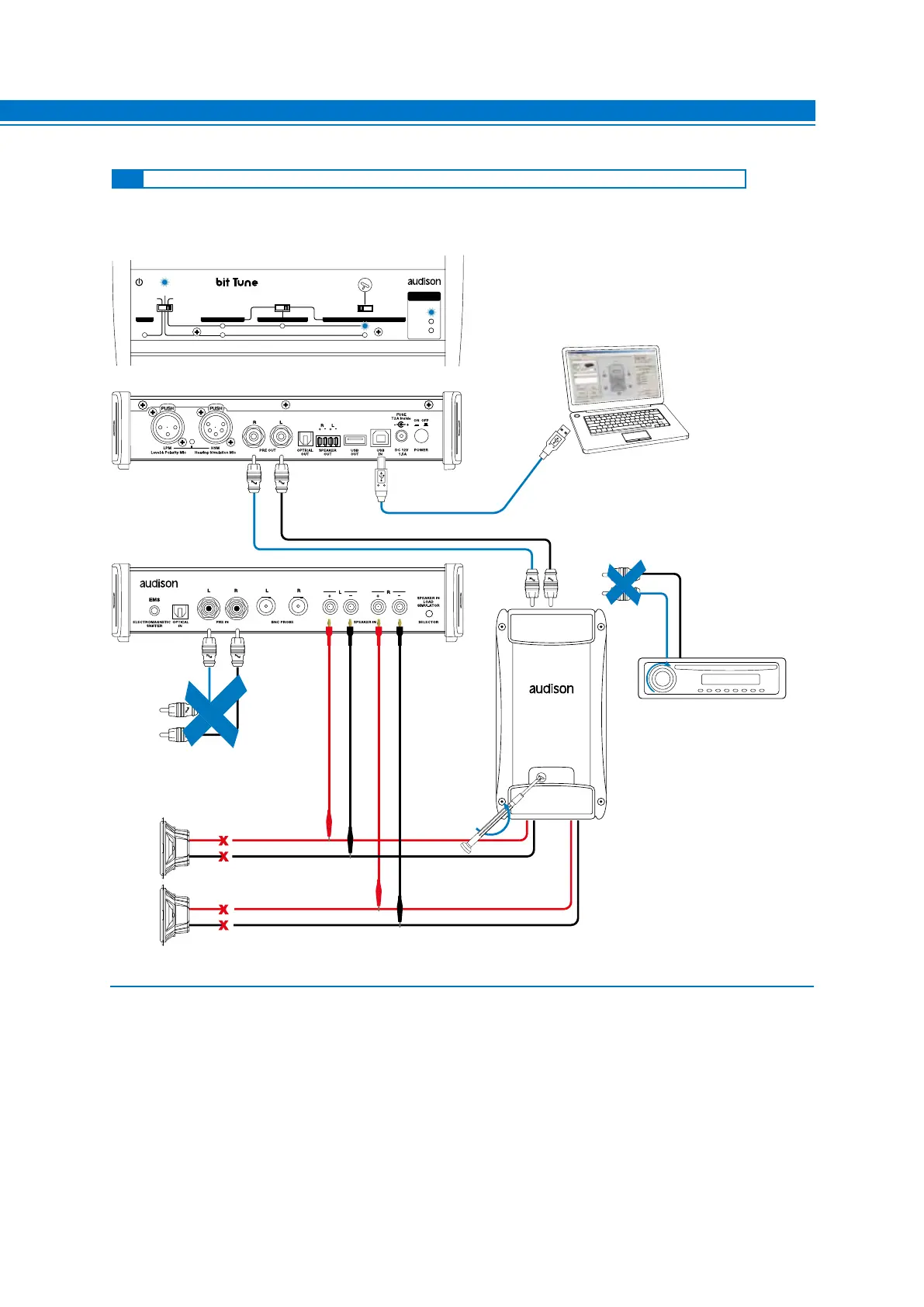
This section describes the steps for the calibration and sensitivity check of the amplifiers in an audio system without
Audison bit processors.
EMS
PC ANALYZER
LINE NOISE
POWER
SEGNAL INPUT
SELECT
RIGHT
VOLUME
MONITOR
47 OHM
SPK SYM
NO LOAD
LEFT
PRE IN BNCSPK INPROBE
MIN •• MAX
LOAD SIMULATOR
SPEAKER IN
TRACK 1
LEVEL
DISCONNECT
THE SPEAKER
DISCONNECT SOURCE
PREOUT
SOURCE
PRE
INPUTS
DON’T CONNECT PRE IN
CABLE INPUTS WHEN USING
SPK IN INPUTS
1. Connect the PRE OUT L-R outputs of the bit Tune to the input of the amplifier/s for which you need to adjust the
input sensitivity.
- Disconnect all speaker wires from the amplifiers.
- Set the sensitivity level of the amplifiers to the minimum (5 V RMS).
- Turn the bit Tune on and connect the USB cable to the PC.
- Set the function switch of the bit Tune on PC ANALYZER.
- Set the SIGNAL INPUT SELECT switch on SPK IN.
- Turn on the Audison bit processor and connect the USB cable to the bit Tune.
- Start the bit Tune software by clicking the icon on the PC desktop created by the installation and launch the
software in bit Tune mode.
7.5 CALIBRATION OF THE SENSITIVITY LEVEL OF A SYSTEM WITHOUT AUDISON BIT PROCESSOR
Fig. 1
7



 To Next Page