USER’S MANUAL / bit Tune /
43
8. SOURCE CHECK
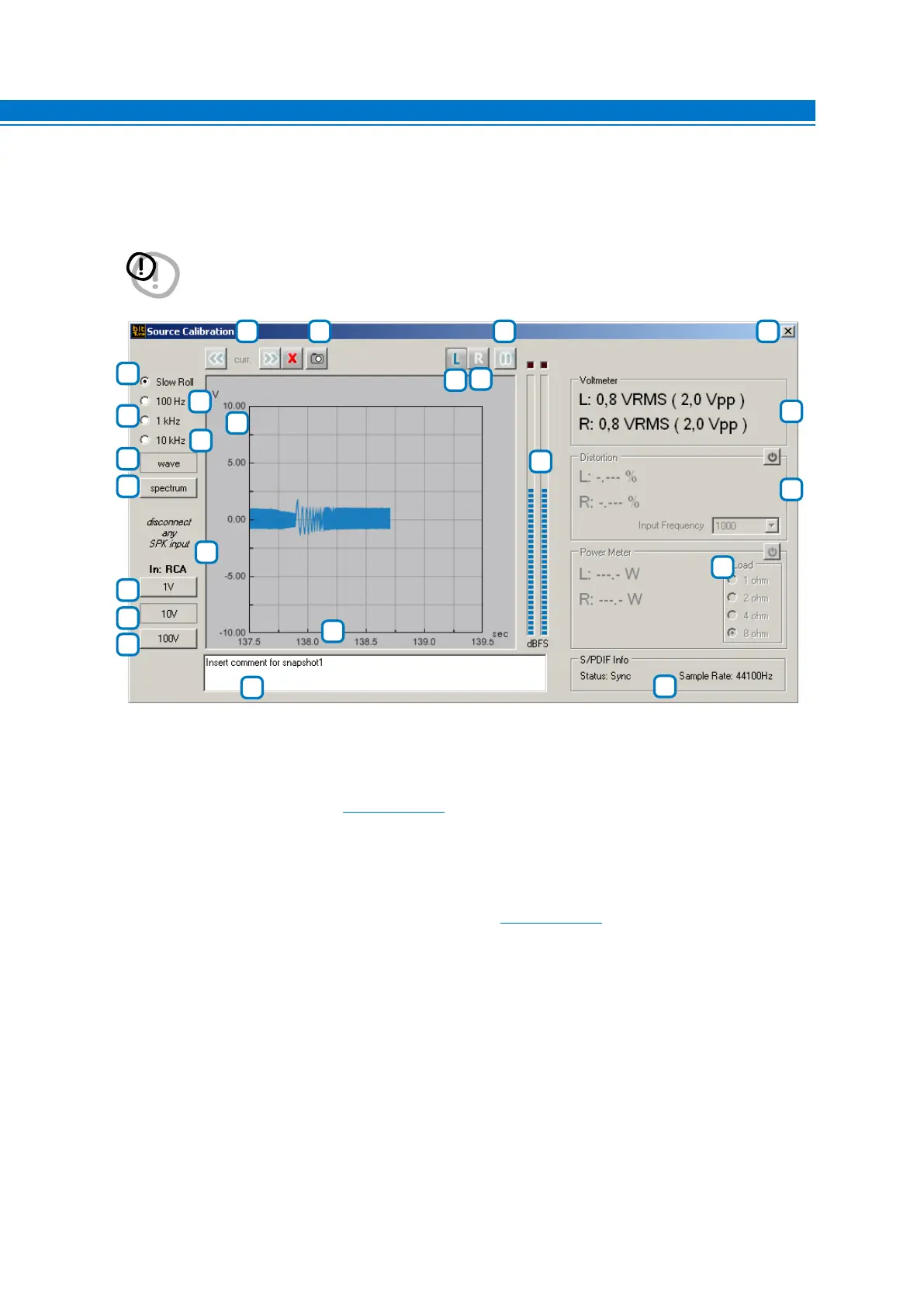
The tool allows you to analyze signals from an amplified or pre-amplified source measuring amplitude distortion
and frequency response using the audio tracks provided in the bit Tune Setup CD.
WARNING: For power measurements you must use a resistive load in proportion to the power of the product.
The use of the speakers for this type of measurement would damage them permanently.
Use the SPK IN inputs for measuring amplified sources.
1
7
5
6
10
8
15
14
12
13
23
18
19
20
21
16
22
4
5
17
9
11
2
3
Description of functions:
1-2-3. Buttons for changing the full-scale sensitivity of the oscilloscope.
Depending on the selected inputs
(see sect. 3.3 point 6) the sensitivity values are pre-set:
RCA inputs: 1 V - 10 V - 100 V.
BNC inputs: 1 V - 10 V - 100 V.
SPK IN inputs: 10 V - 100 V - 1000 V.
Use buttons 1 - 2 - 3 to best display the amplitude of the signal being examined without it exceeding the
full-scale amplitude.
4. IN: Indicates the active input selected for the measurement
(see sect. 3.3 point 6).
5. LEFT: Activates the measurement of the signal on the LEFT input channel. The track displayed on the screen
is blue.
6. RIGHT: Activates the measurement of the signal on the RIGHT input channel. The track displayed on the screen
is green.
7. PAUSE: Blocks the acquisition of the input signal, freezing the acquired signal on the screen.
8. Slow Roll: Sets the “time/div” time base for the signal acquisition to a slow pace. Acquires the signal whose
cycle is less than 5 seconds.
6



 To Next Page