USER’S MANUAL / bit Tune /
30
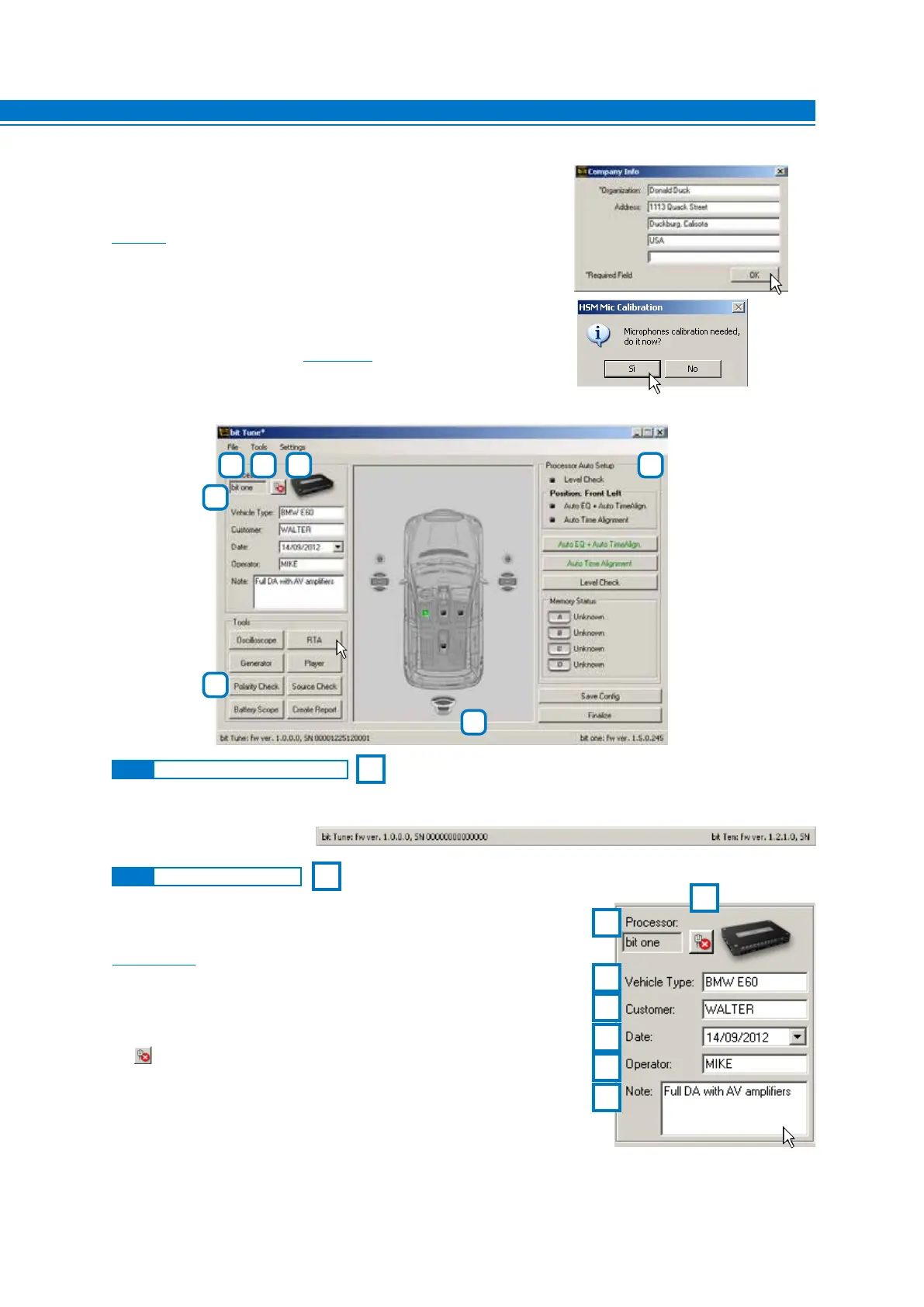
The following paragraphs will describe the functions that allow the adjustment of the system and its acoustic refinement.
When the bit Tune is connected to the processor the message not connected will disappear from this bar, and the
bar will display information on serial numbers, firmware versions and type of connected processor.
This active window allows you to customize the information concerning
the measurement being performed.
The data entered will be included in the final measurement report
(see sect. 6.2.4.9).
Description of functions:
1. Processor: This window shows whether the bit Tune is
connected to an Audison processor.
2. : Active button to connect / disconnect the Audison
processor to the bit Tune.
3. Vehicle Type: Enter the model of the car in which you are performing
a measurement /acoustic refinement session.
4. Customer: Enter the name of the owner of the car in which you are
performing the measurement /acoustic refinement session.
5. Date: Shows the date of the measurement session.
6. Operator: Enter the name of the operator performing the measurements.
7. Note: Enter comments about the measurement session or the system being measured.
1
1
6
7
5
4
3
2
2
6.2.1 CONNECTION STATUS MENU
6.2.2 SESSION NOTE MENU
The first time the product will be turned on you will be prompted for
information regarding the user. Fill in the fields and then click OK. You need
to fill in at least the Organization field. These data may be completed or
changed later
(see 6.2.5.5). They will be used for the compilation of the report.
Long periods of inactivity can change the characteristics of the HSM
microphone. Calibration must performed at the time of first use, and then
repeated at least every 3 months of activity or after long periods of non-use.
Calibrate the HSM microphone (see sect. 7.2.) otherwise select NO.
2
7
3 4 5 6
1
6



 To Next Page