USER’S MANUAL / bit Tune /
26
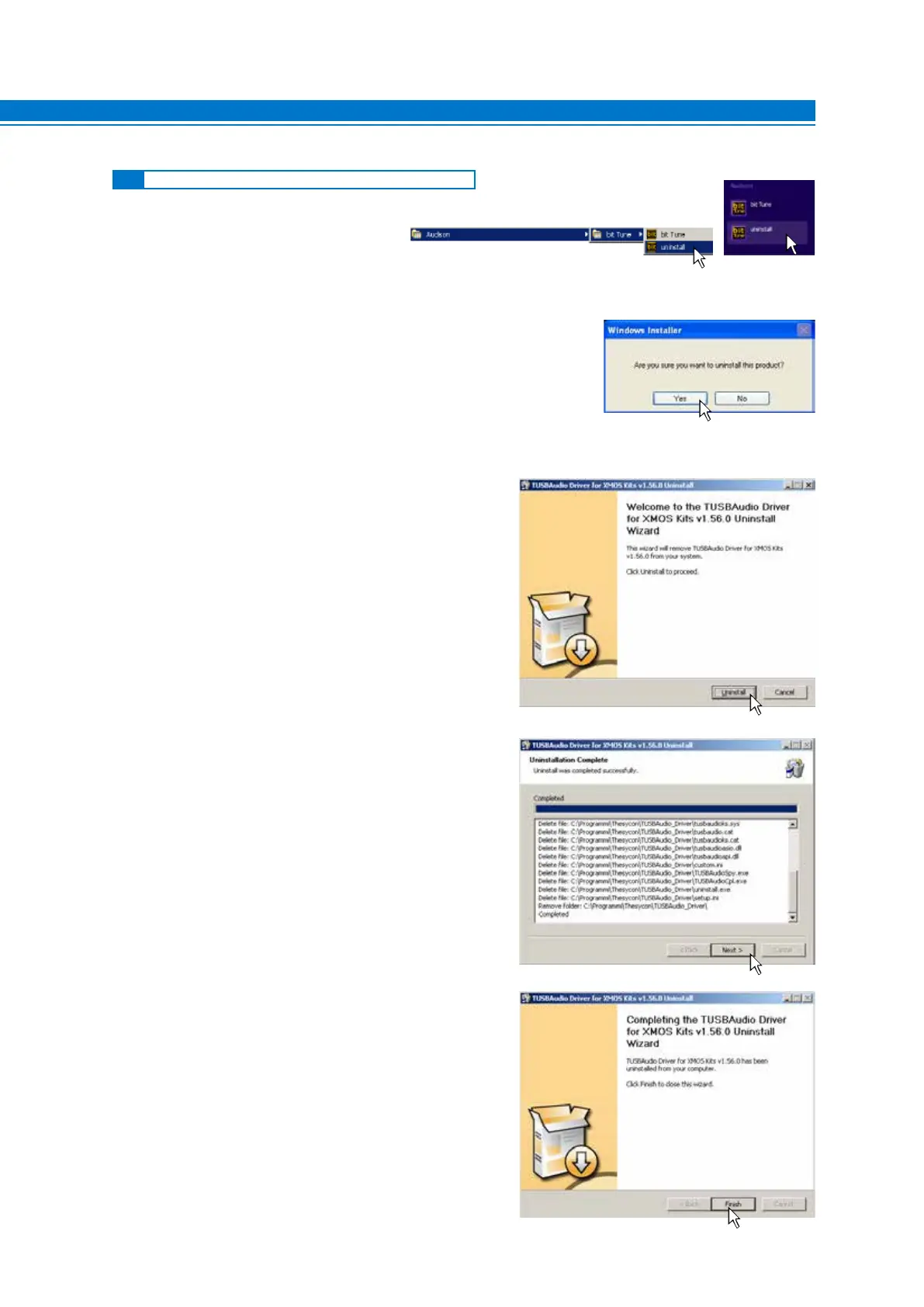
5.2 UNINSTALLING BIT TUNE SOFTWARE and DRIVER
1. To uninstall the bit Tune PC software you
can use the command uninstall.
2. Windows XP: click “YES”;
Windows Vista: click “YES”;
Windows 7: click “YES”;
Windows 8 / 10: click “YES”;
3. Windows XP: click “UNINSTALL”;
Windows Vista: click “UNINSTALL”;
Windows 7: click “UNINSTALL”;
Windows 8 / 10: click “UNINSTALL”;
4. Windows XP: click “NEXT”;
Windows Vista: click “NEXT”;
Windows 7: click “NEXT”;
Windows 8 / 10: click “NEXT”;
5. Windows XP: click “FINISH” to complete the
uninstall process;
Windows Vista: click “FINISH” to complete the
uninstall process;
Windows 7: click “FINISH” to complete the
uninstall process;
Windows 8 / 10: click “FINISH” to complete the
uninstall process;
5
Windows XP, Windows Vista, Windows 7 Windows 8



 To Next Page