USER’S MANUAL / bit Tune /
65
*
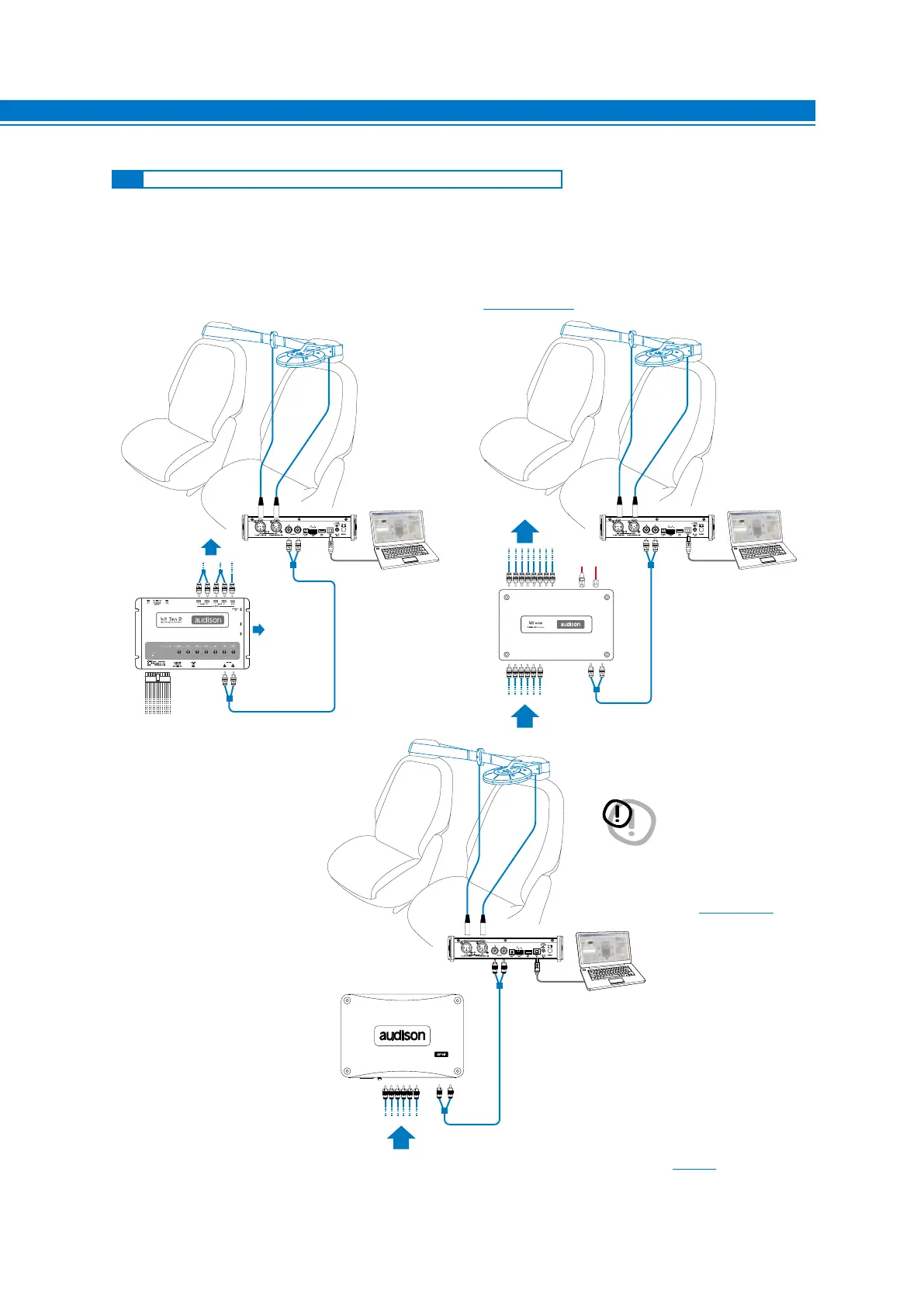
This section highlights the calibration phases of an Audison bit processor interfaced to the system with the aid of
the bit Tune. The process includes the use of a series of instruments also available separately:
Auto EQ+ Auto Time Alignment, Polarity Check, Level check.
At the end of the process the system will perform the automatic calibration of the equalizer (Auto EQ).
The calibration is performed with a system including an Audison processor previously configured (finalized), and
after having performed the procedures described in sections (see sect. 7.3 - 7.4).
*Install the HSM and LSM inside the passenger compartment of the vehicle as described in section 4.
7
7.6 AUTOMATIC CALIBRATION: AUTO EQ + AUTO TIME ALIGNMENT
PHONE
REM
IN
REM
OUT
12V
KEY
SW
INPUTS
MUTE IN FL FR RRRL
AD Link
AC Link
*
*
DIGITAL
SIGNAL
OUTPUTS
AUX INPUTS
AUX 1 INPUTS
SIGNAL INPUTS
SIGNAL INPUTS
SIGNAL
OUTPUTS
DIGITAL SIGNAL
OUTPUTS
Fig 1. Fig 2.
AUX INPUTS
AP bit
SIGNAL INPUTS
Fig 3.
IMPORTANT: In the processors you
should enable the AUX input
if you use a bit Ten/D or AUX1
if you use a bit One through
PC software. This can be disabled
after the measurements. If you want to
connect the bit Tune to AP bit amplifiers to
perform measurements, but the AUX input
port is already occupied, you can use the
OPTICAL input port
(see section 4.5.6)



 To Next Page