USER’S MANUAL / bit Tune /
64
2. Select the Oscilloscope function from the ‘”Tools” menu of the PC software or
click on Oscilloscope from the main menu.
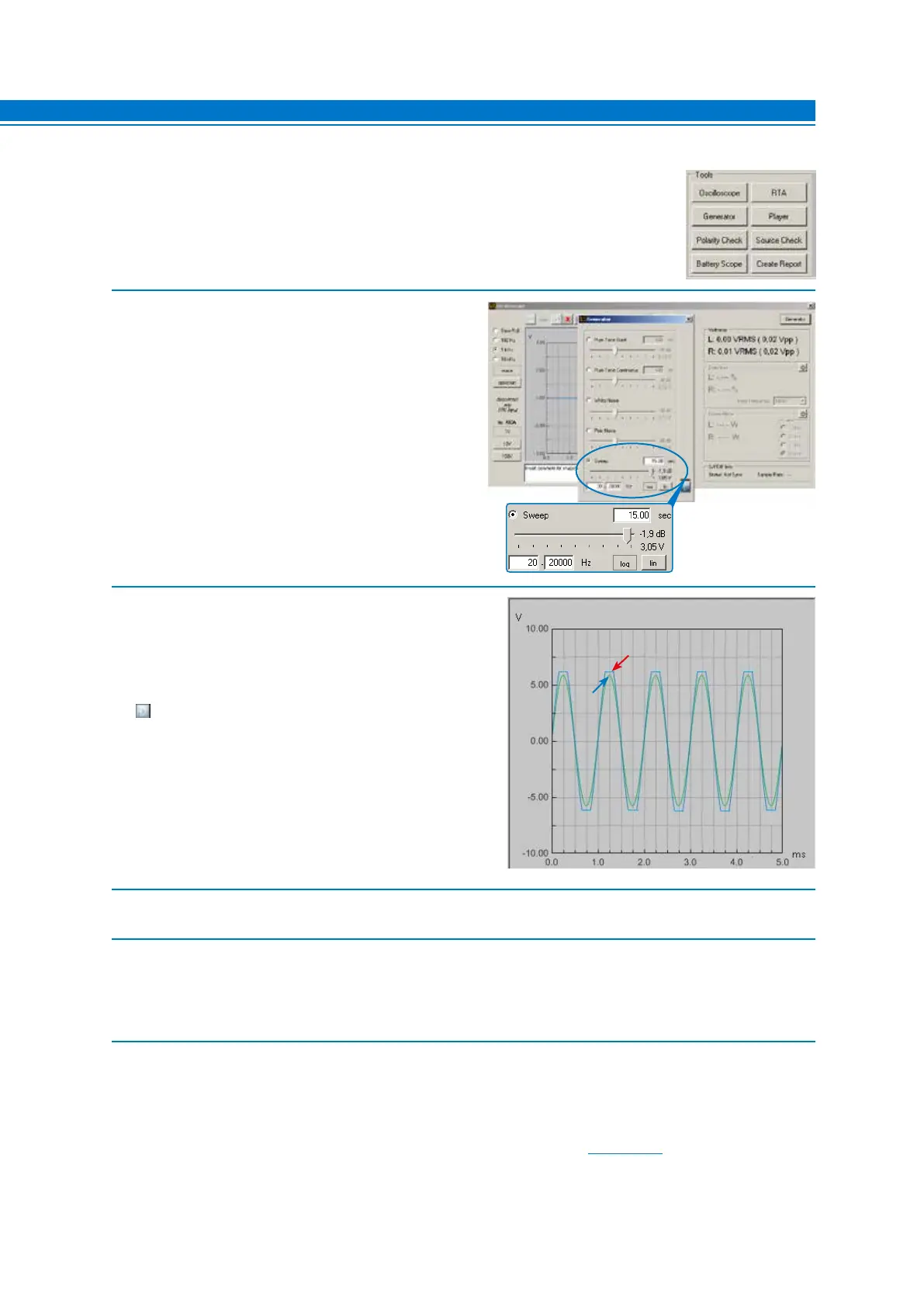
3. Select the Generator tool and set it as shown on the
right. The suggested value of the generator’s output
voltage is approximately 3V RMS. This value can be
reduced to increase the sound impact at a low listening
volume. It should be considered that the reduction of the
voltage results in an increase of the amplifiers’ input
sensitivity, with consequent increase of the background
noise.
If you want to change the suggested voltage, evaluate
the best compromise between the acoustic situations.
4. Connect the SPK IN LEFT and/or RIGHT inputs of the
bit Tune to the STEREO or MONO channels of the amplifier
being tested using the cables supplied with the product.
Activate the signal on the bit Tune outputs. Verify that
the sine wave shown on the screen is within the maximum
width displayed, otherwise change the scale (1 V, 10 V,
100 V).
Increase the level of sensitivity of the amplifier connected
to the SPK IN inputs of the bit Tune until you see on the
oscilloscope a sine wave on the edge of clipping, as shown
here.
5. Repeat the adjustment described in section 4 on the remaining outputs of the audio system’s amplifiers.
6. Set the output level control of the generator to -60 dB (see point 4).
- Turn off the audio system’s amplifiers acting on the remote switches.
- Disconnect the SPK IN inputs of the bit Tune from the outputs of the amplifiers.
- Reconnect to the amplifiers the speakers previously disconnected and turn them on again.
7. After this operation the sensitivity levels of the amplifiers are electrically tuned in an optimal way.
Note: The acoustic levels of the different channels depend not only on the sensitivity of the amplifiers, but also on the
efficiency of the speakers. For optimal acoustic calibration of the audio system you must proceed to the
measurement of the response curve (RTA). After this measurement you may also need to tweak the sensitivity
of the amplifier in order to compensate for the efficiency of the speakers (see sect. 7.8.2).
NO
OK
7



 To Next Page