- 6P10 PILOT MANUAL -
20
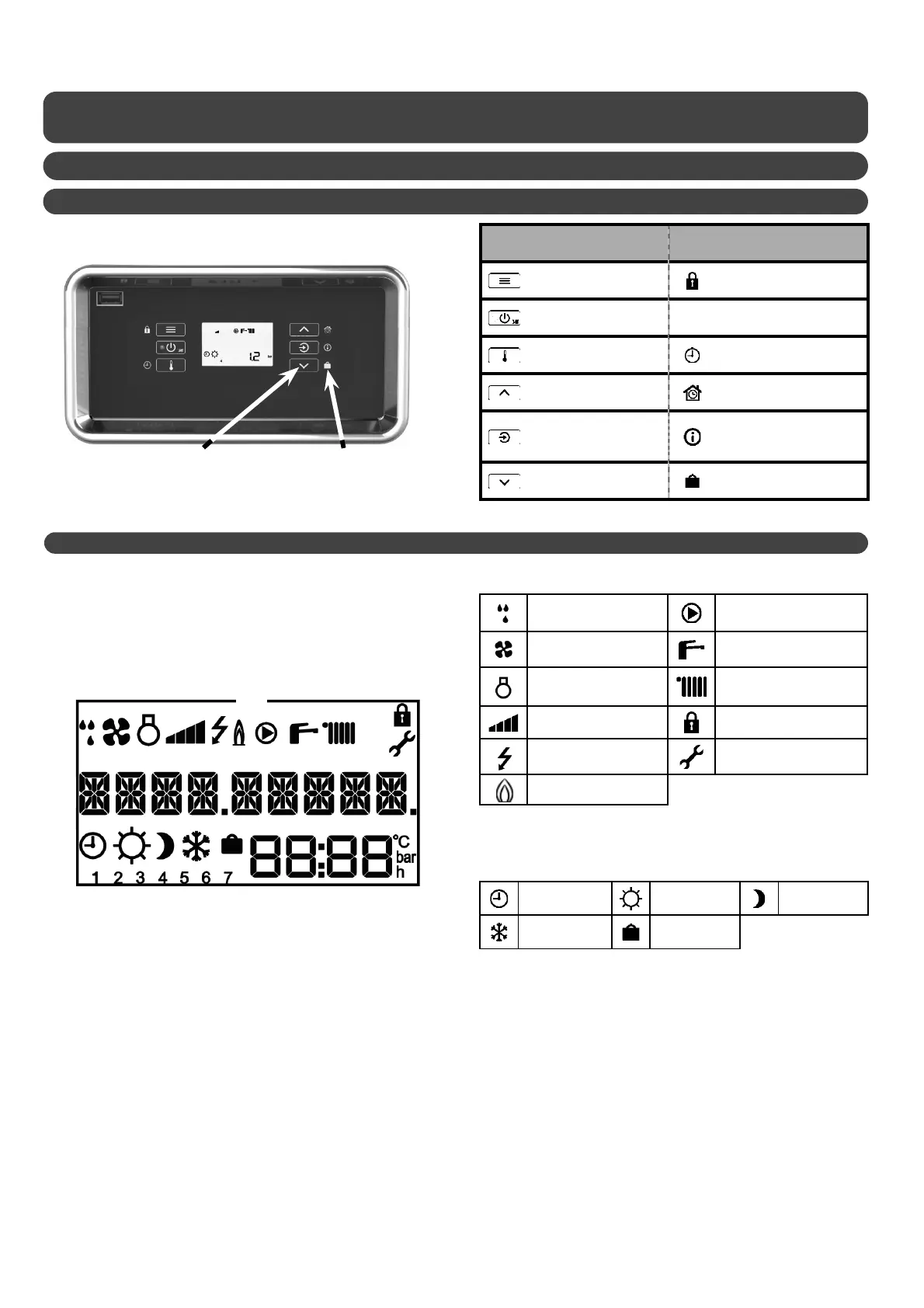
6.1 - Control panel
6.1.1 - Keypad
Primary function
(short press)
Secondary function
(long press)
- menu access
- return / cancel
locking / unlocking of the
keypad
- switch on standby mode
- setting the
temperatures
program scheduled
comfort modes
- increase the setting
- scroll up
activate temporary
comfort mode
- con rm / remove error
- display pressure or T°
information on
temperatures and current
operating state
- decrease the setting
- scroll down
activation of holiday mode
6.1.2 - Display
c
9 character message
e
Day of the week: (1= Monday; 2= Tuesday...)
f
Display zone: temperatures, pressure, settings, time...
d
Current comfort mode
Programming
active
Comfort mode Eco mode
Frost protection
mode
Holiday mode
b
c
d
e
f
defrosting in progress circulating pump working
ventilator working
domestic hot water acti-
vated
compressor working heating activated
power level keypad locked
electrical back-up
installer menu
back-up boiler
b
Symbols of current operating state
Button Primary function
ex.: decrease / scroll down
Secondary function
ex.: holiday mode
6 - SETTINGS AND FUNCTIONS


 To Next Page