- INSTALLER HIGHTEMPERATURE ENERGY EFFICIENT HEAT PUMP MANUAL-
31
Enter
Enter
Enter
Enter
Enter
Enter
Enter
Enter
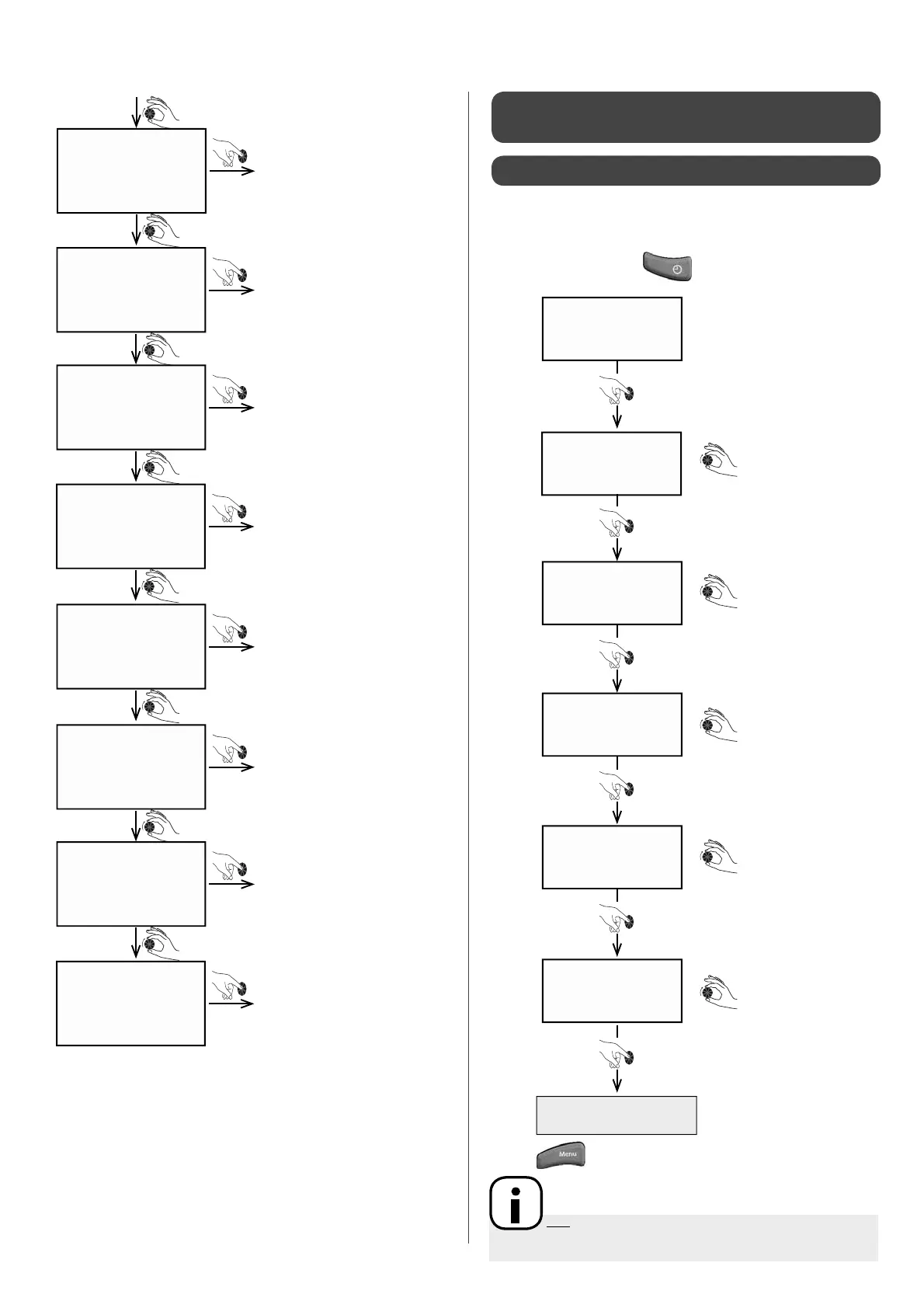
boiler
sol.valve
comp heat1
comp heat2
heat. cable
fan 3
fan 2
fan 1
Boiler start-up
4-way valve
Compressor 1 crank case
heater
Compressor 2 crank case
heater
External heater cable start-up
Fan speed 3
Fan speed 2
Fan speed 1
5 - USE
Setting the date and time enables the system to automatically
adapt to di erent heating modes. See § "Setting heating modes".
5.1 - Setting the date and time
• Press "Clock settings"
Set month
26/09/11
17: 32
--/09/11
17: 32
26/--/11
17: 32
26/09/--
17: 32
monday
17: --
monday
-- : 32
Set day
Set year
Set minutes
Con rm new settings
Set hours
• Press to return to main screen.
N.B: When the display is left inactive for a few minutes,
it will revert to the normal display and backlighting will switch o


 To Next Page