EN29
D - BEGINNING OPERATION
Accélération
OK PROG
Réglage accélération
+ : augmente l’accération
– : diminue l’accélération
OK
MENU 0
réglable de 0 à 4
Tolérance butée
OK
PROG
Réglage tolérance
+ : augmente la tolérance
– : diminue la tolérance
OK
MENU 0
réglable de 0 à 4
* cette modification nécessite de refaire un auto-apprentissage
Type de portailMode photocellules
OK PROG
Type de portail
– et + pour régler la valeur
OK
MENU 0
OK PROG
Mode photocellules
– et + pour régler la valeur
OK
MENU 0
0 : inactives en début d’ouverture
(par défaut)
1 : actives en début d’ouverture
0 : portail à 2 battants (par
défaut)
1 : portail à 1 battant (portillon)
–
+
+
–
+
–
L1 L2 L3 L4
L1 L2 L3 L4
L1 L2 L3 L4 L1 L2 L3 L4 L1 L2 L3 L4
L1 L2
L3 L4
L1
L2 L3 L4
L1 L2 L3 L4
Enregistre réglage*
L1 L2 L3 L4
Enregistre réglage
L1 L2 L3 L4
Enregistre réglage*
L1 L2 L3 L4
Enregistre réglage*
L1 L2 L3 L4
3.2.1. ACCELERATION/DECELERATION AT
END OF TRAVEL
The acceleration at the start of the panel opening
process can be adjusted from a level of 0 to 4. The
higher this value, the more time the gate will take
to reach its nominal speed. The default level is 3,
at which the gate takes about 4 seconds to open.
It may be useful to reduce the acceleration for a
softer start.
To adjust the acceleration, follow the procedure
below
•Press PROG for 3 seconds. L0 will ash once
and L1 will turn on.
•PressPROGfor3seconds.L0willashtwice.
• Press OK and the number of LEDs that turn on
will indicate the set value.
• Use the “+” and “-” buttons to change this value.
•PressOKtoconrmthisvalue.AlltheLEDswill
turnonandofftoconrmtheoperation.
NOTE: If the acceleration setting is changed, self-
learning must be repeated.
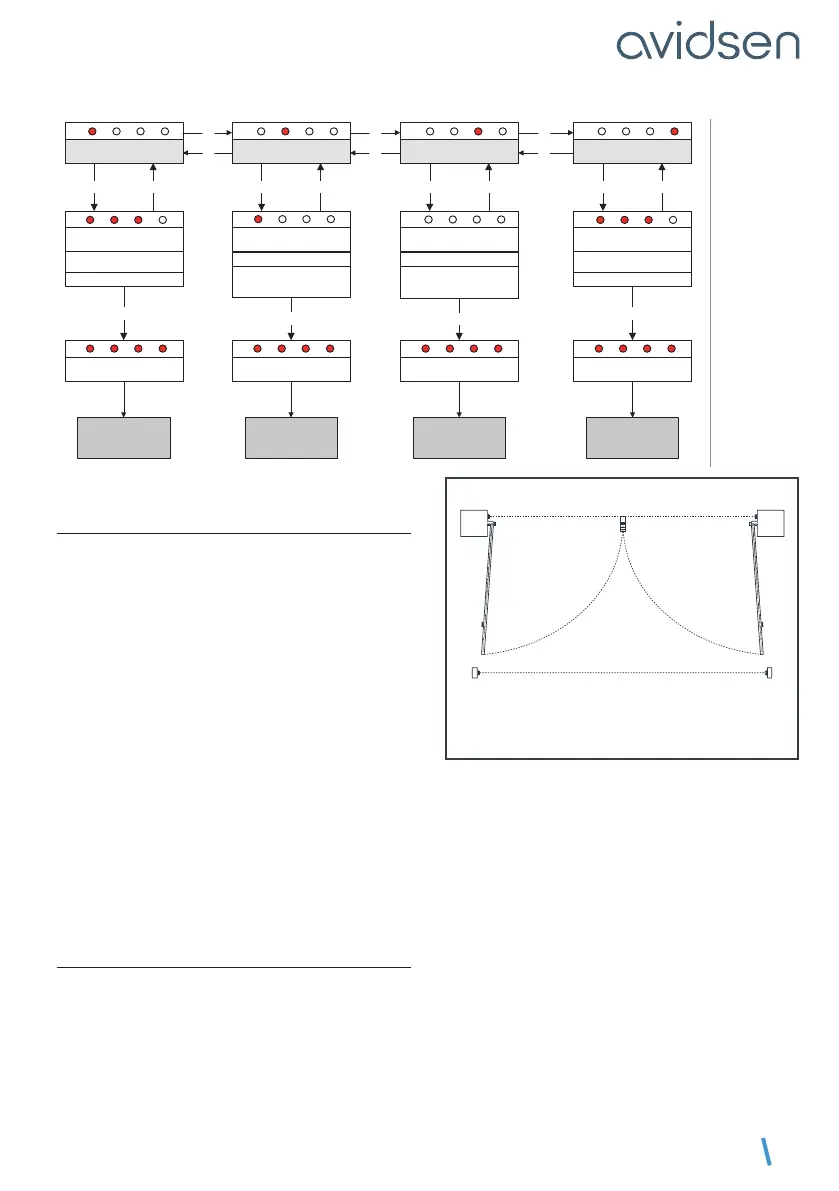
3.2.2. PHOTOCELL MODE
The photocells are active when the panels close
because they are placed between the posts (pair
1) to secure the passage between panels.
The installation of a second set of photocells is
useful to completely protect the gate movement
area during closing and before opening:
Inner side of the property
view from above
pair 2
pair 1
RX1
RX2
TX1
TX2
In that case, the system must verify that its infrared
beam is not obstructed before starting to open the
panels. But by default, photocells are only tested
during closure.
To activate or deactivate photocells at the
beginning of the opening process, follow the
procedure below
• Press PROG for 3 seconds. L0 will ash once
and L1 will turn on.
• Press PROGfor3seconds.L0willashtwice.
• Press “+” once. L2 will turn on instead of L1.
• Press OK.


 To Next Page
 Loading...





