EN31
D - BEGINNING OPERATION
3.3. - MENU 3
Décalage fermeture
OK PROG
Réglage temps
+ : augmente le temps
– : diminue le temps
OK
MENU 0
0 : 2.5 sec (par defaut)
1 : 3 sec
2 : 3.5 sec
3 : 4 sec
4 : 4.5 sec
Temps préclignotement
OK PROG
Temps préclignotement
OK
MENU 0
– et + pour régler la valeur
0 : 1 sec (par défaut)
1 : 3 sec
–
+
L1 L2 L3 L4
L1 L2 L3 L4 L1 L2 L3 L4
L1 L2 L3 L4
Enregistre réglage
L1 L2 L3 L4
Enregistre réglage
L1 L2 L3 L4
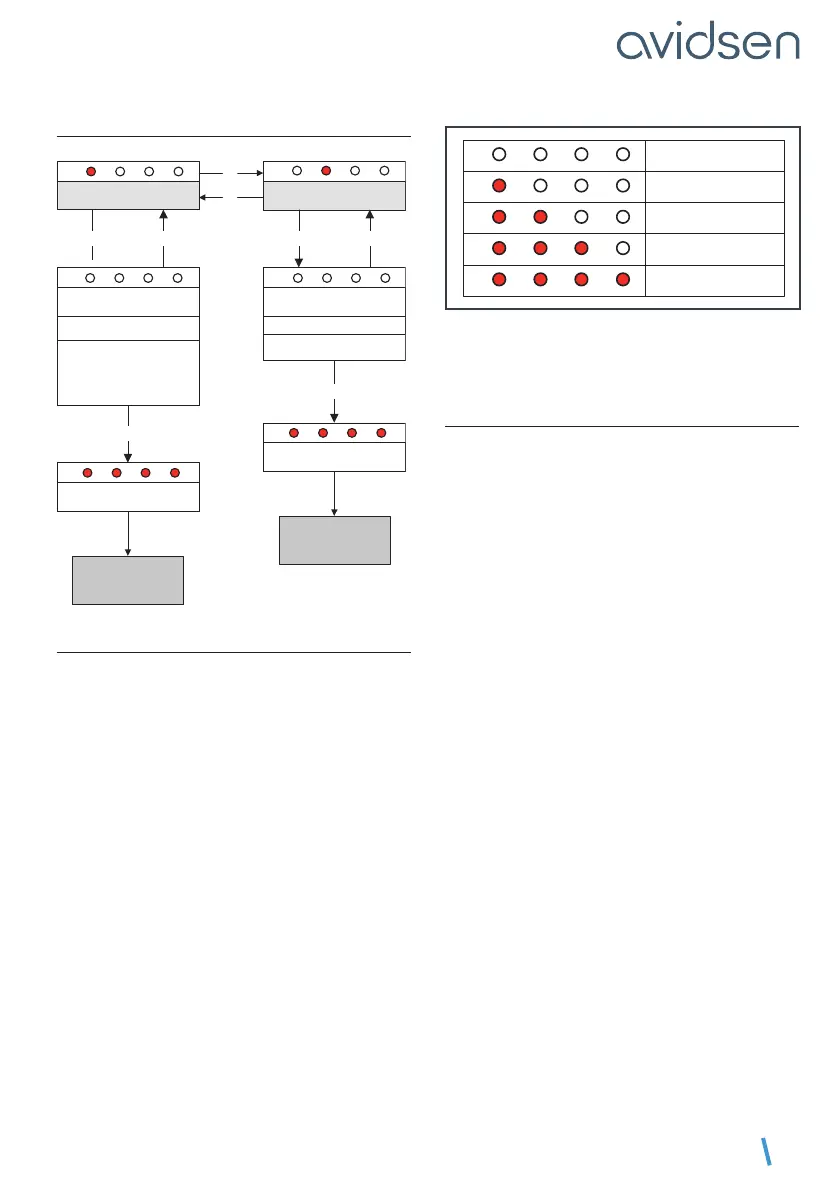
3.3.1. CLOSING TIME INTERVAL
In general, on closing, one gate panel closes over
the other. This panel is controlled by the motor
connected to output M1 of the electronic card. To
ensure that the panels close in the correct order,
the system arranges for the panel of motor M2 to
come to a stop 2.5 seconds before the panel of
motor M1. If the gate is solid and exposed to the
wind, panel M2 may be stopped by the wind and
panel M1 may be helped by the wind on closing. In
this case, panel M1 may catch up to panel M2 and
the panels may close in the wrong order.
If this occurs, the time interval between the panel
movements during closure may be increased.
To adjust this time interval, follow the
procedure below
• Press PROG for 3 seconds. L0 will ash once
and L1 will turn on.
• Press PROGfor3seconds.L0willashtwice.
• Press PROGfor3seconds.L0willash3times.
• Press OK. The number of LEDs that turn on will
indicate the set value.
• Use the “+” and “-” buttons to change this value
(see table below).
• Press OKtoconrmthisvalue.AlltheLEDswill
turnonandofftoconrmtheoperation.
L1 L2 L3 L4
2.5 s (par défaut)
L1 L2 L3 L4
3 s
L1 L2 L3 L4
3.5 s
L1 L2 L3 L4
4 s
L1 L2 L3 L4
4.5 s
Note: During opening, there is also a time
interval between the panel movements, but
this time interval is xed and is equal to 2.5
seconds.
3.3.2 - FLASHING LIGHT PRE-FLASHING TIME
The ashing light is an important safety
component. It starts when a command to set the
gate in motion is received by the electronic card.
The gate is set in motion around one second after
a command is received.
In certain use cases, it is better that the time
between receiving a motion command and the
start of the manoeuvre is longer. It is possible to
increase this time to 3 seconds.
To set the pre-ashing time, follow the
procedure below
• Press on PROG 2 or 3 times and the green LED
should be switched on (only the green LED)
• Press “PROG”for3seconds.L0willashonce
and L1 will turn on.
• Press “PROG”for3seconds.L0willashtwice.
• Press “PROG” for 3 seconds.
• Press “+” once. L2 will turn on instead of L1.
• Press OK.
• If L1 is switched off, the time is 1 second. Press
“+” to increase it to 3 seconds, then OK to
conrm.
• If L1 is switched on, the time is 3 seconds. Press
“–”toreduceitto1second,thenOKtoconrm.


 To Next Page
 Loading...





