IFD500 Series Pilot Guide
4-36 Map Subsystem
lines only show direction, they do not convey any speed information
about the sensed traffic’s speed.
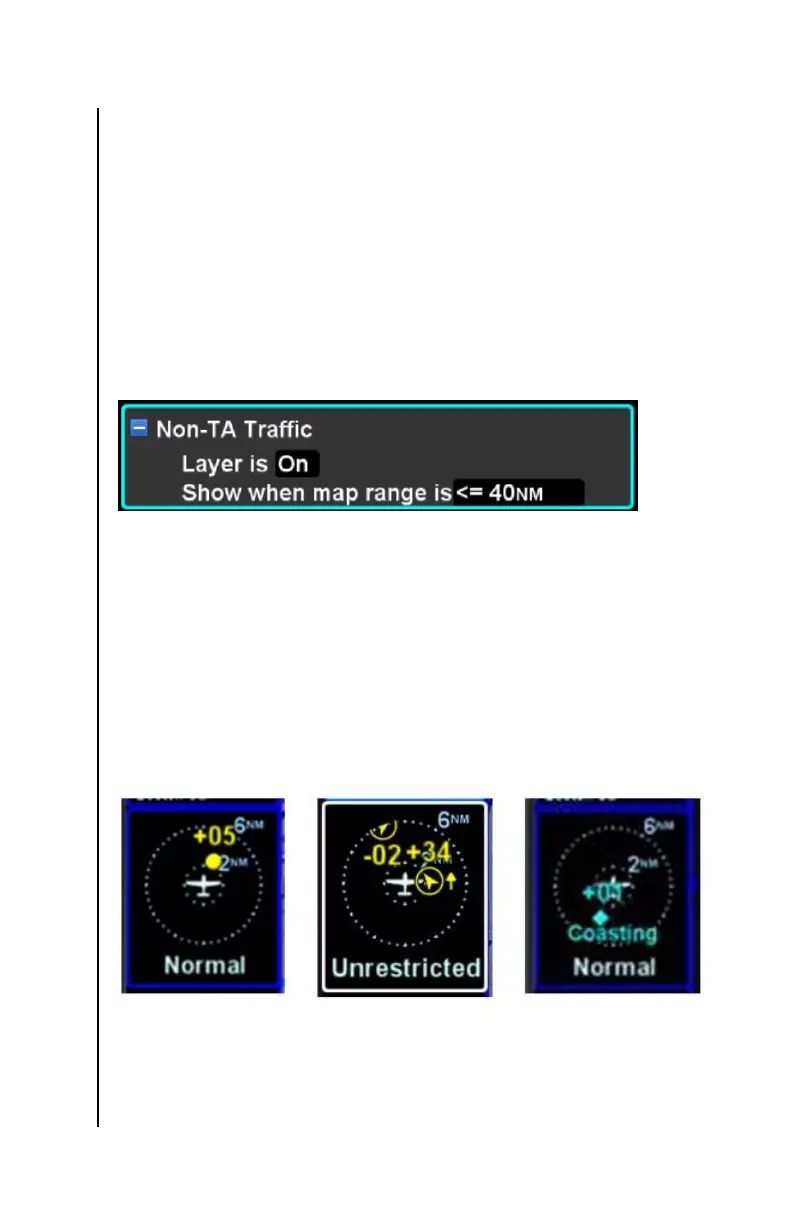
Non-TA Traffic Range Filter
TA and PA traffic is always displayed on the map. However, to avoid
display clutter at wide map zoom ranges, “other” and “ground” traffic
is defined as a map layer that can be turned off. The “Non-TA
Traffic” map layer is part of the Map settings on the Setup Page (see
page 5-62) and can be turned on or off. If the layer is on, then the
range below which the traffic will be displayed is also configurable.
Setup Page Non-TA Traffic Layer Item
Traffic Thumbnail Datablock
For space reasons, the Traffic Thumbnail datablock does not show
the traffic ID or ADS-B HVV barbs. TAs which are beyond the range
of the traffic thumbnail will display as a half symbol at the edge of the
thumbnail’s outer range ring. The traffic thumbnail is always
displayed with the ownship heading up (HDG) for TAS and TCAS
sensors. For ADS-B and TIS-B, the traffic thumbnail may be
displayed as track-up (TRK) if heading is not available.
TAS Traffic ADS-B Traffic Traffic Thumbnails
Traffic Advisories (TA) will generate a CAS message. Depending
upon the type of traffic system installed, an aural alert may also be
generated.



 To Next Page