18
Description of the device
5.5
Alarm status display
Alarms are displayed via a notication on
the display, asignal tone and a LED:
Yellow: Pre-alarm.
The alarm indicator LED lights up per-
manently in yellow.
Note: Yellow LED lights up only if
enabled in Service Tool
Red: Operating alarm.
The alarm indicator LED ashes in red.
Q
Press OK to acknowledge the alarm.
Q
Continue the therapy or start new
therapy.
5.4
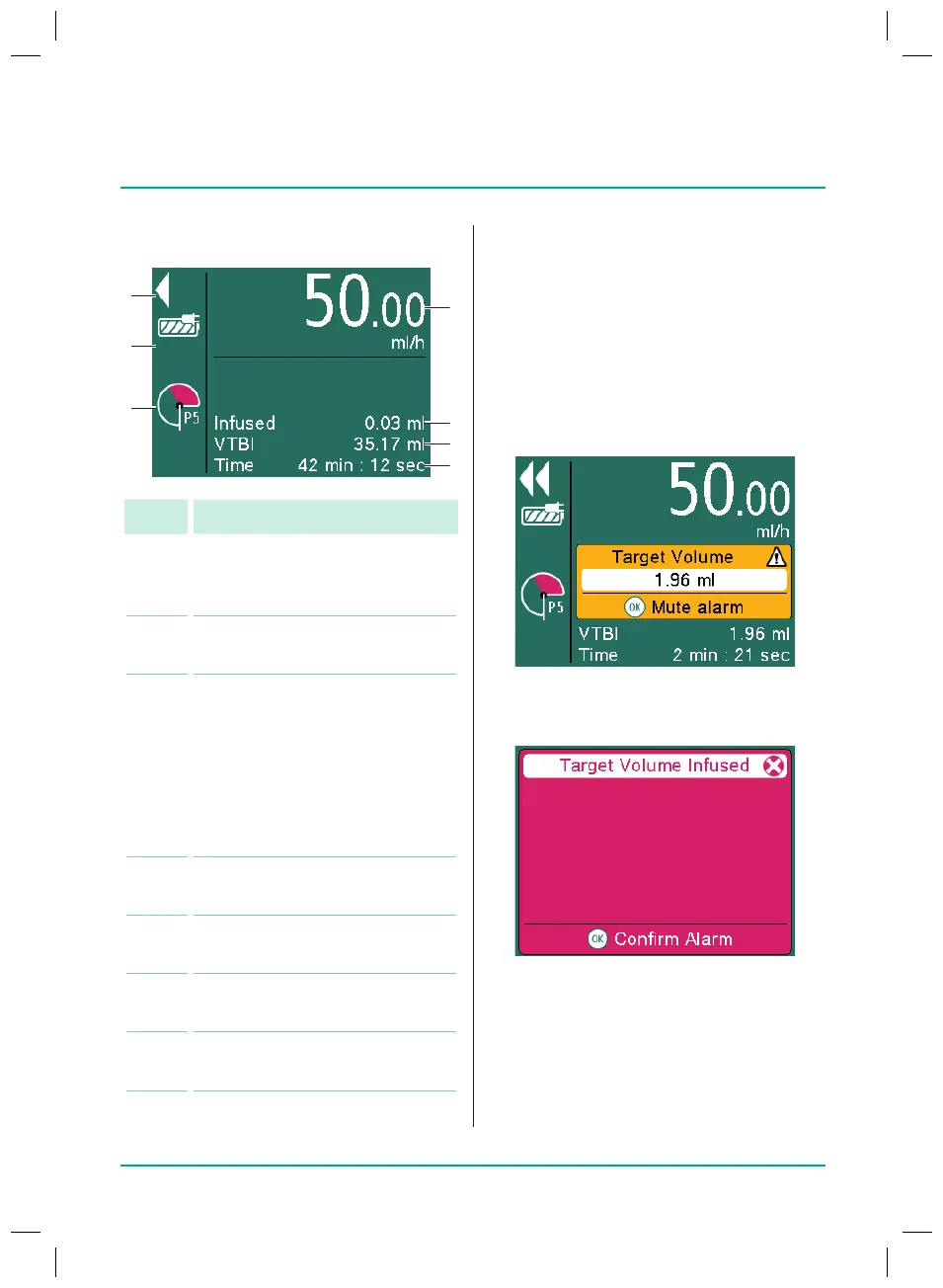
Display overview
No. Display / Function
1
Moving arrows: Delivery in
progress (stopped delivery is
shown by two bars)
2 Mains connection/battery
status
3 Pressure symbol (“manometer”):
Indication of P1 to P9 pressure
level set with current system
pressure (pointer)
Note: Pressure detector is
also active when the device is
stopped or in standby mode.
4
Set delivery rate with drug
administration unit
5 Volume already administered
during the current infusion
6 Remaining volume for the
current infusion
7 Remaining time for the current
infusion
38932401_Infusomat_compactPlusP_EN_IFU_1020_v5.indd 18 15.10.2020 17:47:26















 To Next Page