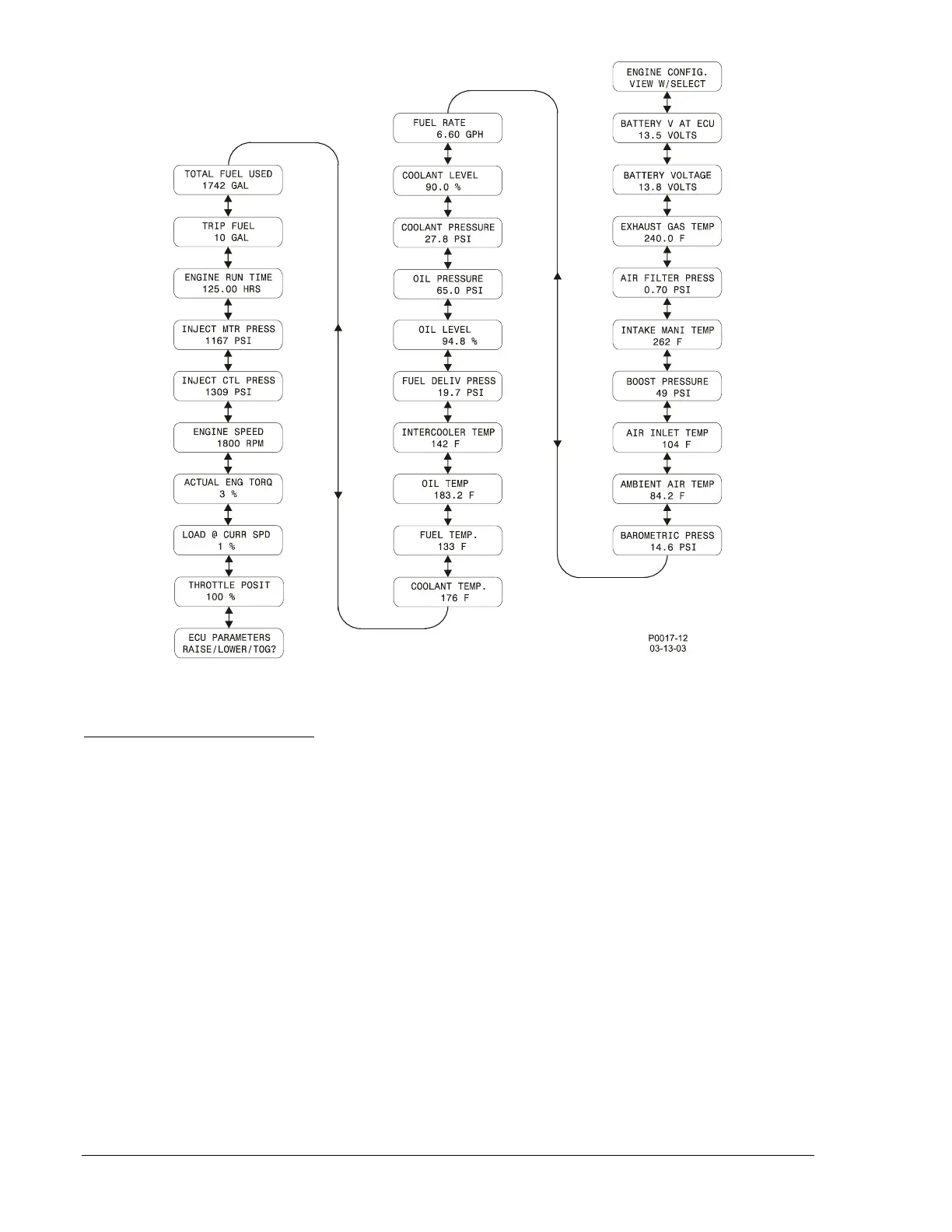
Figure 3-6. ECU Parameters Navigation
Engine Configuration Parameters
Engine configuration parameters can be accessed from the ECU Parameters menu. To view these
parameters read from the ECU, press the Select/Enter pushbutton while viewing the Engine
Configuration (ENGINE CONFIG.) screen. The following list of all engine configuration parameters is
presented in the order in which they appear when pressing the Raise/Scroll pushbutton.
1. Engine speed at idle, point 1
2. Percent torque at idle, point 1
3. Engine speed at point 2
4. Percent torque at point 2
5. Engine speed at point 3
6. Percent torque at point 3
7. Engine speed at point 4
8. Percent torque at point 4
9. Engine speed at point 5
10. Percent torque at point 5
11. Engine speed at high idle, point 6
12. Gain (KP) of the end-speed governor
13. Reference engine torque
14. Maximum momentary engine override
speed, point 7
15. Maximum momentary override time limit
16. Requested speed control range lower limit
17. Requested speed control range upper limit
18. Requested torque control range lower limit
19. Requested torque control range upper limit
Figure 3-7 illustrates the Engine Configuration Parameter menus after the DGC-500 has established
communication with the ECU.
3-18 DGC-500 Functional Description 9355400990 Rev H



 To Next Page