Maintenance Interval Pre-Alarm - Enable. This setting enables and disables annunciation of a
maintenance interval pre-alarm.
Maintenance Interval Pre-Alarm - Threshold (Hours). This setting selects the length of the maintenance
interval. An interval of zero to 5,000 hours may be selected. Refer to the Maintenance Interval Timer
Reset paragraph of the System sub-section for information about resetting the Maintenance Interval Pre-
Alarm.
Hi Coolant Temperature Pre-Alarm - Enable. This setting enables and disables annunciation of a high
coolant temperature pre-alarm. A 60 second activation delay prevents a Hi Coolant Temperature Pre-
Alarm from occurring at engine startup.
Hi Coolant Temperature Pre-Alarm Threshold (Deg F). This setting selects the coolant temperature that
will trigger a high coolant temperature pre-alarm. A threshold setting of 100 to 280 degrees Fahrenheit or
38 to 138 degrees Celsius may be entered. A 60 second activation delay prevents a Hi Coolant
Temperature Pre-Alarm from occurring at engine startup.
CAN Bus-Diagnostic Trouble Codes
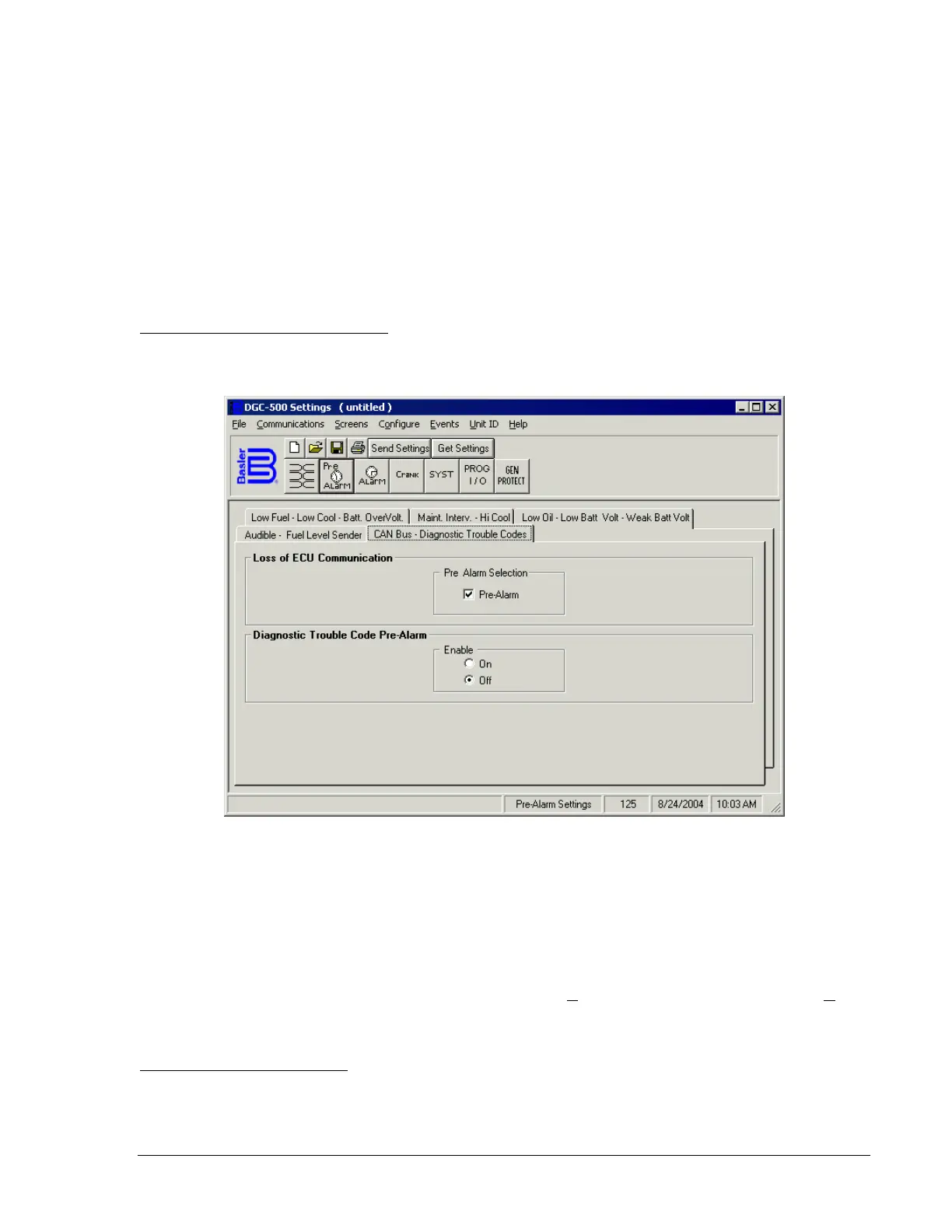
The CAN Bus-Diagnostic Trouble Codes Tab settings are shown in Figure 4-10. Each tab setting is
described in the following paragraphs.
Figure 4-10. Pre-Alarms Screen, CAN Bus-Diagnostic Trouble Codes
Loss of ECU Communication - Pre-Alarm Selection. This setting enables annunciation of a pre-alarm
when communication between the DGC-500 and engine control unit (ECU) is interrupted.
Diagnostic Trouble Code Pre-Alarm. This setting enables and disables annunciation of a diagnostic
trouble code (DTC) pre-alarm. The DGC-500 receives unsolicited DTCs from the ECU.
Alarms
Click the Alarm button to access the Alarms screen or click Screens on the menu bar and click Alarm
Settings.
The Alarms screen consists of two tabs: Hi Cool-Low Fuel-Low Oil and Overspeed-Sender Fail.
Hi Cool-Low Fuel-Low Oil Tab
The Hi Cool-Low Fuel-Low Oil Tab settings are shown in Figure 4-11. Each tab setting is described in the
following paragraphs.
9355400990 Rev H DGC-500 BESTCOMS Software 4-7



 To Next Page