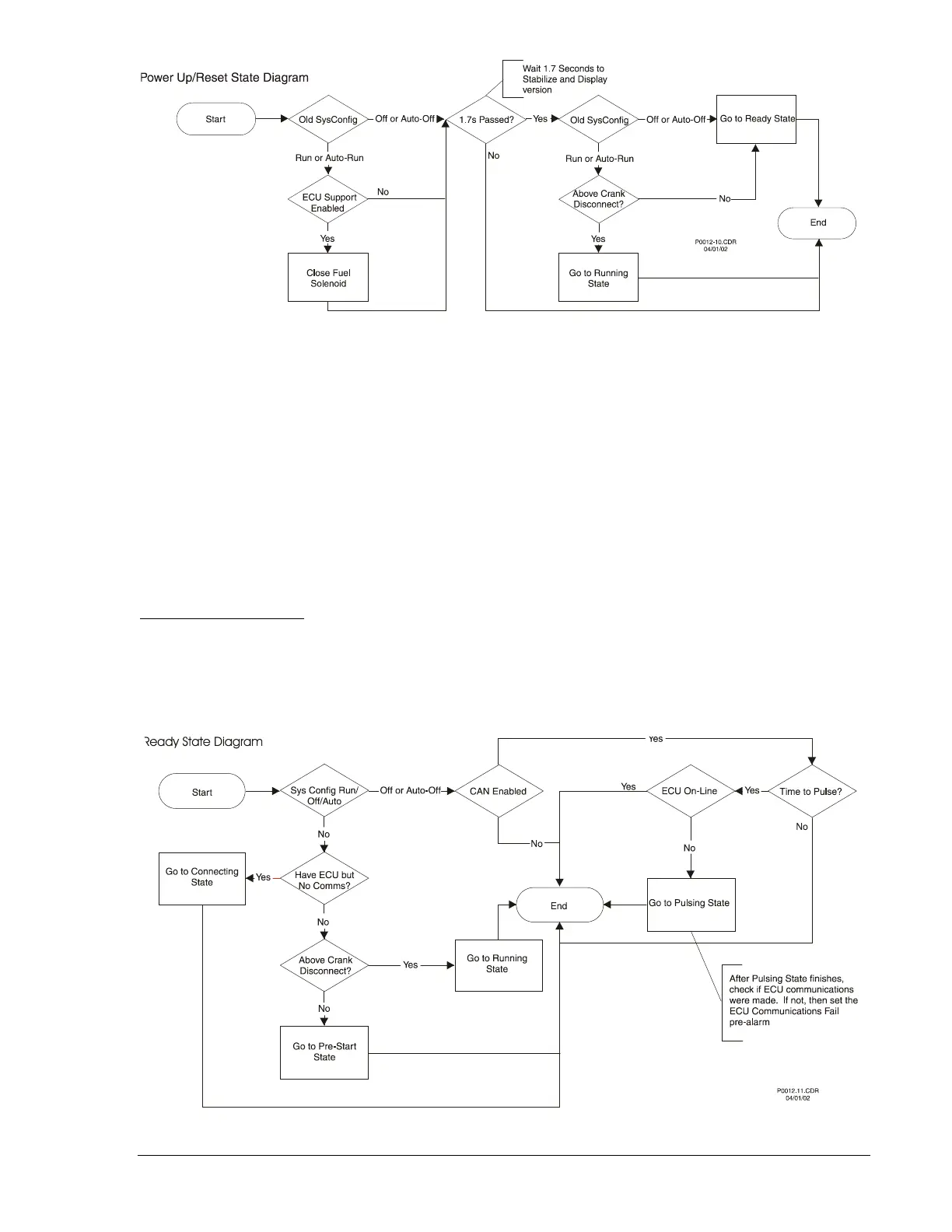
Figure 3-18. Power Up/Reset State Diagram
Ready State
The DGC-500 will be in Ready state when system configuration is Off/Auto-Off. If the system
configuration changes to Run/Auto-Run, then it will check to see if it needs to go to the Connecting, Pre-
Start or Running state. If ECU support is selected and there is no ECU communication and the Pulse
Cycle Timer has expired, the Ready state will transition into Pulsing. The Pulse Cycle Timer can be set to
expire and force a Pulsing state. There are three ways to force a pulse.
• When a user logs on to a unit through BESTCOMS, if the unit is in Ready state, a pulse is forced to
update the internal variables used to meter ECU data.
• User attempts to clear DTCs from the ECU while the DGC-500 is in Ready (therefore, the ECU is
probably powered off).
• Manually force a pulse and update the internal variables. The user can do so in BESTCOMS or
locally pulse the ECU by pressing the front panel pushbuttons in the ordered sequence: Auto, Off.
Going to Off or Auto-Off
If the DGC-500 is in the Connecting, Pre-Start, Resting or Cooling state when the unit goes to Off or Auto-
Off mode, then the state will transition to the Ready state. If ECU support is enabled, then the unit will go
to the Pulsing state immediately after transitioning to the Ready state.
Figure 3-19 illustrates the Ready state flowchart.
Figure 3-19. Ready State Diagram
9355400990 Rev H DGC-500 Functional Description 3-31



 To Next Page