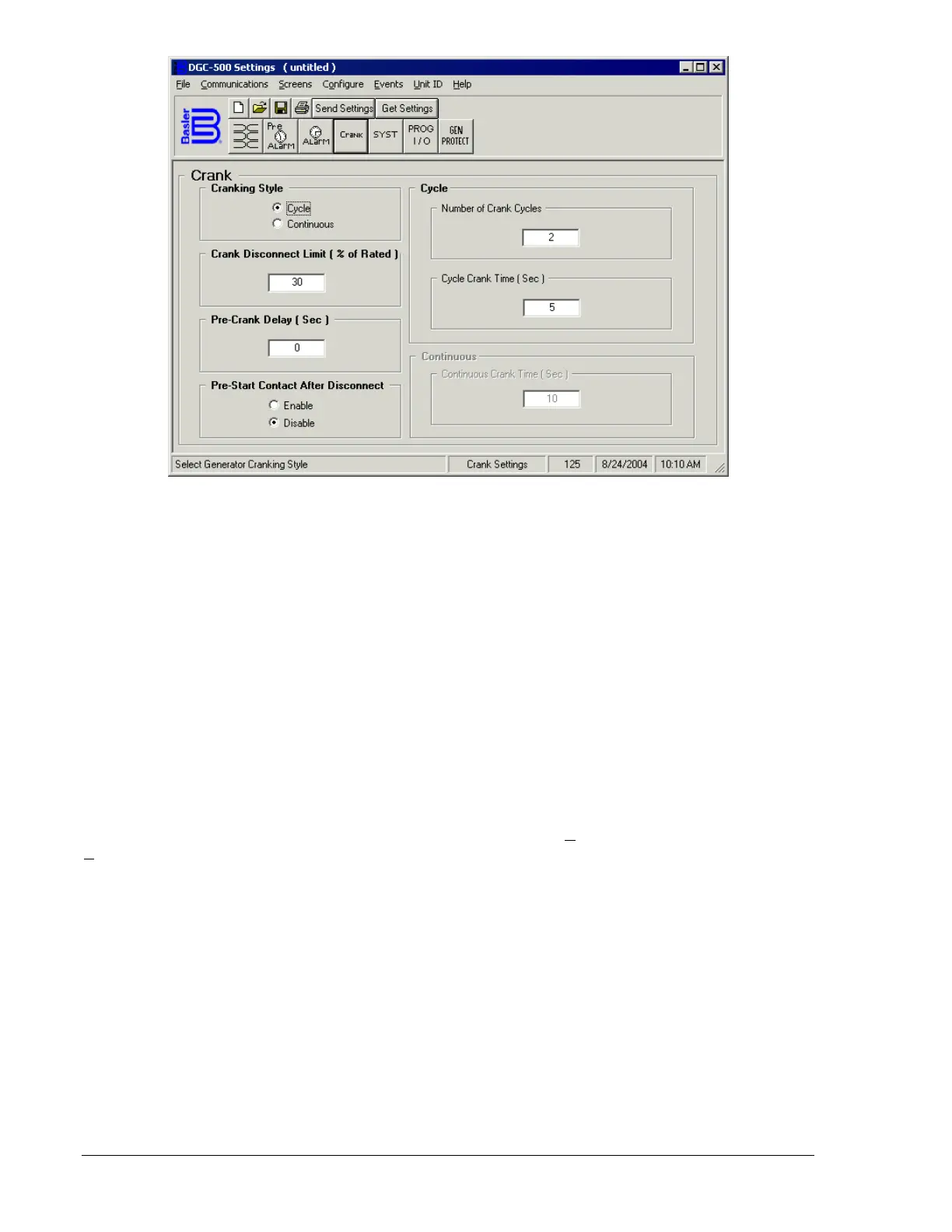
Figure 4-13. Engine Cranking Screen
Pre-Crank Delay (Sec). This setting adjusts the time delay between initiating engine starting and
beginning engine cranking. A delay of zero to 30 seconds may be entered.
Pre-Start Contact After Disconnect. This setting selects whether or not the pre-start contact remains
closed after disconnect occurs.
Cycle - Number of Crank Cycles. This setting, available only if cycle cranking is selected, selects the
number of engine cranking attempts before an overcrank condition occurs and cranking is terminated.
The crank cycles setting range is 1 to 7.
Cycle - Cycle Crank Time (Sec). This setting, available only if cycle cranking is selected, controls the
duration of each cranking cycle. Each cranking period is separated by a resting period of equal length. A
crank time of 5 to 15 may be entered.
Continuous - Continuous Crank Time (Sec). This setting, available only if continuous cranking is selected,
selects the duration of a single engine cranking attempt before an overcrank condition occurs. A
continuous crank time of 1 to 60 seconds may be entered.
System
Click the SYST button to access the System Settings screen or click Screens on the menu bar and click
System Settings.
System settings are shown in Figure 4-14 and are described in the following paragraphs.
Genset's kW Rating. The generator power rating is entered in this field. A genset kW rating of 5 to 9,999
may be entered.
Cool Down Time. This setting selects the time delay time for any of the following three conditions.
• The generator load is removed and engine shutdown is permitted.
• The Auto Transfer Switch is opened while operating in Auto mode and engine shutdown occurs.
• A remote shutdown is initiated and engine shutdown occurs.
A cool-down time of zero (0) to 60 minutes may be entered.
Rated Engine RPM. This setting selects the rated rotating speed of the engine. A value of 750 to 3,600
rpm may be entered.
Maintenance Interval Timer Reset. Selecting this checkbox terminates the maintenance interval pre-alarm
and resets the maintenance interval timer back to the programmed value. The Send Settings button must
be clicked for the reset to take effect.
4-10 DGC-500 BESTCOMS Software 9355400990 Rev H



 To Next Page