Low Oil-Low Batt Volt-Weak Batt Volt Tab
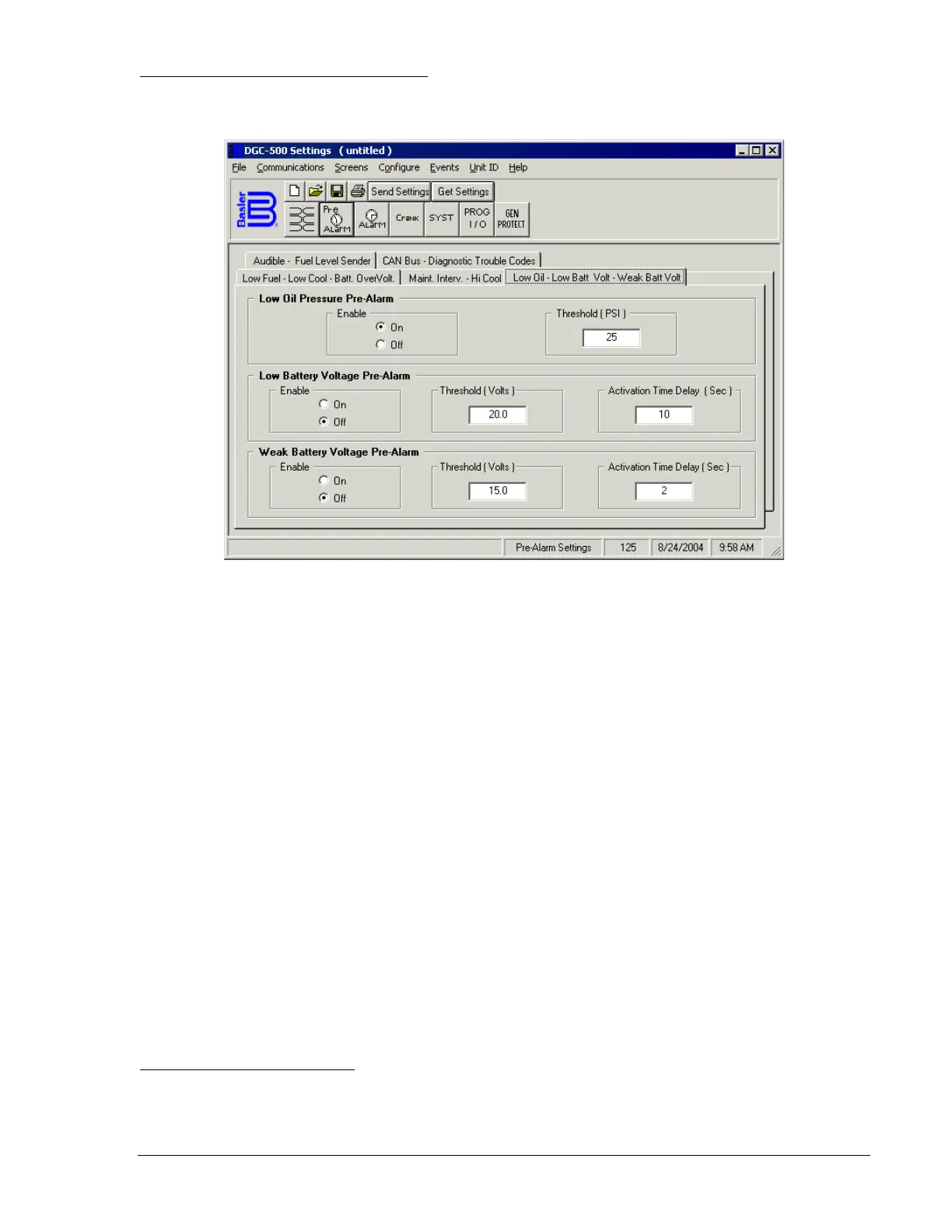
The Low Oil-Low Batt Volt-Weak Batt Volt Tab settings are shown in Figure 4-7. Each tab setting is
described in the following paragraphs.
Figure 4-7. Pre-Alarm Screen, Low Oil-Low Batt Volt-Weak Batt Volt Tab
Low Oil Pressure Pre-Alarm - Enable. This setting enables and disables annunciation of a low oil
pressure pre-alarm. A 10 second activation time delay prevents low oil pressure annunciation during
engine startup.
Low Oil Pressure Pre-Alarm - Threshold (PSI). This setting selects the oil pressure level that will trigger a
low oil pressure pre-alarm. A threshold setting of 3 to 150 psi or 20 to 1,035 kPa may be entered. A 10
second activation time delay prevents low oil pressure annunciation during engine startup.
Low Battery Voltage Pre-Alarm - Enable. This setting enables and disables annunciation of a low battery
voltage pre-alarm.
Low Battery Voltage Pre-Alarm - Threshold (Volts). This setting selects the voltage level that will trigger a
low battery voltage pre-alarm. The threshold setting is adjustable from 6 to 12 Vdc for 12 Vdc systems
and 12 to 24 Vdc for 24 Vdc systems.
Low Battery Voltage Pre-Alarm - Activation Time Delay (Sec). This setting selects the time delay from
when low battery voltage is detected until a pre-alarm is annunciated. A time delay of 1 to 10 seconds
may be entered.
Weak Battery Voltage Pre-Alarm - Enable. This setting enables and disables annunciation of a weak
battery voltage pre-alarm.
Weak Battery Voltage Pre-Alarm - Threshold (Volts). This setting selects the voltage level that will trigger
a weak battery voltage pre-alarm. The threshold setting is adjustable from 4 to 8 Vdc for 12 Vdc systems
and 8 to 16 Vdc for 24 Vdc systems.
Weak Battery Voltage Pre-Alarm - Activation Time Delay (Sec). This setting selects the time delay from
when weak battery voltage is detected until a pre-alarm is annunciated. A time delay of 1 to 10 seconds
may be entered.
Audible-Fuel Level Sender Tab
The Audible-Battery Charger-Fuel Level Sender Tab settings are shown in Figure 4-8. Each tab setting is
described in the following paragraphs.
9355400990 Rev H DGC-500 BESTCOMS Software 4-5



 To Next Page