7.2.5 Operating the B-TIMER
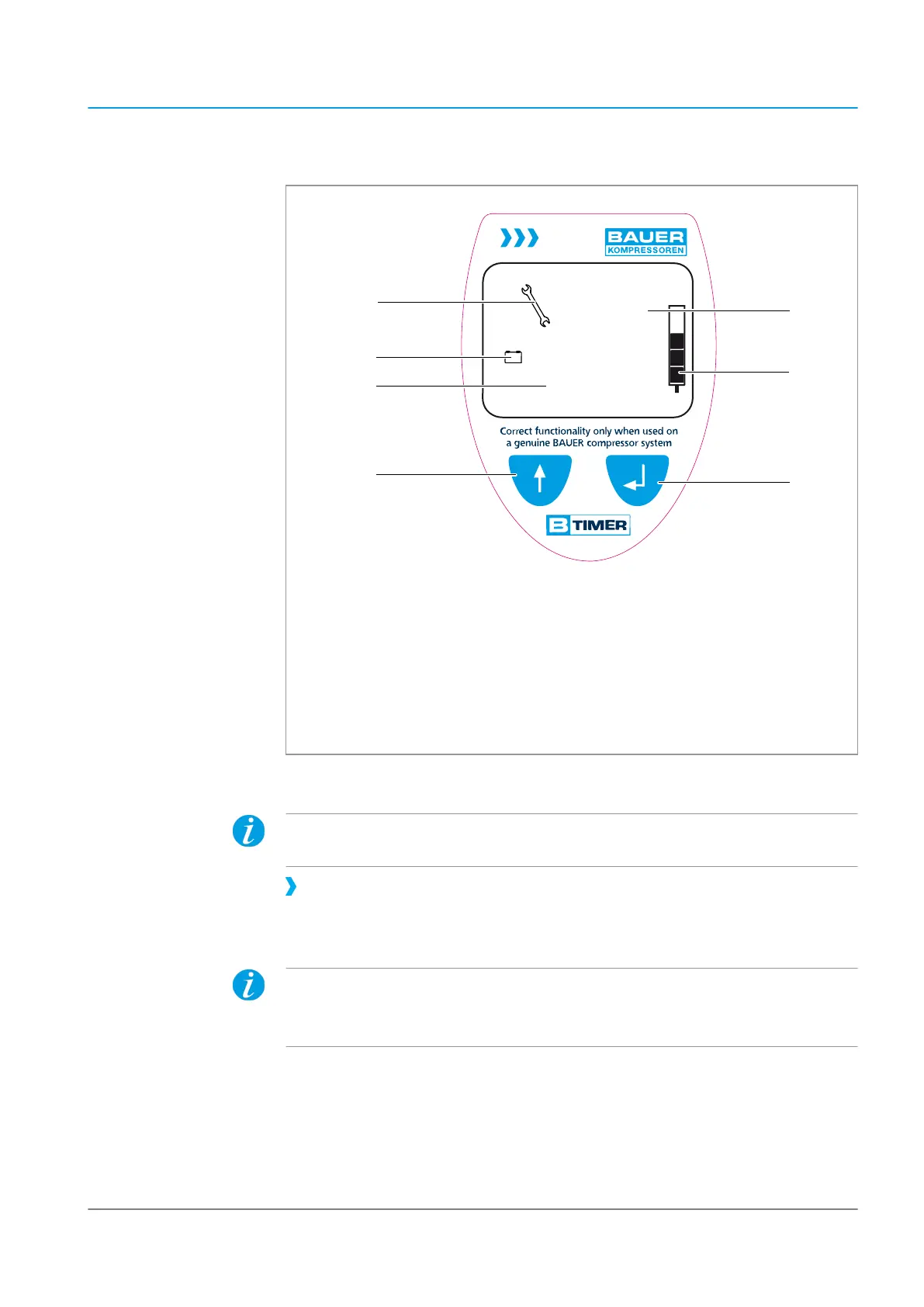
Fig. 17 Display and operating elements
1 Display of due maintenance 5 Input key
2 Display of low battery status 6 Display of cartridge saturation
3 Display of operating hours or car-
tridge number
7 Display of due maintenance type or
the setup menu
4 Selection key
Switching on the B-TIMER
The B-TIMER switches itself on when the compressor is activated. The compressor
operation is indicated in the display of the B-TIMER using a flashing "h".
Press one of the buttons to switch on the B-TIMER without compressor opera-
tion.
Ä
The main menu is displayed.
If no button is actuated within 1 minute, the display reverts to the main menu.
2 minutes without pressing a button and compressor operation causes the B-TIM-
ER to switch off.
OPERATING MANUAL Commissioning and operation | 7
10-10-2016
A_Compact-Line_002_en
67/106




 To Next Page