3 | Description Baumer
18 Operating Manual IDC200 | V1.0
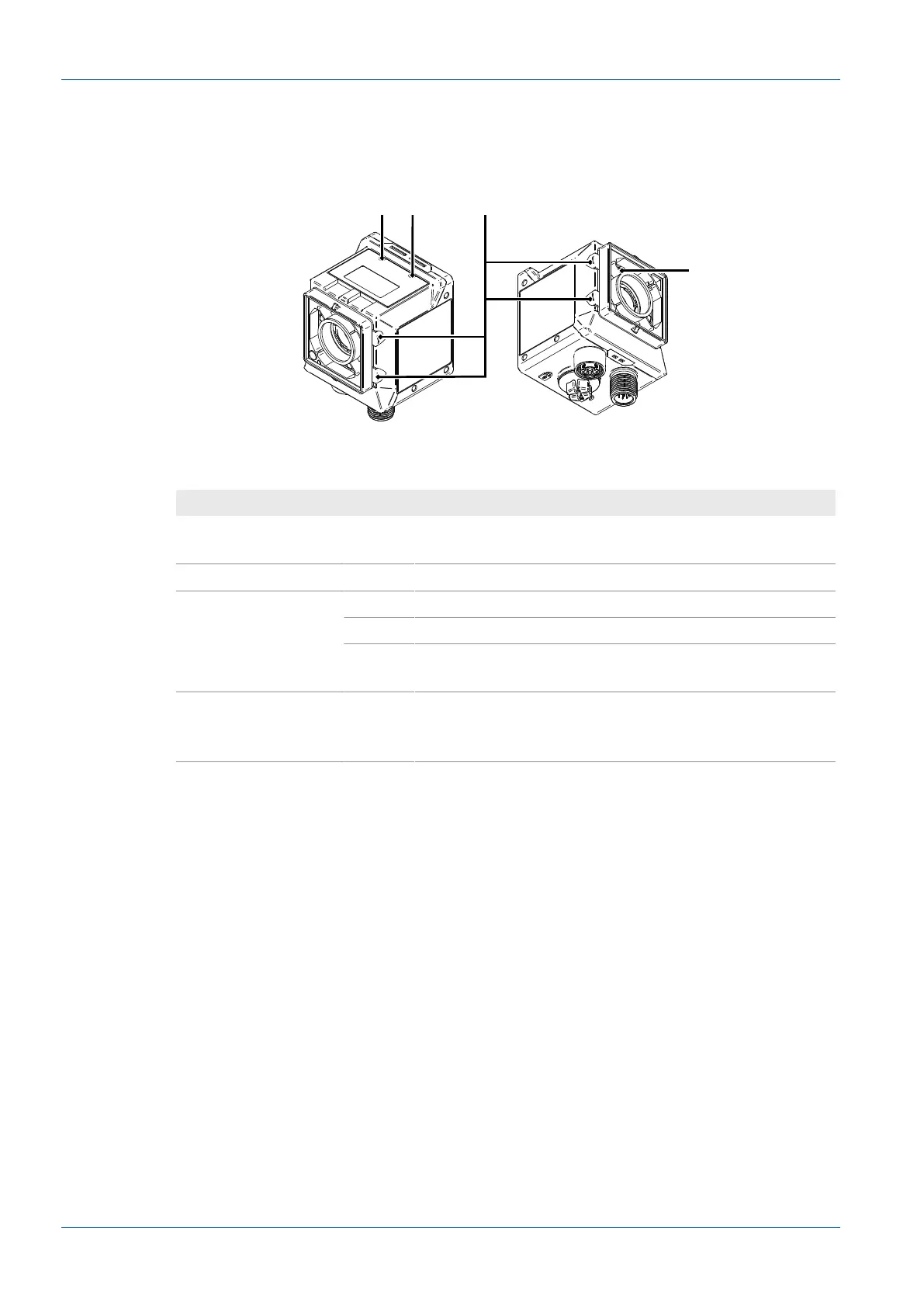
3.2.2 Sensor LEDs
Link Power
Illuminated ring
Pointer
Designation Illuminated Flashing
Link green
n
if Ethernet connection
present
n
Device identification
Power green
n
Voltage supply present —
Illuminated ring (dis-
able via web inter-
face)
red
n
Fail —
green
n
Pass —
blue
n
Ready for reading in mon-
itoring mode
n
Device identification
Pointer (disable via
web interface)
green
n
Device in monitoring
mode (positioning aid)
n
Device in parameteriza-
tion mode (positioning
aid)
3.2.3 Display
The sensor features a display showing the different sensor parameters.
The following functions are available:
n
Indicating firmware version at sensor boot up
n
Indicating the sensor's IP address (alternating in between USB and Ethernet address)
n
Indicating progress bar at Auto Setup
n
Indicating job number of the currently loaded job
n
Indicating the first code being read in the current job
n
Indicating type and nature of the first code being read
Display will deactivate after having remained unaltered for 60 minutes (e.g. job execution). Dis-
play reactivates using the qTeach buttons or when alternating (e.g. Auto Setup).



 To Next Page