89000046-014 KSN 780/8XX/900 AeroNav AML STC Installation Manual for Helicopters
Rev 0 Page 7-31
© Honeywell International Inc. Do not copy without express permission of Honeywell.
7.5.15.1.1 Configuring the AeroNav as a WAP
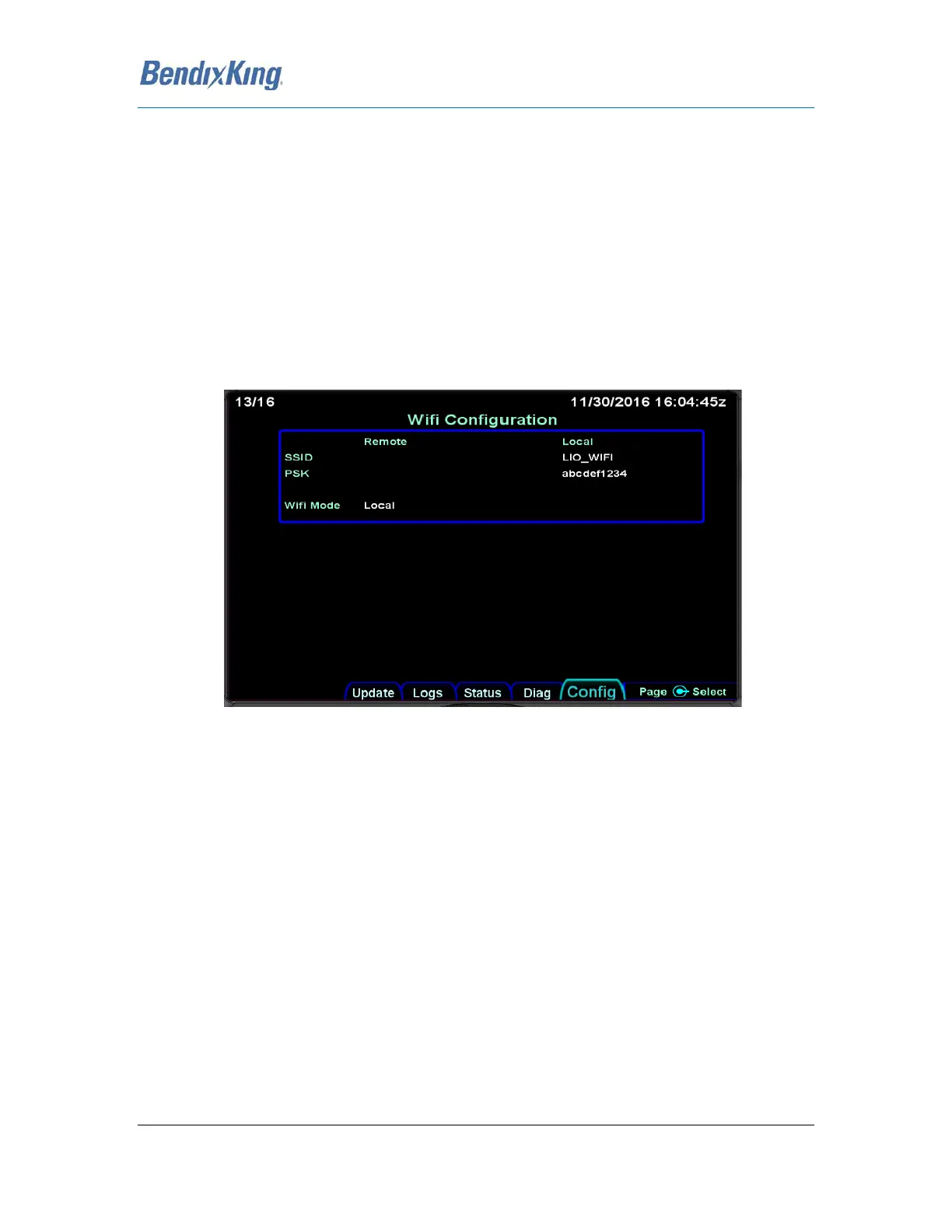
The factory default setting for the AeroNav, presents the AeroNav as WAP with SSID (i.e. the name of
the provided network) set to "LIO_WIFI". Additionally, the default PSK (i.e. the password needed to
access the Wi-Fi access point) is set to "abcdef1234". Each of these settings can be modified from the
AeroNav Maintenance mode. In order to modify one or both of these settings proceed as follows.
To configure the WiFi Mode
1. Boot the AeroNav to Maintenance mode.
2. Select the "Config" tab.
3. Turn the right knob until the "Wifi Configuration" Page is displayed as shown in the image
below.
Figure 21 WiFi Configuration Page
4. If the "Wifi Mode" value is not set to "Local", press the lower right knob and use the outer
knob to select the mode value.
a. Once selected, use the inner knob to change the value to "Local"
b. Press the knob again to exit edit mode.
To configure the network name (SSID)
1. Boot the AeroNav to Maintenance mode.
2. Select the "Config" tab.
3. Turn the right knob until the "Wifi Configuration" Page is displayed as shown in the image
below.



 To Next Page