11
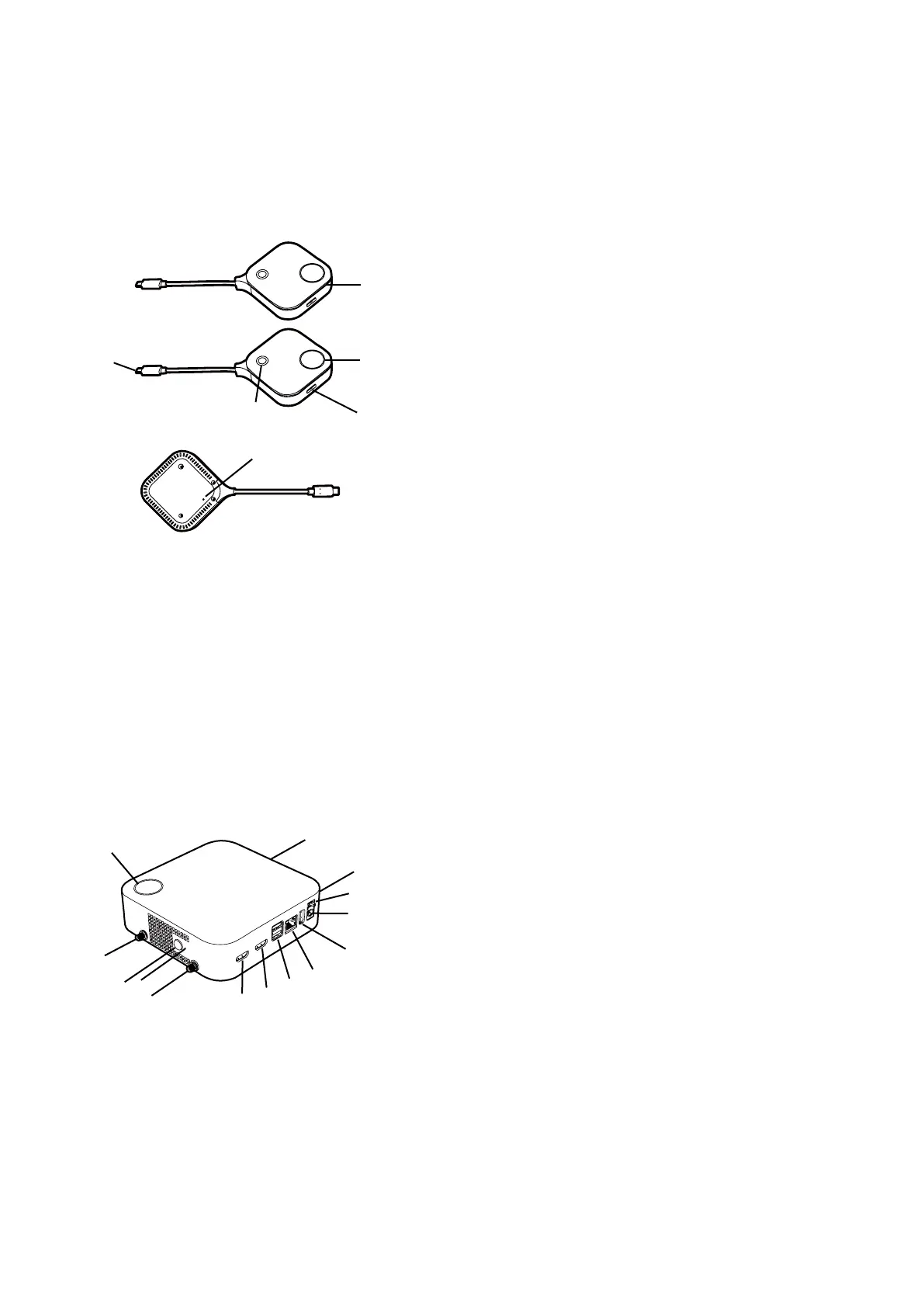
Overview
Button
2
3
5
4
1
6
Bottom of a Button
1. Microphone
Captures sound for videoconferences.
2. Present key with LED indicator
Press to start or stop presenting.
3. Split screen key
Press to enable split screen presentations.
4. Mute key
Press to mute the microphone on the Button
when it is used in a videoconference.
5. USB-C connector
Connect to a computer or laptop.
6. Reset
Poke the reset hole to reset the device if the
device stops responding. Refer to Resetting a
Button on page 32 for more information.
Host
11
1
1
1
1
2
8
4
6
7
9
3
5
10
1. Fixture parts for the Antennas
Refer to Assembling the Host on page 15
for more information.
2. PAIRING key
Press to pair with a Button.
3. RESET
Poke the RESET hole to reset the device if the
device stops responding. Refer to Resetting a
Host on page 31 for more information.
4. HDMI IN port
Allows users to connect another Wireless
Presentation System using an HDMI A(M)
to A(M) cable to integrate it into a video
conference.
5. HDMI OUT port
Connect to a display using an HDMI A(M) to
A(M) cable.


 To Next Page