LB 470 Level 7 Main Menu Device Setup
56925BA2 Rev. 03, 11/2017
All entries and changes in the ″Parameters″ tab will take effect only when you
click on the < Calibrate > button click in the Calibrate Submenu.
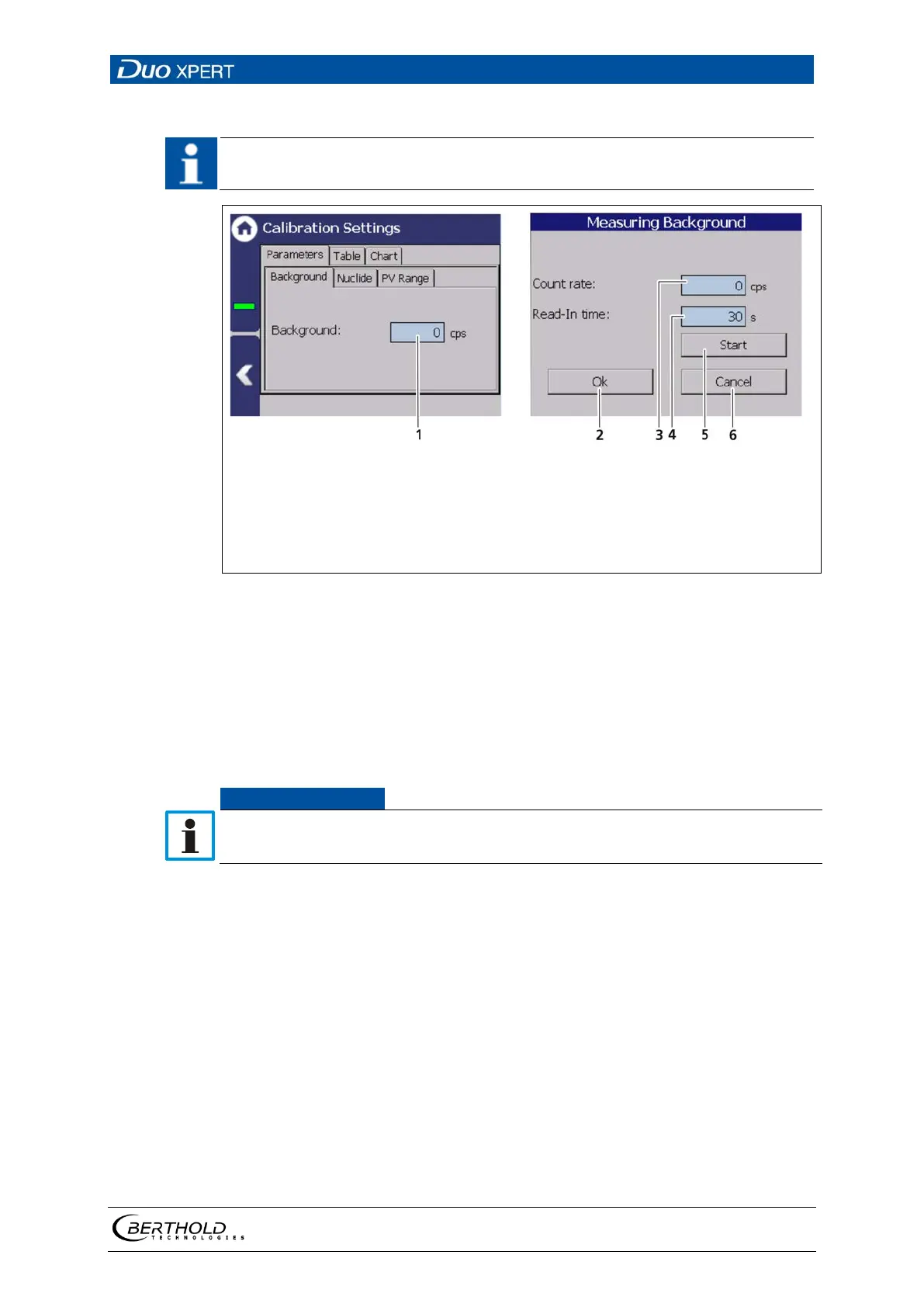
Input field Background [cps]
Button <Ok>
Input field count rate
Input field measuring Duration
Button <Start>
Button <Cancel>
82 Calibration parameters: Background
Determine background
Device settings | Setup | Calibration | Calibration Settings
1. Click on the text field "Background" (Fig. 82, item 1).
A new window "Background" opens to determine the background Count
rate.
Influences from neighbouring sources must be excluded in order to avoid errors
in the measurement of natural background radiation.
2. Click on the ″Read-In-Time″ field and specify the duration of the measure-
ment in seconds. The higher you set the measurement time, the more
accurate the result.
3. Confirm with the Enter key and click on the button <Start> to start the meas-
urement.
The measurement is performed.
4. Click on <OK> to accept the count rate.



 To Next Page