LB 470 Level 7 Main Menu Device Setup
56925BA2 Rev. 03, 11/2017
Calibrate
Device settings | Setup | Calibration
Data that are necessary for a complete measurement are found in the calibration
parameter set. All the data of the calibration parameter set are transferred to the
measurement parameter set when the button "Calibrate" is clicked. Only after this
are they can be used for measurement value calculation.
2
3
Button <Yes>
Button <Close>
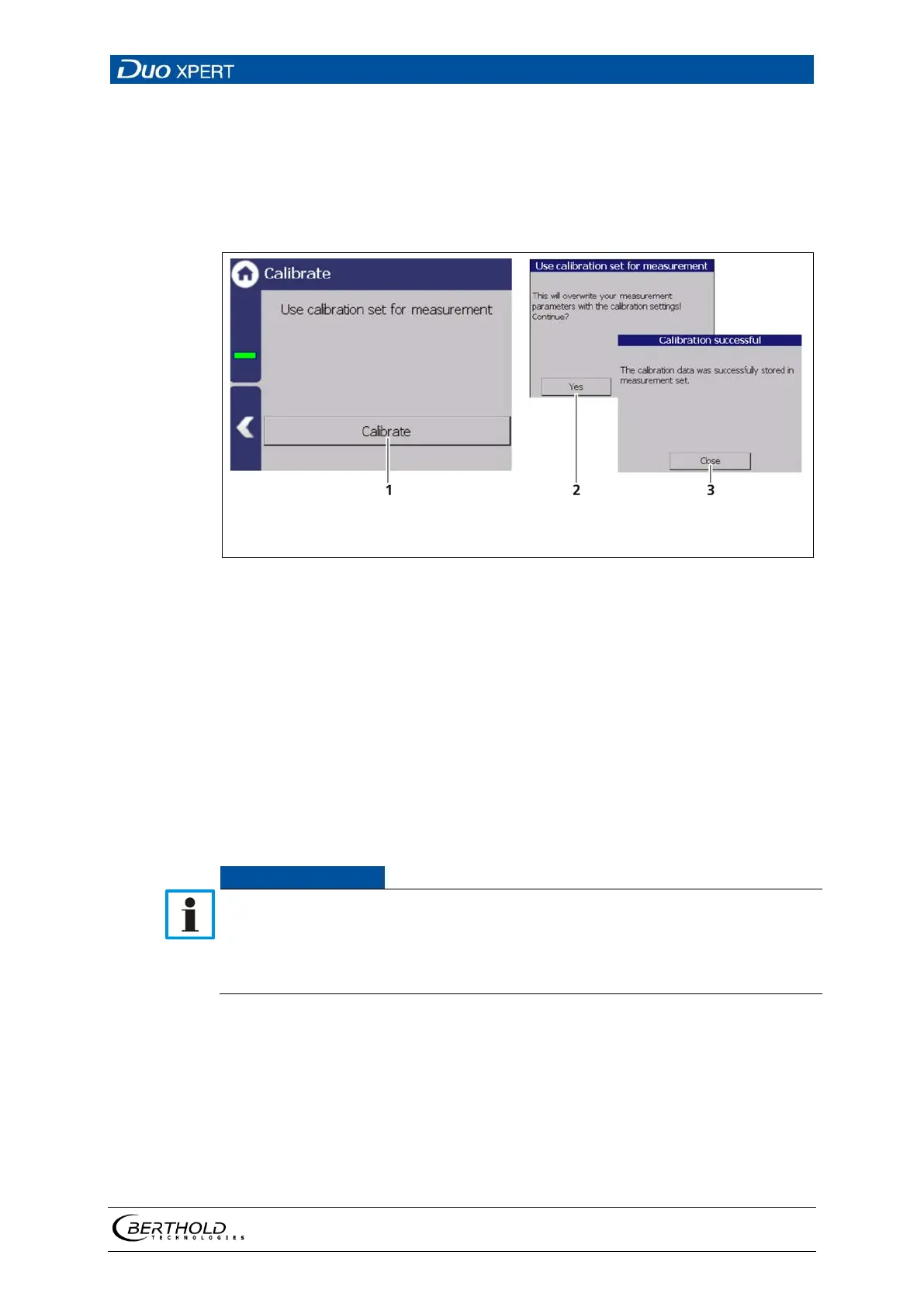
89 Calibrate
1. Click on the button <Calibrate> (Fig. 89, item 1).
A new window with the message ″Use calibration set for measurement″ ap-
pears.
2. Click on the <Yes> button (Fig. 89, item 2) to overwrite your measurement
parameters with the calibration settings.
A new window with the message ″Calibration successful″ appears.
3. Click on the <Close> button (Fig. 89, item 3)
The calibration was performed.
Check your calibration by simulating a detector count rate. Use the test count
rate in the simulation menu.
As the value of the test count rates, e.g. the counting rates from the calibration
points are used. Check whether the correct measured value is displayed at the
respective test count rate.


 To Next Page
 Loading...