LB 470 Level 7 Main Menu Device Setup
56925BA2 Rev. 03, 11/2017
Perform Plateau Measurement
Device settings | Setup | Sensors | [NAME DETECTOR] | Plateau | Plateau Measure-
ment
The environmental conditions and the dose rate must be constant during the
plateau recording.
Observe the operating manual of the detector!
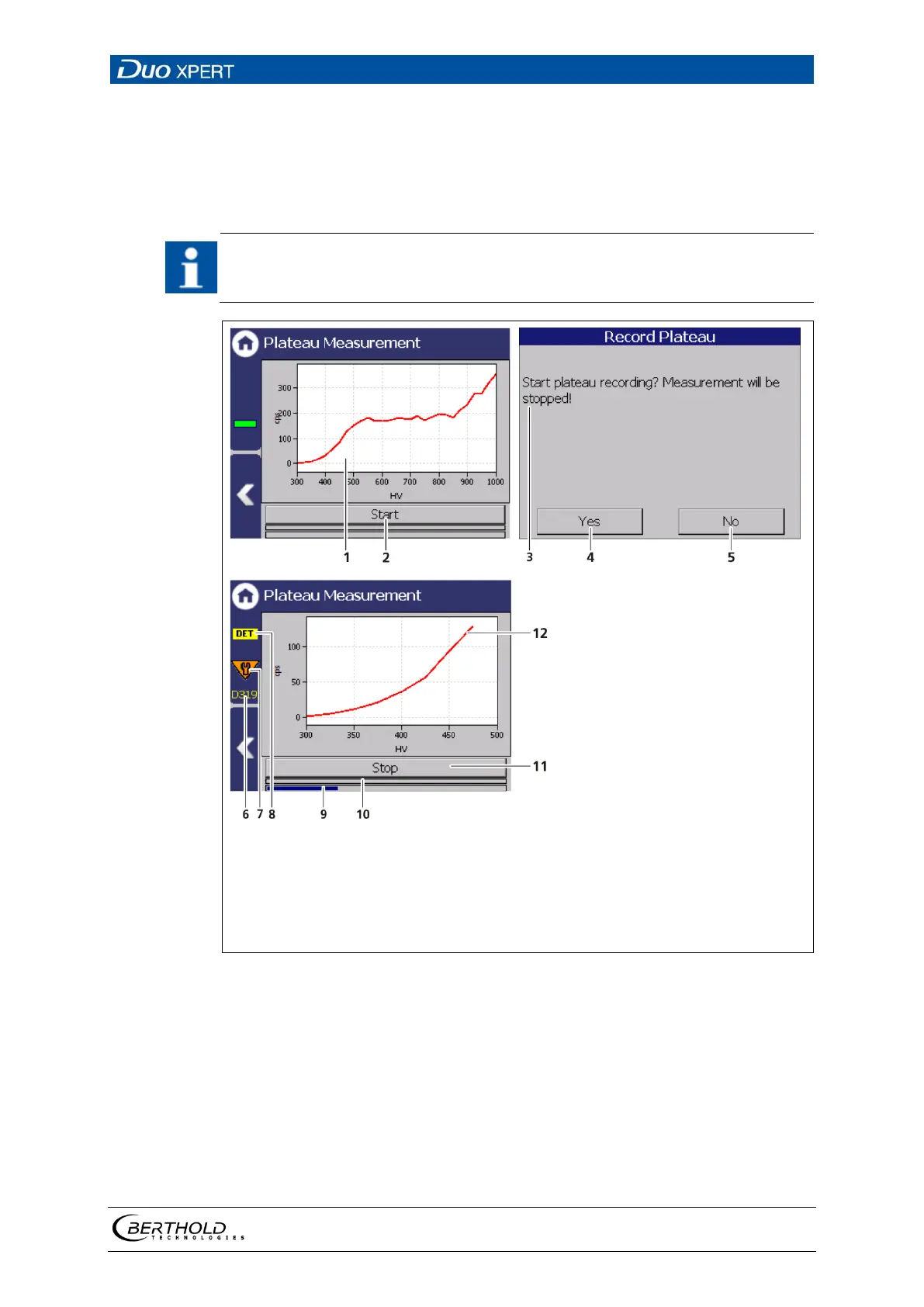
Plateau curve
Button <Start>
Window "Record plateau"
Button < Yes >
Button <No>
Notice Code 505
Notice Maintenance
Notice DET
Progress bar measuring process
Progress bar measuring step
Button <Stop>
New plateau curve
66 Recording a plateau curve
1. Click on < Start > (Fig. 66, item 2) to perform a plateau measurement.
The confirmation message "Record plateau" (Fig. 66, item 3) opens.
2. Confirm with < Yes > (Fig. 66, item 4).
The EVU switches to mode "DET" (Fig. 66, item 8) and the current measure-
ment is stopped.



 To Next Page