4-4 BL-CB33-0115 - 03-01-2018
4-1.1. CONTROLLER TROUBLESHOOTING
The controllers provide diagnostics information to
assist technicians in troubleshooting problems. Refer
to Table 4-2 for the traction controller error messages.
Refer to Table 4-3 for the steering controller error mes-
sages.
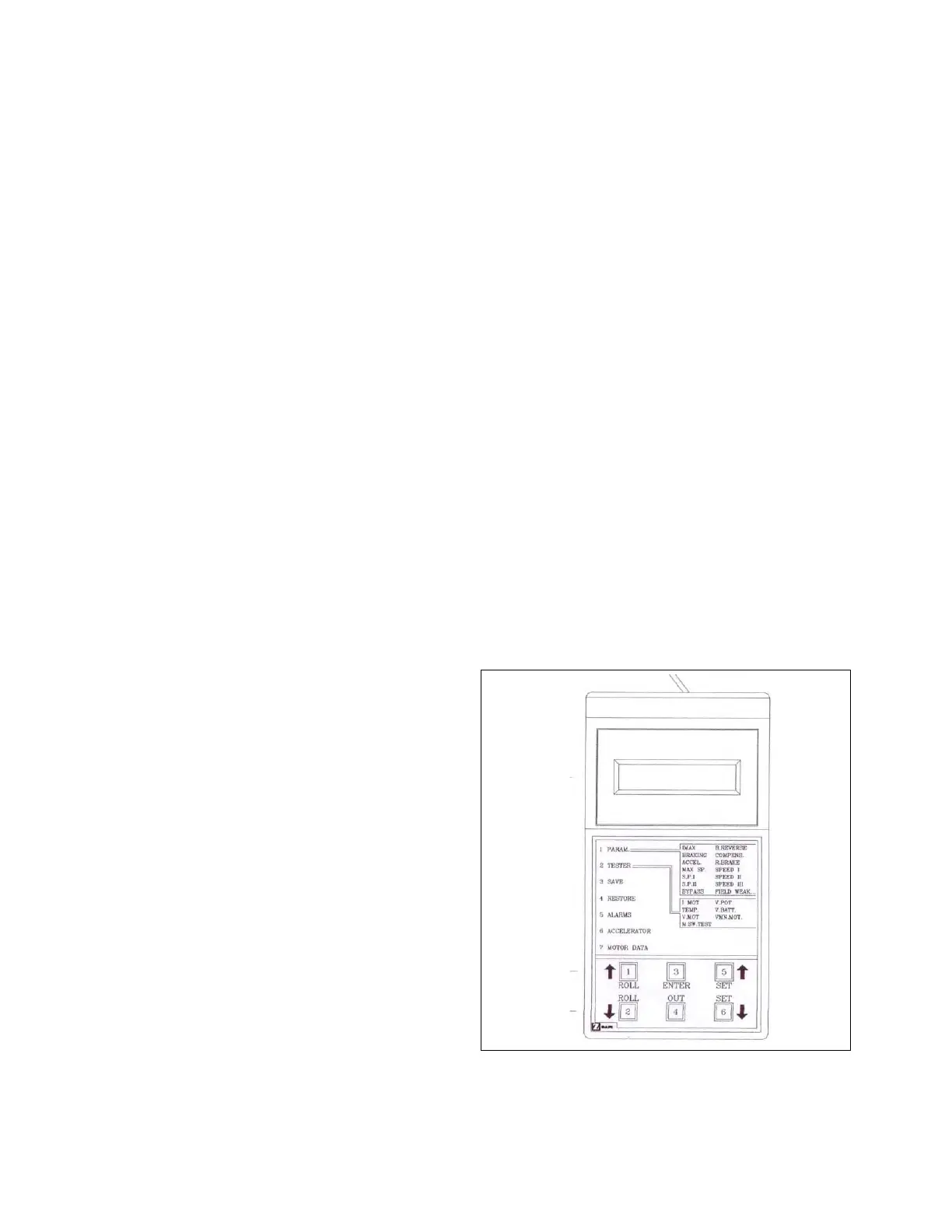
4-1.2. Zapi Handset
A Zapi Handset is available that is designed specifi-
cally for use with the Zapi controller. It serves multiple
functions of reading diagnostic data, testing truck
operation, setting options, adjustments and parameter
changes of the controller. The Zapi Handset is avail-
able through your Big Lift LLC dealer. If you require
dealer location information, contact Big Lift LLC.
Remove the rubber plug from the CNC connector of
the controller and plug in the Zapi Handset connector.
4-1.3. Fault Detection.
4-1.3.1. General
The controller provides diagnostics information to
assist technicians in troubleshooting problems. When
a fault is detected, an alarm is recorded in the logbook.
It has a FIFO (First Input First Output) structure that
means the oldest alarm is lost when the database is
full and a new alarm occurs. The logbook is composed
of alarms with the following information:
• The alarm code
• The times that each alarm occurs consecutively
• The Hour Meter value when the latest event of every
alarm occurred
• The invert temperature when the latest event of
every alarm occurred.
This function permits a deeper diagnosis of problems
as the recent history can be revisited.
4-1.3.2. Logbook Access
To view the alarm logbook proceed as follows:
1. Connect the Zapi Handset, refer to paragraph
4-1.2.
2. Press the ROLL down button and the ENTER but-
ton at the same time to enter the MAIN MENU.
3. Press the ROLL down button or the ROLL up but-
ton to find the ALARMS display.
4. Press the ENTER button to view the alarms.
5. When finished, press the OUT button (6). The dis-
play will ask: “ARE YOU SURE?”. Press ENTER
BUTTON (3) for yes, or OUT for NO.
6. Press the OUT button (6) to exit the ALARMS dis-
play.
NOTE: Refer to bigjoesupport.com for the Zapi sup-
plement containing detailed information on
alarm codes. There are two versions shown.
The CB33 uses the Standard version which
lists the error by: Alarm Name, Repetitions,
Temperature and Hour Meter reading.
4-1.4. Testing Truck Operation.
The Zapi Handset can be used to test certain truck
operations as follows:
1. Connect the Zapi Handset, refer to paragraph
4-1.2.
2. Press the ROLL down button and the ENTER but-
ton (3) at the same time to enter the MAIN MENU.
3. Press the ROLL down button or the ROLL up but-
ton to find the TESTER display.
4. Press the ENTER button (3) to view the tests.
5. To verify various switch functions, locate the
switch on the display and then operate that func-
tion to verify operation
6. Press the OUT button to exit the tests.
Figure 4-1 Zapi Handset
4-1.5. Settings and Adjustments


 To Next Page