UF V (E3) 03/2019 Page 20/116
2.2.1 Operating the NumPad (option “Door access system”)
Combined with the electromechanical door locking the NumPad permits personalized access control to
the freezer.
(1)
(2)
(3)
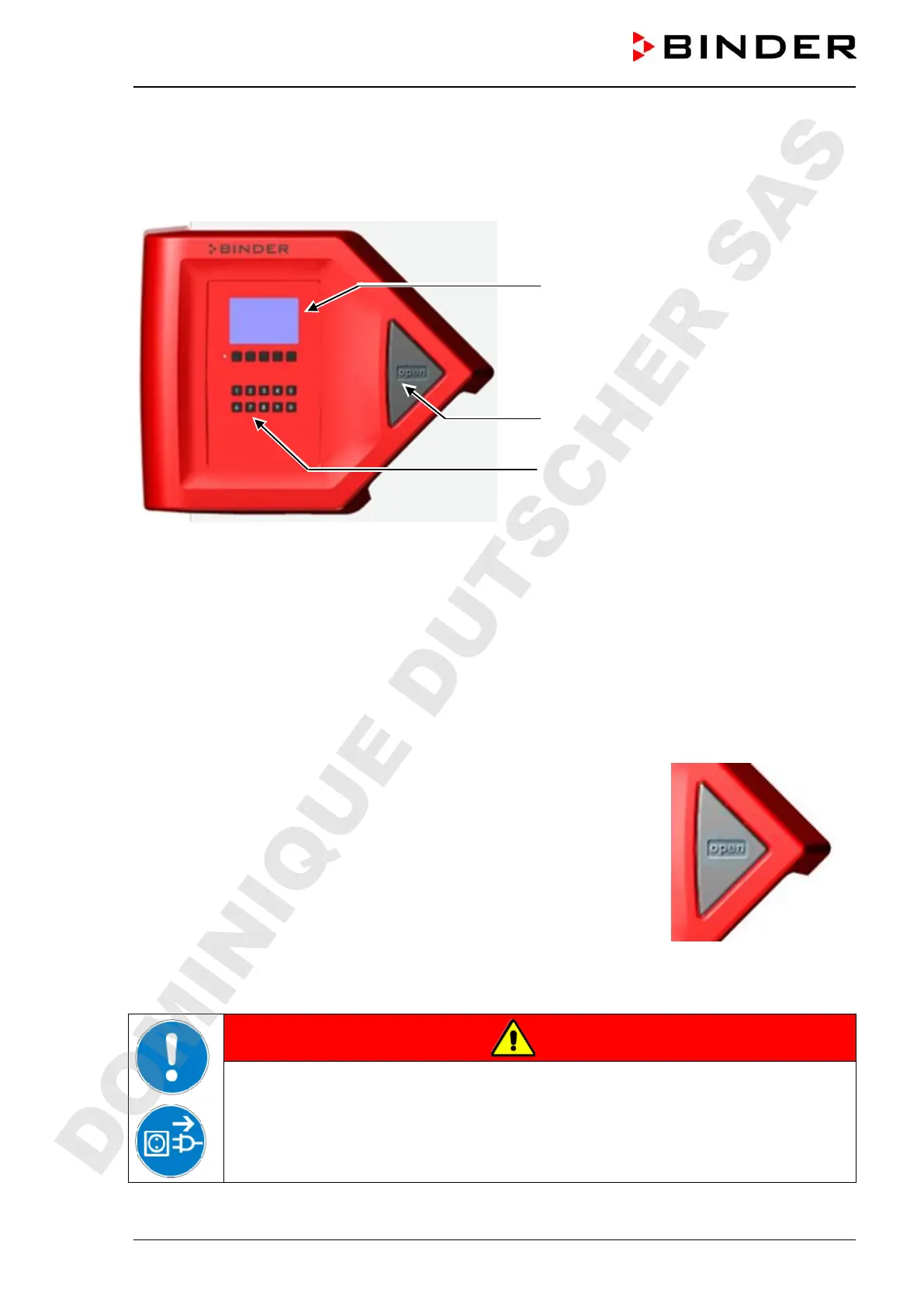
Figure 7: Door lock and controller housing with “Door access system” option:
Numpad, controller operating panel and pushbutton “OPEN” to open the chamber door
(1) Controller RD4 operating panel
(2) Pushbutton “OPEN” to open the chamber door
(3) NumPad to control the electromechanical door locking
2.2.2 Operating the electromechanical door locking (option “Door access system”)
A pushbutton permits opening the electromechanical door locking with-
out using your hands. A pull-tight function automatically closes the outer
door when slightly open.
Opening the door:
Firmly press the one-touch pushbutton “OPEN”. You can now open the
door.
Closing the door:
Firmly press on the door for at least 2 seconds until the automatic door
mechanism is activated and closes the door tightly.
Figure 8: Pushbutton “OPEN”
to open the door
DANGER
Risk of locking in a person.
Danger of death.
Before closing doors, make sure that nobody is inside.
Pull the power plug before entering the interior (e.g. for cleaning purposes).
DOMINIQUE DUTSCHER SAS


 To Next Page