Biotage
®
Selekt User Manual | © Biotage 2020
Start, Monitor, and Control a Purification
Chromatogram
The signals and the thresholds are displayed in the
chromatogram using the following colors:
= Light absorption measured by the internal detector for
the whole λ-All range and the threshold in mAU. (Requires a
Spektra software license.)
= Light absorption measured by the internal detector
at wavelength UV1 and the threshold in mAU.
= Light absorption measured by the internal detector
at wavelength UV2 and the threshold in mAU.
= Signal from the external detector (when connected)
and the threshold in mV.
The defined wavelengths and real-time measurements of the
absorption are displayed in the Collection panel.
Zoom in on the Chromatogram
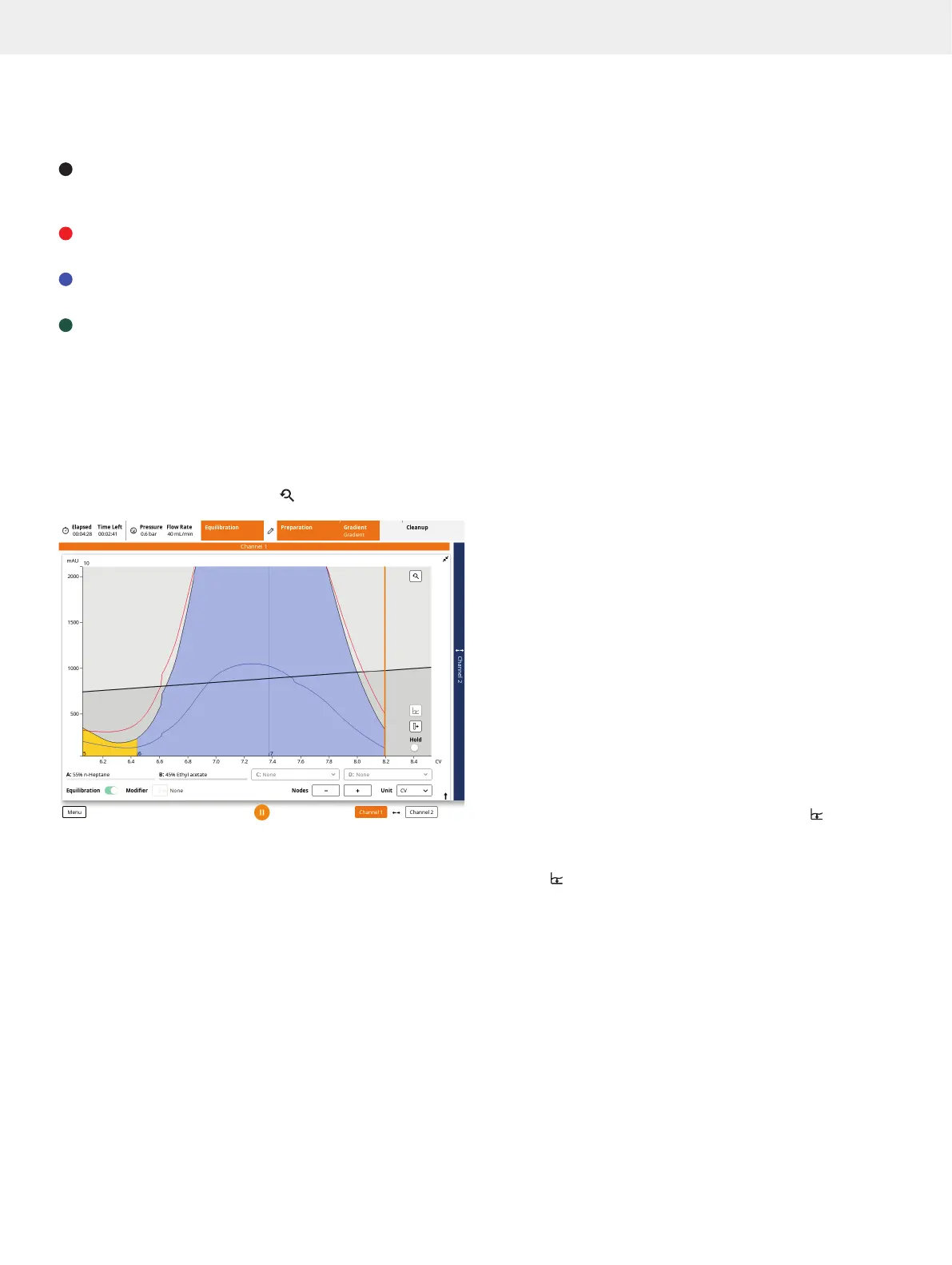
It is always possible to zoom in and out of the gradient and
chromatogram using the pinch-to-zoom feature (see Figure 30).
It is possible to zoom in one direction (X or Y) or both directions
(X and Y). To reset the zoom, press
.
Figure 30. Zoomed-in chromatogram.
Current Solvent Mix
The percentage of pumped solvents (excluding the modifier,
if used) are displayed underneath the chromatogram during
the whole run (see Figure 28 and Figure 29 on page 13).
Status in the Top Pane
»
Conversion: When reversed phase is run on one
channel and normal phase on the other, a solvent
flush is performed between runs that are using
different channels. Note that conversions are not
performed when one of the runs uses more than two
solvents. For more information; see page 7.
»
Equilibration Flush: The system empties the
solvent inlets of solvents used in the previous
purification and fills them with new solvents.
»
Equilibration: The system is running a column equilibration.
»
Purge: The system releases the column pressure.
»
Sample Load: Sample can be loaded onto the column.
»
UV Warm-Up: The UV lamp is being warmed up.
»
UV Zero: The system is setting the UV zero level using
the solvent mix used at the start of the gradient.
»
Baseline Detection: The system is measuring the light
absorbance of the used solvents (A, B, and modifier)
for the whole detector range. During the gradient
run, the baseline is subtracted from the signal.
»
Baseline Flush: After baseline detection,
the system is flushed with the solvent mix
used at the start of the gradient.
»
Gradient: The system is running a purification.
»
Line Flush, Purge, and Detector Flush: At the end
of a run, i.e. after the gradient purification stage is
completed or ended by the user, the system performs
the flushes that are enabled in the system settings
(see page 27) and a system decompression (purge).
»
Finished: The purification run was completed
or ended/aborted by the user.
»
Failed: The purification run failed.
Manual UV Zero
During the gradient run, it is possible to manually set the
current UV absorbance level to zero AU by pressing
in the
chromatogram (see Figure 30). This feature can be enabled/
disabled in the system settings; see page 27.
Note: The
button is only enabled when UV Baseline
Correction is turned off in the run setup.
Start and End an Isocratic Segment
At any time during the gradient run, you can start an isocratic
segment by enabling the Hold option in the chromatogram
(see Figure 30). End the segment by disabling the option.



 To Next Page