Set Up a Purification
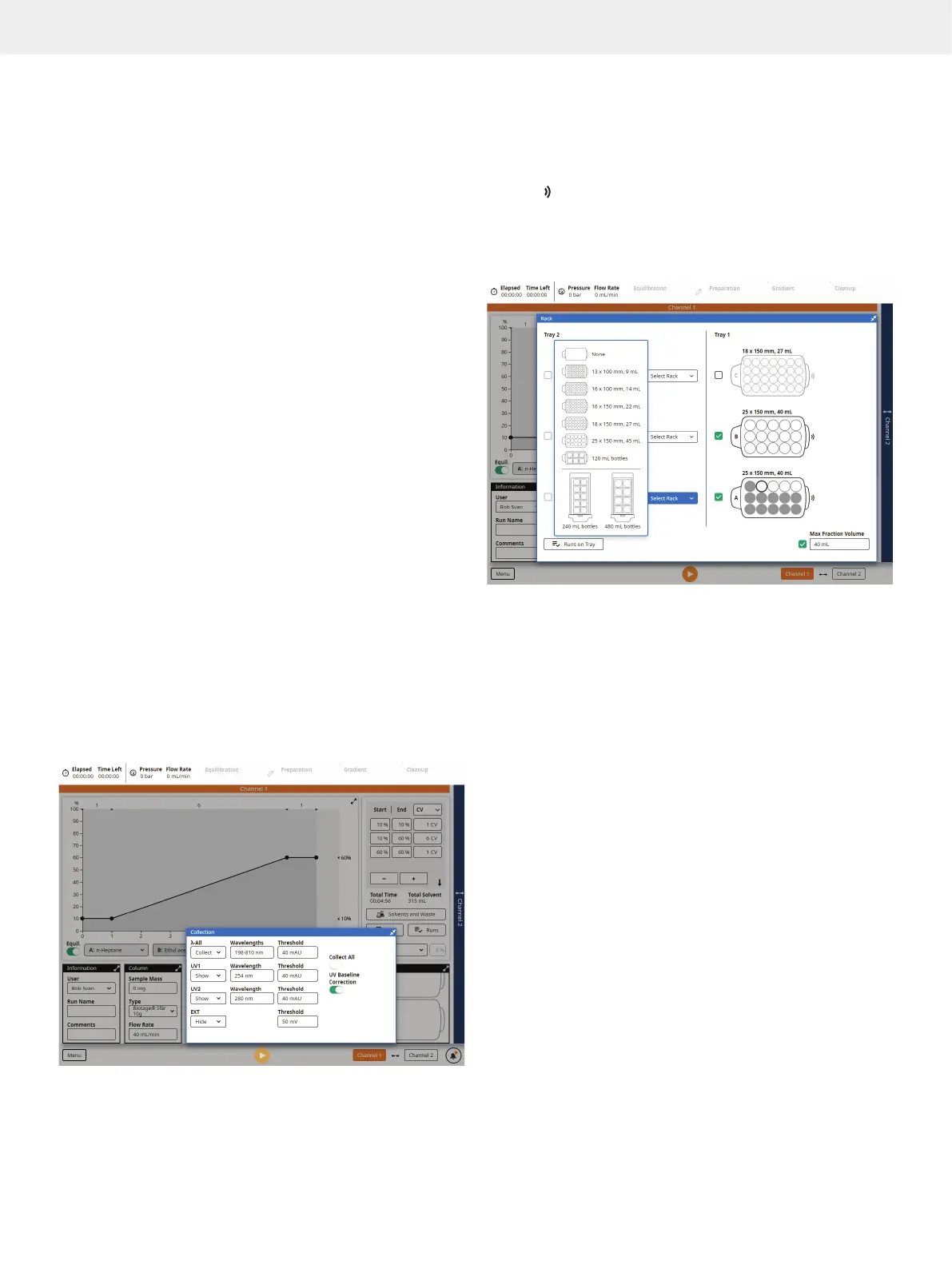
Specify the Collection Parameters
»
λ-All
*
: Select whether the average absorbance within
a user-defined wavelength range should be used for
collection and fractionation (Collect), used for monitoring
(Show), or not be shown during the run (Hide).
»
UV1 and UV2: Select whether the wavelength signals should
be used for collection and fractionation (Collect), used for
monitoring (Show), or not be shown during the run (Hide).
»
EXT: Select whether a signal from an external
detector (optional) should be used for collection
and fractionation (Collect), used for monitoring
(Show), or not be shown during the run (Hide).
»
Wavelengths
*
: The shortest and longest wavelength to be
included in the λ-All signal. The range is 200 to 400 nm
(UV detector) or 198 to 810 nm (UV-VIS detector).
»
Wavelength: The wavelength to be used for UV1
and UV2. The range is 200 to 400 nm (UV detector)
or 198 to 810 nm (UV-VIS detector).
»
Threshold: Used to collect samples when the
signal level exceeds the set threshold.
»
Collect All: Used to collect the entire run.
»
UV Baseline Correction
*
: When this option is turned on,
the gradient run is preceded by a light absorbance
detection phase. During this phase, the light absorbance
of the used solvents (A, B, and modifier) is measured for
the whole detector range using either the initial gradient
mix to the end mix A/B or the initial gradient mix to
100% solvent B (see “System Settings” on page 27).
The measurement results in a baseline containing the
maximum absorbance of the solvents. During the gradient
run, the baseline is subtracted from the detector signal
affecting UV1, UV2, λ-All, and the absorbance spectrum.
*
Only available on systems with a Spektra software license.
Figure 25
. The Collection panel expanded on a system with a Spektra
software license and an external detector connected.
Specify the Rack Parameters
Load Racks
The Selekt racks have RFID tags that are automatically identified
by the system when placed on the collection bed. RFID racks
have the
icon in the expanded Rack panel (see Figure 26).
If the RFID reader is disabled in the system settings (see
page 27), it is possible to select the collection rack type
manually by expanding the Rack panel (see Figure 26).
Figure 26. The Rack panel expanded on a system with extended
collection bed and rack sharing enabled in the system settings (Start
Collection is set to First Empty Vessel). Rack A was used in the previous
run but still has empty vessels that can be used by the next run. Rack C
is disabled and will not be used for collection. Note that it is also possible
to select the rack type from the drop-down list, if e.g. the RFID reader is
disabled in the system settings.
Assign Racks to the Run
To assign or remove a rack from the run, expand the Rack panel
(see Figure 26) and set/clear the check box in front of the rack.
The following racks will automatically be assigned to your run:
»
A rack that you place on the collection bed.
»
A rack that was assigned to but not used by the previous run.
»
The last rack used in the previous run, if it still has
one or more empty vessels or rows that are allowed
to be used in the next run according to the system
settings (see “Rack Sharing” on page 12 ).
Note: If you do not want to share the last rack used in the
previous run, either remove it from the system or clear the check
box in front of the rack.



 To Next Page