Biotage
®
Selekt User Manual | © Biotage 2020
Set Up a Purification
Warning
»
Never exceed the maximum pressure or flow rate for the
used column.
»
Always use Biotage Safety Valve (P/N 417115SP) when
processing columns or combinations (e.g. column and dry
load vessel) with a total CV larger than 0.8 L.
»
Never use columns or combinations with a total CV larger
than 3.1 L.
»
Never use the system without a column mounted or the column
inlet and outlet tubing coupled together, on both channels.
Note: For instructions on how to mount a SNAP XL column onto
the system, see page 5.
1. In the software, select the column channel to be used by
pressing Channel 1 or Channel 2 in the lower right corner,
or by swiping left or right on the channel tab along the edge.
2. To base the purification on a previous run, press Runs and
then see “Base a New Run on a Previous Run” on page 22.
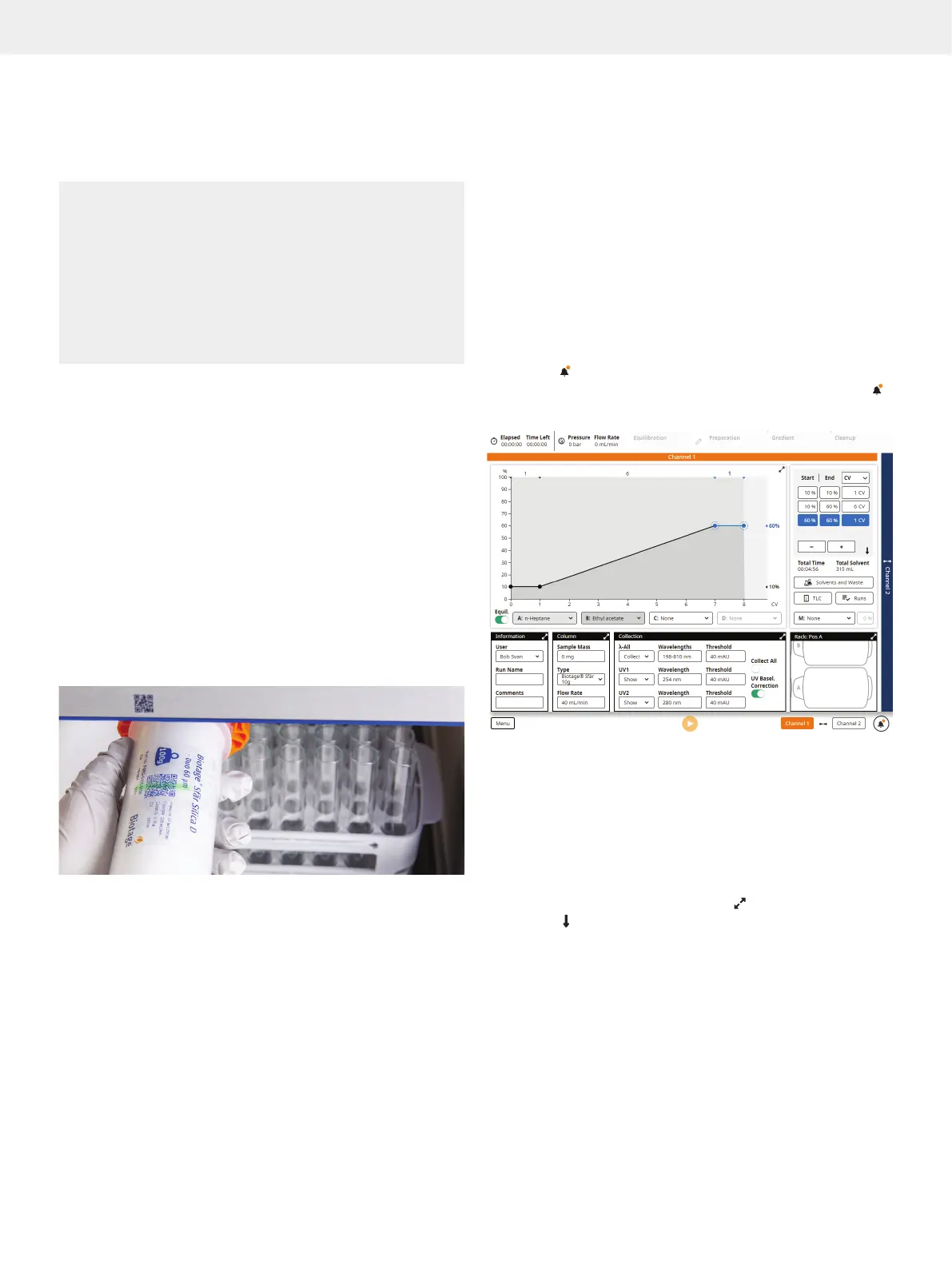
3. Either scan your column using the QR reader underneath
the touch screen (see Figure 18) or select the column type
from the Type drop-down list in the Column panel (see
Figure 19).
Note: If using a column or a combination of a column and
e.g. dry load vessel with a total CV larger than 0.8 L, a safety
valve supplied by Biotage (P/N 417115SP) must be used.
For more information, see page 4.
Figure 18. The QR reader is located underneath the touch screen.
4. Place the column in a column holder on the right side of the
system or on the front (up to 50g).
5. Connect the correct inlet and outlet tubing to the column.
The tubes for channel 1 are labeled C1 with orange tags and
the tubes for channel 2 are labeled C2 with blue tags.
6. Ensure that the inlet and outlet tubing on the other (unused)
channel are coupled together.
7. Place the collection rack(s) that you want to use on the
collection bed. Racks with vessel volumes up to 120 mL
require the collection tray. Selekt racks are automatically
identified by the system when placed on the collection bed.
If automatic rack detection has been disabled (see page 27),
select the collection rack manually (see “Specify the Rack
Parameters” on page 11).
8. Set up the run parameters as described in the following
sections.
Note: If the
button is available in the bottom right corner, one
or more run parameters are either missing or incorrect. Press
for more information.
Figure 19. The run setup view.
Specify the Gradient
The gradient can be set up using the gradient graph or the
gradient table. It is also possible to calculate a gradient from
R
f
values obtained from TLC analysis (see page 9).
Gradient Graph and Table
Expand the gradient graph by pressing and the gradient table
by pressing
.
Change the length unit by selecting CV, mm:ss, or mL from the
unit drop-down menu in the gradient table or the expanded
gradient graph.
Set Up a Purification



 To Next Page