Troubleshooting
Fraction Collector-Related Problems
»
The collection arm does not position
correctly over each collection vessel:
»
Ensure that the racks and tray(s) are aligned correctly.
»
Ensure that the correct rack type has been selected in
the Rack panel for the rack in use (see page 11).
»
Ensure that there is nothing obstructing
or restricting the arm movement.
If this does not solve the problem, the collection arm may
need to be recalibrated. Contact Biotage 1-Point Support.
»
Dripping needle and/or inconsistent dispensing
volumes can be signs of a dirty collect valve.
Please contact Biotage 1-Point Support.
Gradient Problems
Low composition gradient is not correct
To improve gradient accuracy at very low percentages, premix
solvents using the desired final % strong solvent in the weak
solvent and use this as solvent B. Program the gradient from
0 to 100% B using the pre-mixed solvent B.
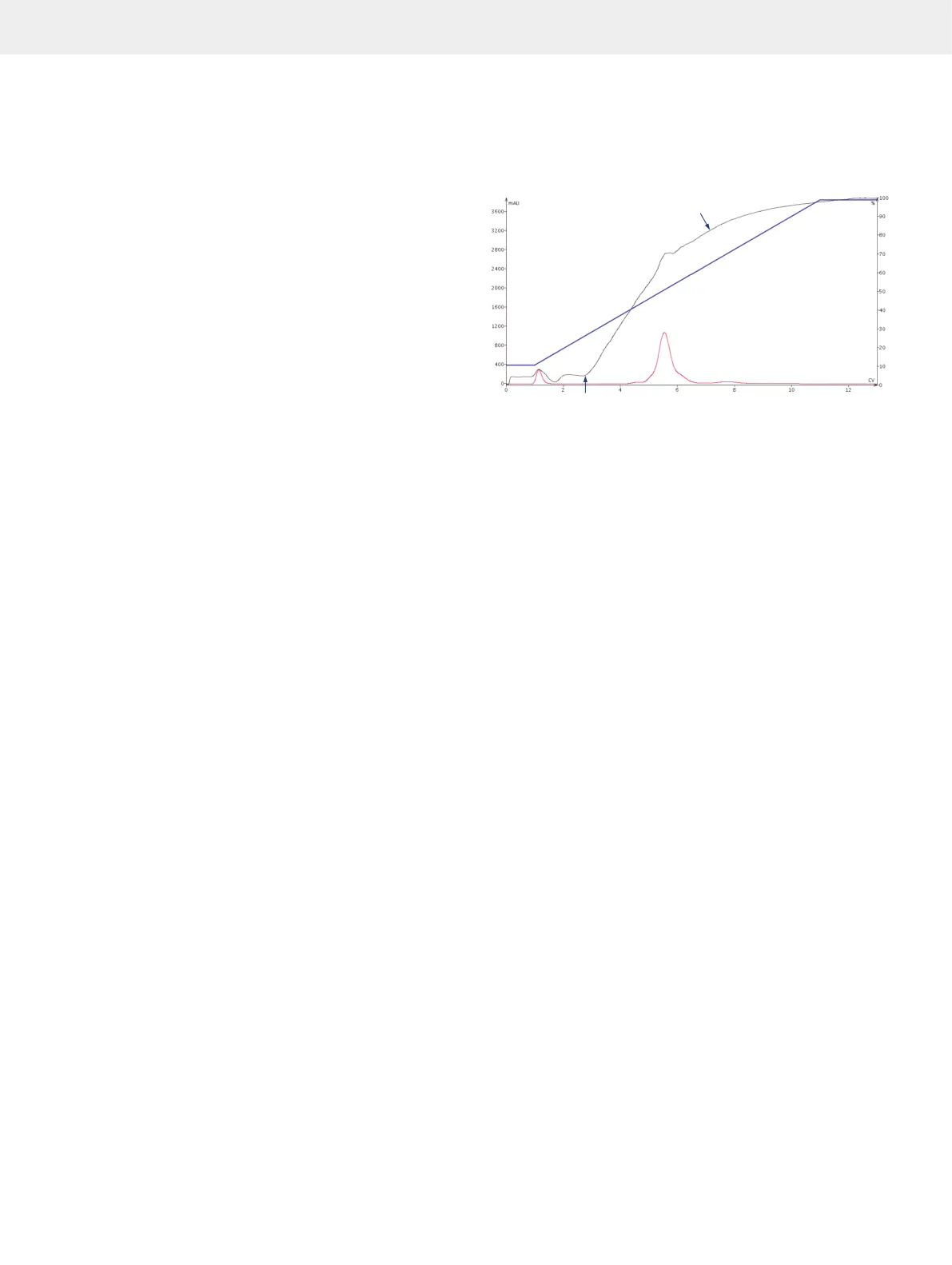
The baseline drift is different from the programmed gradient
Two factors contribute to altering the gradient as observed by
the internal detector:
1. As it takes at least 1 CV for the solvent to pass through the
column and reach the internal detector, the initial front
of the gradient will always be delayed by at least 1 CV
compared to the programmed gradient. A longer gradient
delay may be due to interactions with the silica, where
strong solvent is being selectively retained on the column.
2. The gradient as observed by the internal detector will at
times decline and plateau before the programmed gradient
does. This is due to the detection limit of the internal
detector. Any increase in the concentration of strong solvent
will not be registered as no light is reaching the detector at
those particular wavelengths.
If using a system with a Spektra software license, try performing
the run with the UV Baseline Correction option turned on.
Non-linear behavior due to
detection limit of the detector
Longer delay than expected (approx. 2 CV instead of 1 CV)
due to interactions with the silica, where strong solvent is
being selectively retained on the column
Internal UV Detector-Related Problems
»
No signal. Check that the UV flow cell is correctly
mounted, see step 6 in “Clean the Flow Cell of
the Internal UV Detector” on page 31.
»
Noise may be due to a contaminated flow cell.
Clean the flow cell; see page 31.
»
Drifting baseline may be due to:
»
Contaminated flow cell. Clean the
flow cell; see page 31.
»
Used solvent is absorbing light at the selected
wavelength(s). Change the collection and fractionation
wavelength(s) or turn on the UV Baseline Correction
option (only on systems with a Spektra software license).
»
Defective UV lamp. Contact Biotage 1-Point Support.
»
UV baseline correction is not eliminating drifting baseline:
»
B/C or C/D solvents are used. The UV baseline correction
is only adjusting for absorbance of the A/B solvents.
»
The gradient is modified by the user during the run.
If the gradient is changed outside of its original
boundaries, this is not covered by the standard
UV baseline correction (start to end mix A/B).
Change to full UV baseline correction (start mix to
100% B) in the system settings (see page 27).
»
The modifier percentage is changed by the
user during the run. The UV baseline correction
is based on the original percentage.
»
Missing peaks when using UV baseline correction.
If expected peaks do not show when you have the
UV Baseline Correction option turned on and you are
using solvents that are high-absorbing over a wide
range of wavelengths (e.g. acetone or toluene), try
performing the run without UV baseline correction.
Troubleshooting



 To Next Page