Data Administration
Data Administration
Note: Only users with system owner privilege can administrate
column types, solvents, rack types, and user accounts.
Administrate Column Types
The software comes with a preconfigured list of column types
and their settings. To add, edit, and delete user-defined column
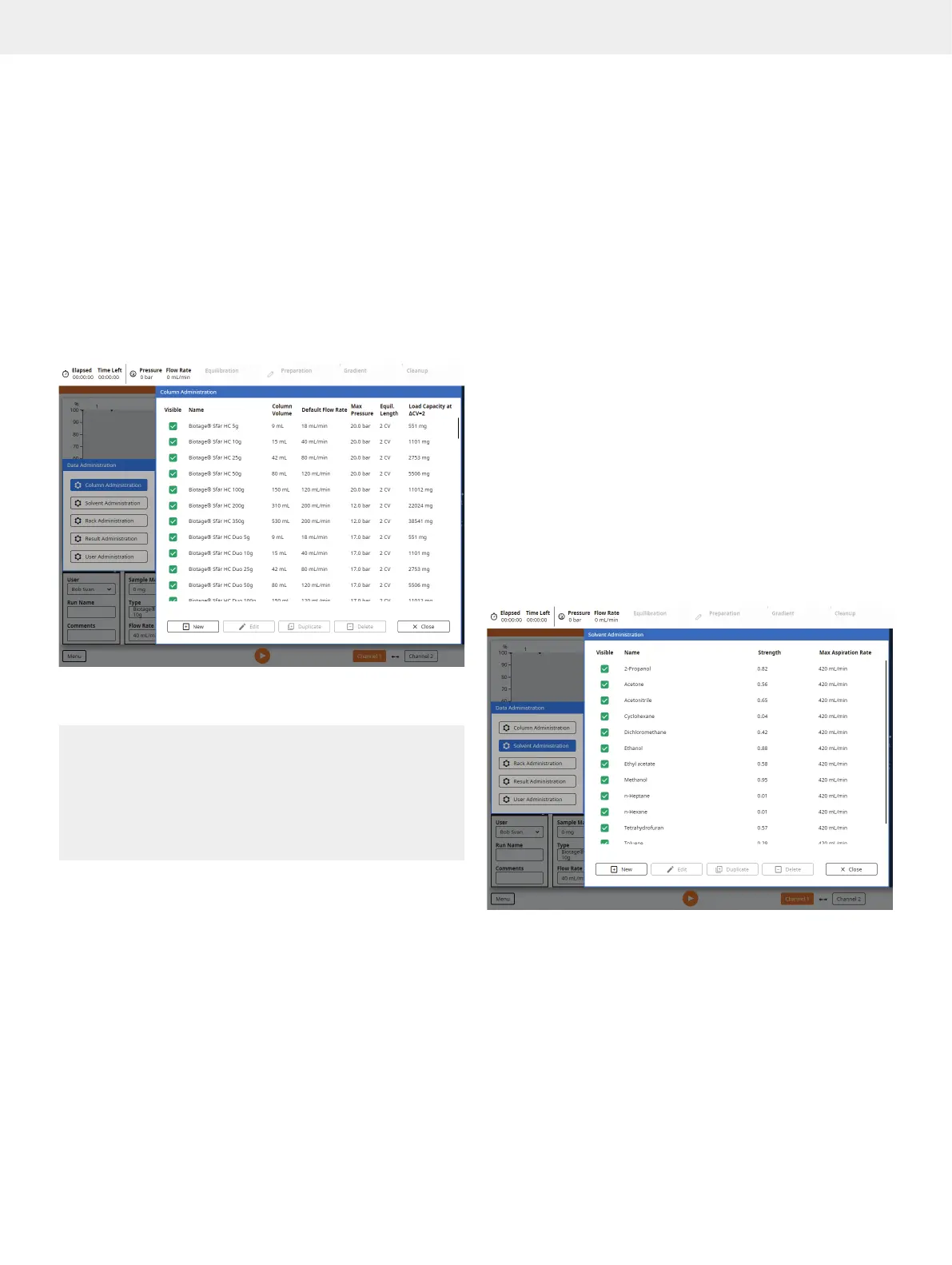
types, press Menu, Data Administration and then Column
Administration (see Figure 46).
Figure 46. The Column Administration view.
Column Parameters
Warning
»
Always use Biotage Safety Valve (P/N 417115SP) when
processing columns or combinations (e.g. column and dry
load vessel) with a total CV larger than 0.8 L.
»
Never use columns or combinations with a total CV larger
than 3.1 L.
»
Never exceed the maximum pressure or flow rate for the column.
Note: The preconfigured Biotage column types cannot be edited
or deleted. We recommend that you disable Visible for any
column that will not be used.
»
Visible: If enabled, the column type is available for use.
»
Name: The name of the column type.
»
Column Volume: The column volume (CV) in mL.
»
Default Flow Rate: The default flow rate in mL/min.
»
Max Pressure: The safety pressure in bar or psi
(see page 27). If reached, the flow rate will be
reduced to keep the pressure at this level.
»
Equilibration Pressure: The maximum pressure during the
equilibration, in bar or psi (see page 27). If reached, the
flow rate will be reduced to keep the pressure at this level.
»
Equil./Equilibration Length: The equilibration length in CV.
»
Equilibration Flow Rate: The equilibration
flow rate in mL/min.
»
Air Flush Length: The air flush length in CV.
This value will be used as the default volume
for the air flush feature (see page 24).
»
Load Capacity at CV=2: The approximate
load capacity when delta CV is 2.
»
Chemistry Type: The type of chromatography the
column is used for, normal or reversed phase.
»
Part Number: The manufacturer’s part number.
Administrate Solvents
The software comes with a preconfigured list of solvents
and their settings. To add, edit, and delete user-defined
solvents, press Menu, Data Administration and then Solvent
Administration (see Figure 47).
Figure 47. The Solvent Administration view.
Solvent Parameters
Note: The preconfigured Biotage solvents cannot be edited or
deleted. We recommend that you disable Visible for any solvent
that will not be used.
»
Visible: If enabled, the solvent is available for use.
»
Name: The solvent name.



 To Next Page