Biotage
®
Selekt User Manual | © Biotage 2020
Maintenance
Maintenance
Warning
»
There are potentially lethal voltages inside the system.
Do not remove the cover panels; there are no user serviceable
parts inside.
»
If the system has been damaged or does not function properly,
shut it down immediately and contact Biotage
®
1-Point Support
™
(www.biotage.com).
Back Up and Restore the System’s Database
The system database contains all results and registered
solvents, column types, and user accounts.
Note: Restart is required after both backup and restore.
Note: Do not remove the USB memory device until the
backup/restore has been completed.
To back up the database:
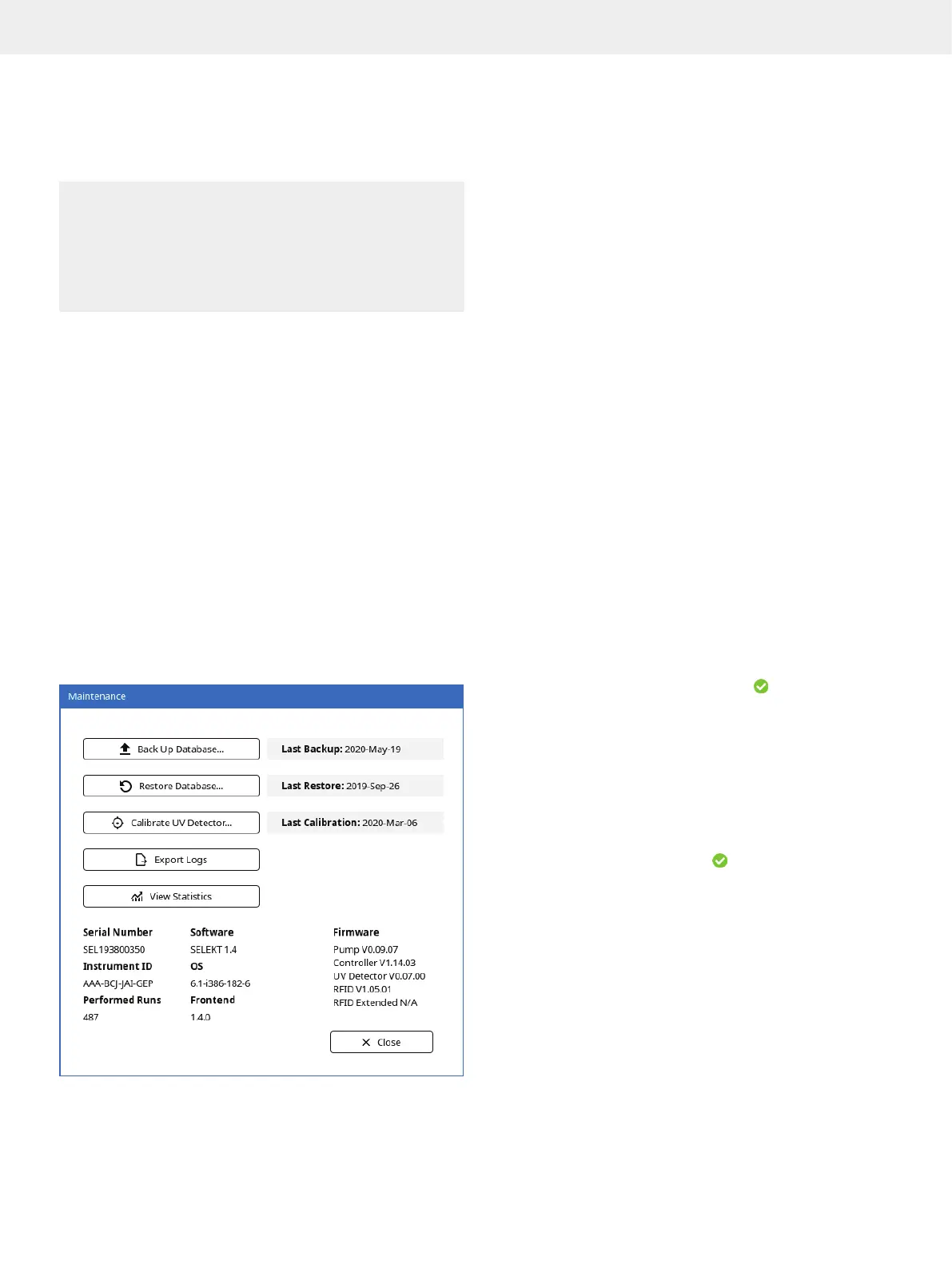
1. Press Menu and then Maintenance.
2. Connect an empty memory device to a USB port on the left
side of the system.
3. Press Back Up Database.... The Confirm Backup dialog opens.
4. To confirm backup, press Yes.
5. When a message saying that the backup has been completed
appears, remove the memory device and press Shut Down.
The backup file is saved at \biotage\selekt\backup\.
Figure 52. The Maintenance view.
To restore the database:
1. Press Menu and then Maintenance.
2. Connect the memory device that contains the backup to
a USB port on the left side of the system.
3. Press Restore Database....
4. In the Select Backup File dialog, select the backup file and
press Restore. The Confirm Restore dialog opens.
5. To confirm restore, press Yes.
6. When a message saying that the restore has been completed
appears, remove the memory device and press Shut Down.
Export System Logs
If your system is connected to an e-mail server, you can either
send the system log(s) in an e-mail or export them to a USB
memory device. Note that only the current system log is sent
with the e-mail while all system logs are exported to the USB
memory device.
Export to a USB Memory Device
1. Connect the USB memory device to a USB port on the left
side of the system.
2. Press Menu, Maintenance, and then Export Logs.
3. If the Export dialog opens, press Export again. The
documents are saved in a zip file at \biotage\selekt\logs.
4. When the export has been completed (
), press Close and
remove the USB memory device.
Send in E-mail
1. Press Menu, Maintenance, and then Export Logs.
2. In the Export dialog, select your user name in the User
drop-down list and press Send.
Note: Only users with a registered e-mail address are listed
in the User drop-down list.
3. When the e-mail has been sent (
), press Close.
Calibrate the Internal UV Detector
If the internal detector needs to be recalibrated (e.g. when a
new flow cell has been installed), use the following procedure.
1. Press Menu and then Maintenance.
2. Press Calibrate UV Detector.... Read and follow the
instructions that appear on the screen.



 To Next Page