Start, Monitor, and Control a Purification
Add, Empty, and Replace
Racks During the Run
Note: To add/remove racks during a run, the run must
be paused.
If more fractions are to be collected than can fit in the available
rack(s), the system automatically pauses, the collection arm
returns to the home position (the inner right corner), and you
are prompted to load and/or assign more racks to the run.
To assign a rack to the run, expand the Rack panel and set the
check box in front of the rack.
Note: Rack sharing with another run is only possible at the
start of a run; see “Rack Sharing” on page 12.
Empty a Rack
When a Selekt rack that has been used in previous run(s)
is removed from the system and then reinserted, it is
automatically cleared and enabled for the run in progress.
When a Selekt rack that has been used for the run in progress is
removed from the system and then reinserted, it is not cleared
automatically. To clear the rack, press Empty in the Rack panel.
Note: If the RFID reader is disabled in the system settings, all
racks have to be manually cleared in the Rack panel.
Rack has been used by the run
in progress.
Rack has been removed.
Rack has been reinserted. If all vessels
are empty, press Empty.
Rack was used in a previous run or runs.
When removed and then reinserted, it is
automatically emptied in the software.
Table 1. Unload and empty a rack when the RFID reader is enabled,
system paused.
Rack B has been used by the run in
progress and Rack A was used in a
previous run or runs.
When replacing all vessels with empty
ones, press Empty.
When replacing the rack with another
type of rack, select the correct type from
the Select Rack drop-down list.
When removing the rack and leaving the
rack position empty, select None from
the Select Rack drop-down list.
Table 2. Unload and empty a rack when the RFID reader is disabled,
system paused.
Rack has been removed.
Rack reinserted before the run is
resumed. Collection will be resumed
in the vessel with thicker border. If all
vessels are empty, press Empty.
Rack reinserted after the run was
resumed. Empty vessels cannot be used.
If all vessels are empty, press Empty.
The rack can then be reused.
Table 3. Unload the rack in use when the RFID reader is enabled, system
paused.
Resume the Run
Before you resume the run, ensure that the setup in the Rack
panel corresponds to what is loaded onto the collection bed.
The system uses the assigned racks in alphabetical order in
regard to their positions on the tray. Collection will be resumed
in the vessel that is highlighted with a thicker border in the Rack
panel; see Figure 31.
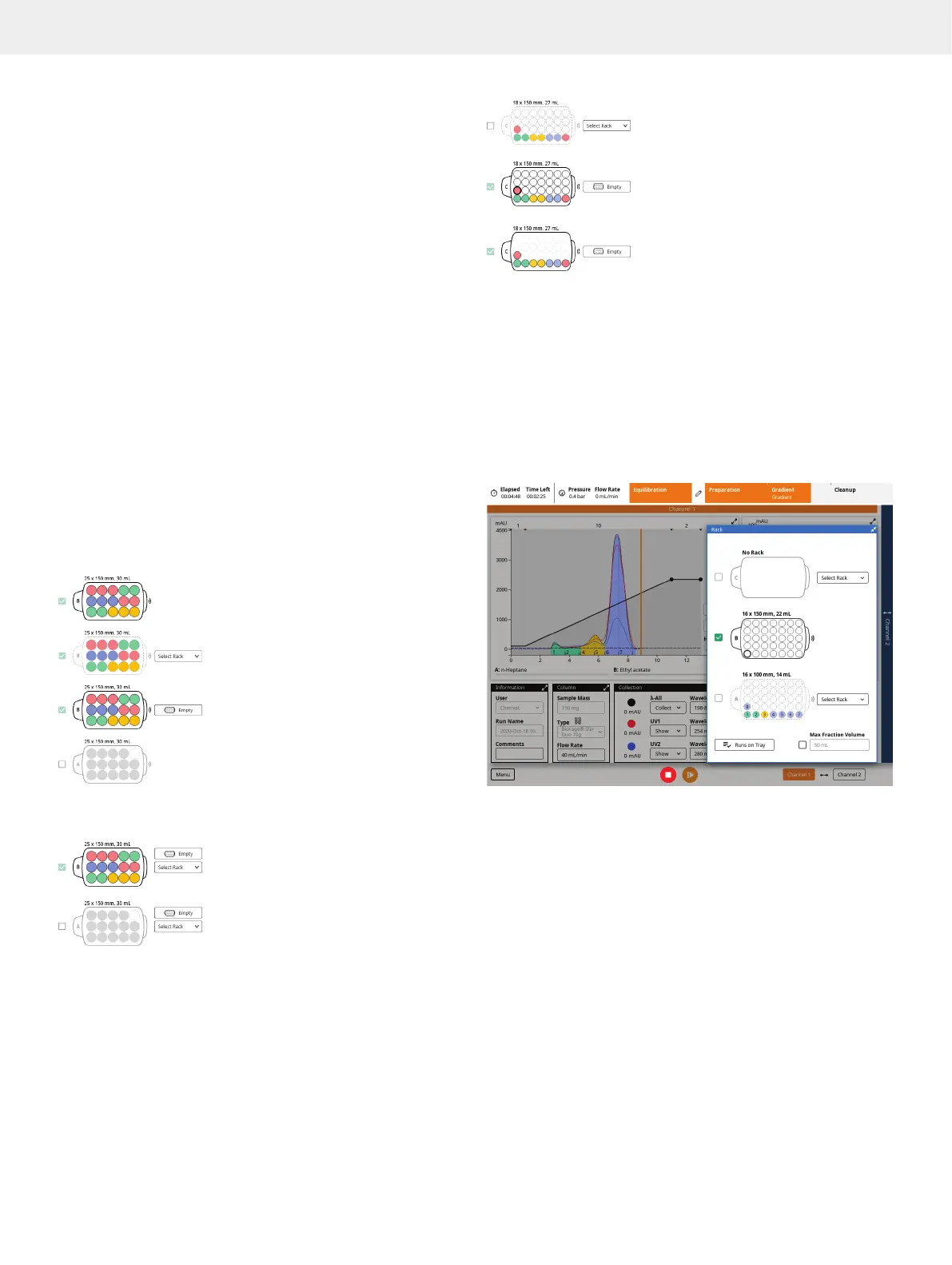
Figure 31. The Rack panel. Rack A is used in the current run but has been
removed, and rack B is assigned to the run but has not yet been used.
If the run is resumed without rack A being in position, the collection will be
resumed in rack B.



 To Next Page