Maintenance
Clean the Exterior of the System
Regular cleaning of the touch screen, if performed properly,
extends the touch screen life and reduces wear.
Warning
»
When cleaning the touch screen, use only non ammonia-based
window cleaner and do not apply the liquid directly to the screen
as this could damage electronic components.
Note: Avoid harsh cleaners and chemicals, and moisture getting
into the system.
1. Shut down the system as described on page 18.
2. Disconnect the power cord from the power outlet.
3. Clean the touch screen using a clean, non-abrasive, dry cloth.
If this does not clean the screen properly, the cloth can be
lightly dampened with a non ammonia-based window cleaner.
After cleaning, wipe dry with a clean, non-abrasive cloth.
4. Clean the exterior surfaces of the system using a clean,
lint-free cloth lightly dampened with water. If required,
a small amount of mild soap may also be used.
After cleaning, wipe dry with a clean, lint-free cloth.
Clean the Flow Cell of the
Internal UV Detector
Warning
»
Ultraviolet (UV) light can injure your eyes. Always turn off the
system before removing the flow cell. Never have the system
turned on when the flow cell is removed or when the retaining
nut is loosened.
Note: Always handle the flow cell using gloves and never touch
the fiber optics; see Figure 53.
Figure 53. The fiber optics on the flow cell. Do not touch.
Keep the detector flow cell clean and protect it from dust and
chemical spills. Particular attention should be paid to prevent
the flow cell from leaking.
A contaminated flow cell has decreased transmissivity, which
causes increased noise levels, decreased response, and
difficulties performing UV Zero.
To clean the detector flow cell:
1. Shut down the system as described on page 18.
2. Remove the flow cell by holding the flow cell with one hand
while loosening the retaining nut.
3. Disconnect the inlet and outlet tubing from the flow cell and
visually inspect the cell for contamination.
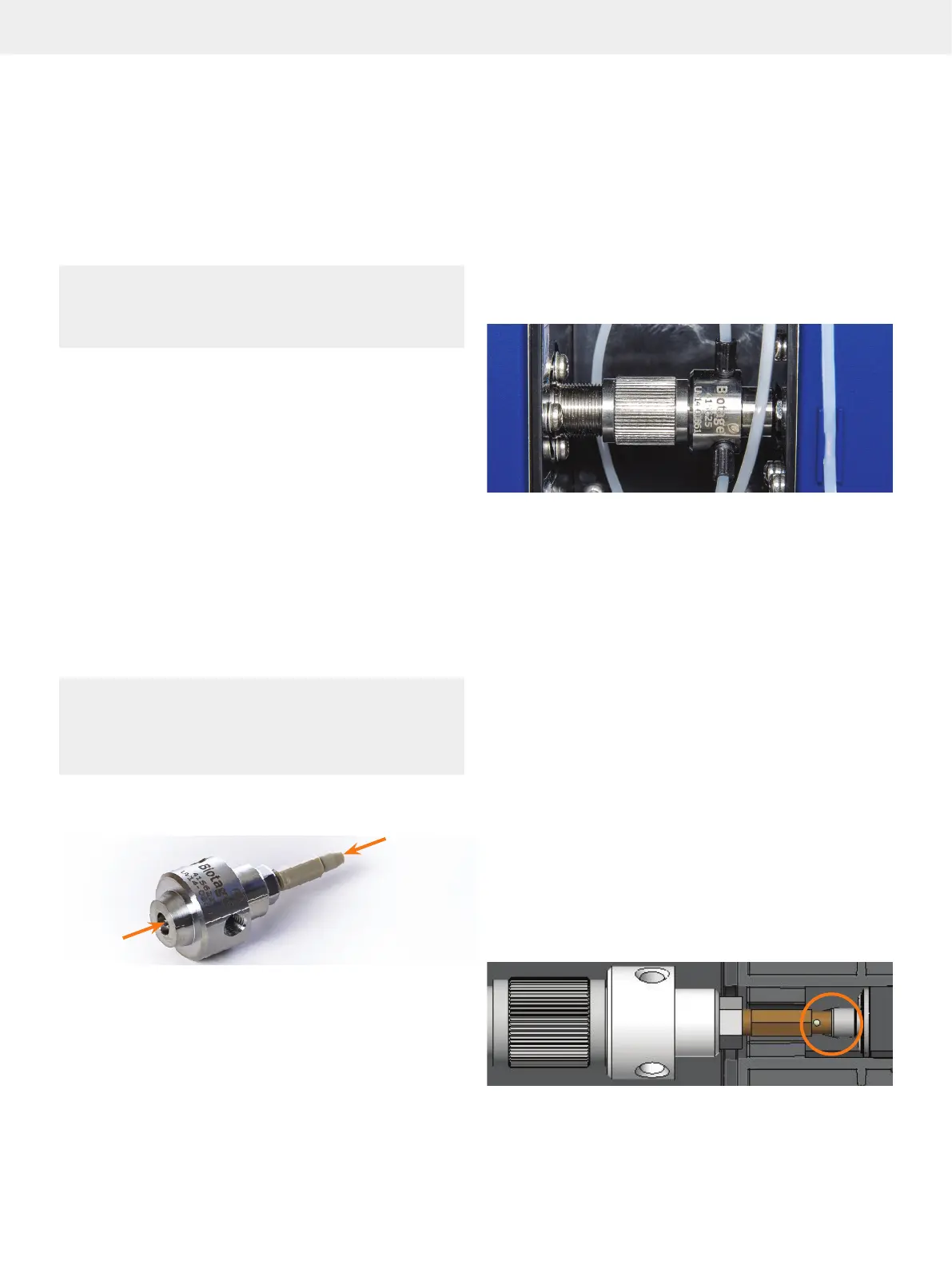
Figure 54
AA
CC
BB
DD
. The flow cell of the internal detector. A = flow cell outlet tube,
B = flow cell, C = flow cell inlet tube, and D = retaining nut.
4. Flush the flow cell with a series of miscible solvents using
the injection maintenance kit supplied with the system.
Select the solvents based on the contamination. It is
possible to use both organic and inorganic solvents and
diluted solutions of acids (e.g. H
2
SO
4
or HNO
3
diluted with
distilled water in a ratio of 1:20 to 1:10), unless they react
with stainless steel, PTFE, or fused silica windows.
5. Visually re-examine cell windows for visible contamination.
If contamination is still present, repeat step 4. If you are not
able to remove the contamination, we recommend that you
replace the flow cell (P/N 415625SP) and recalibrate the UV
detector (see page 30).
6. Carefully insert the flow cell and close the retaining nut:
a. Insert the flow cell cone straight into its housing inside
the UV detector; see the highlighted section in Figure 55.
b. Close the retaining nut. Tip! At the last couple of turns,
hold the flow cell flat against the retaining nut while
closing the nut completely.
Note: The retaining nut should close with little effort. If it is
difficult to close, the flow cell is probably misaligned.
7. Reconnect the tubing to the flow cell.
Figure 55. Cross section of the flow cell properly inserted into the
UV detector.



 To Next Page