877-877-2269 | blackbox.com
Page 26
Chapter 4: Quick Installation Guide
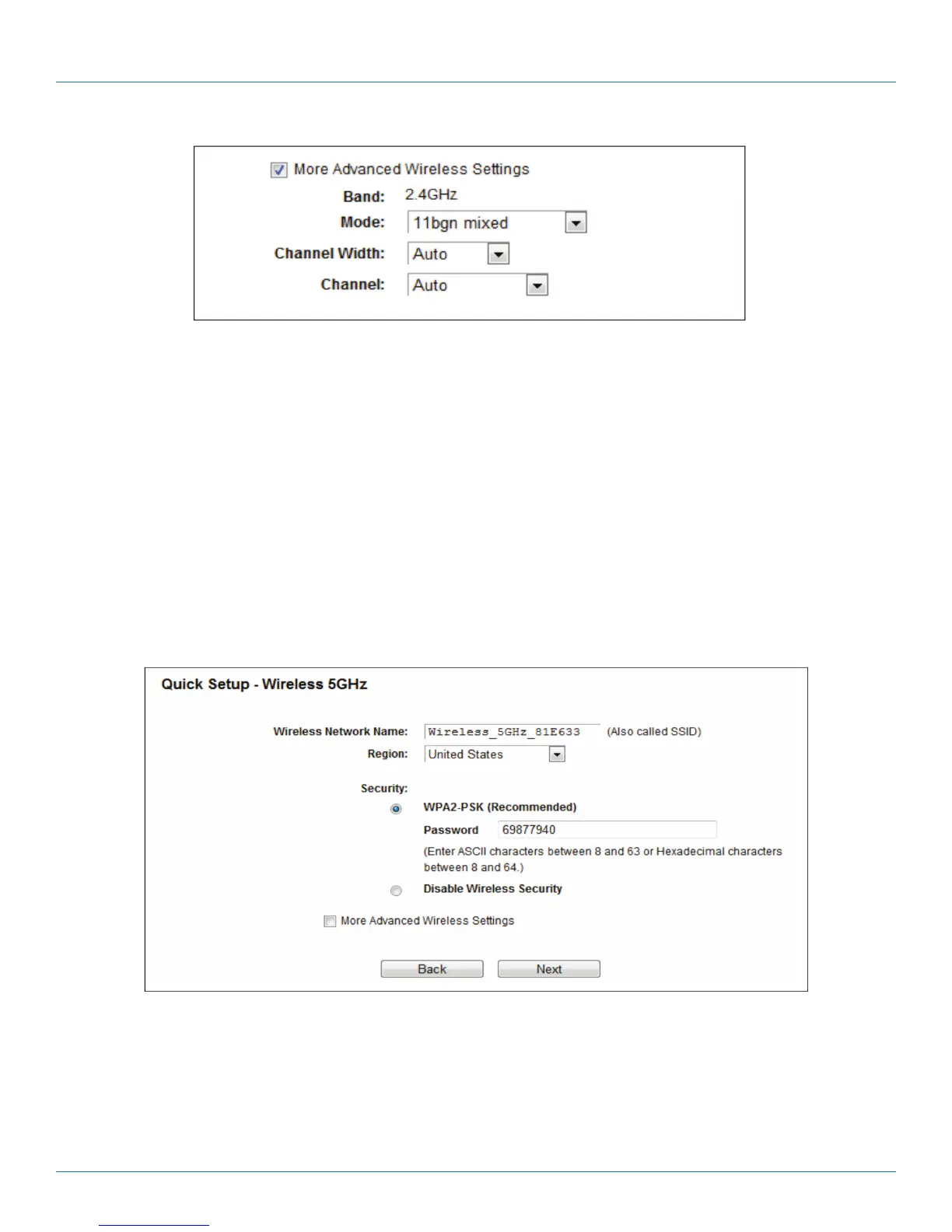
Figure 4-18. More Advanced Wireless Settings screen.
• Band - This field displayed the operating frequency being configured.
• Mode - This field determines the wireless mode which the router works on.
- 11bg mixed —Select if you are using both 802.11b and 802.11g wireless clients.
- 11bgn mixed—Select if you are using a mix of 802.11b, 11g, and 11n wireless clients.
• Channel Width—Select any channel width from the drop-down list. The default setting is “Auto,” which can adjust the channel
width for your clients automatically.
• Channel—This field determines which operating frequency will be used. It is not necessary to change the wireless channel
unless you notice interference problems with another nearby access point. If you select “Auto”, then the AP will select the best
channel automatically.
8. Configure the basic parameters for 5 GHz wireless network in the following screen, and then click Next.
Figure 4-19. Quick Setup—Wireless 5 GHz.
• Wireless Network Name—Also called the SSID (Service Set Identification). Enter a value of up to 32 characters. The same name
must be assigned to all wireless devices in your network. The default SSID is set to be Wireless_5GHz_XXXXXX. This value is
case-sensitive. For example, TEST is NOT the same as test.



 To Next Page