Video Preview
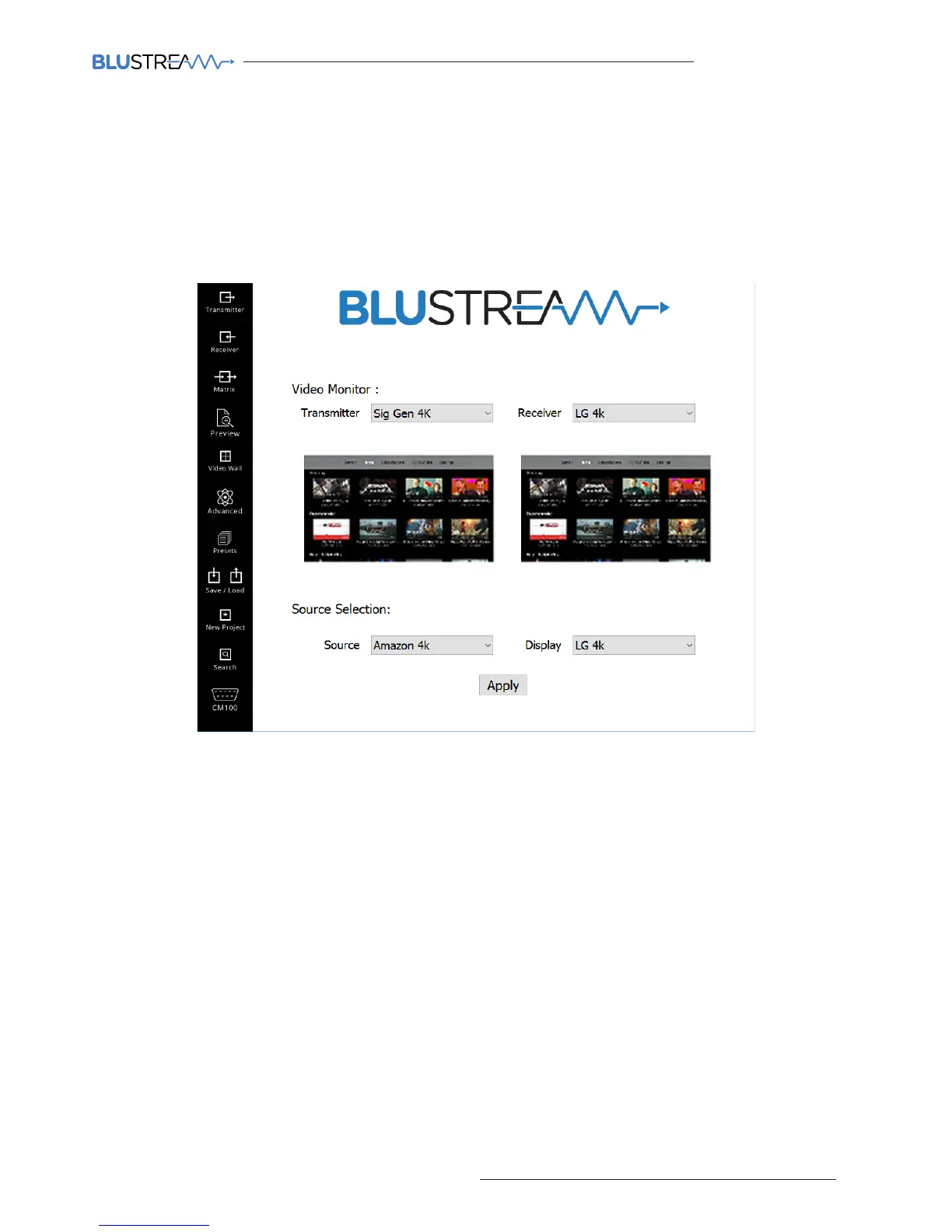
The video preview page allows you to view what video signal is passing through all Transmitters and Receivers in the live system.
The preview windows are a tool to help diagnose faults with the video distribution system, allowing you to see if each
transmitter is receiving a signal from the source, and whether each receiver is transmitting a signal to the display. This
can all be acheived from your computer, meaning you do not have to walk to each display in the system.
To view the video output from a source (Transmitter) simply select the required Transmitter from the Transmitter drop-
down box.
To view the video output to a display from a Receiver simply select the Receiver from the Receiver drop-down box.
The image that is shown in both preview windows is a single frame that is refreshed every 2 seconds.
Matrix Switch Control
If the number of Transmitter and Receiver units are too many to display in the previous ‘MATRIX CONTROL’ window it
may be easier to use the matrix switch control option at the bottom of the ‘VIDEO PREVIEW’ page.
To switch sources to dierent screens:
1) Select the required source from the Source drop-down box
2) Select the display you wish to view the previously selected source (Transmitter) using the Display drop-down box
3) Click ‘Apply’ for the input changes to apply
4) The video preview function can be utilised to ensure the switch has taken place



 To Next Page