Video Wall
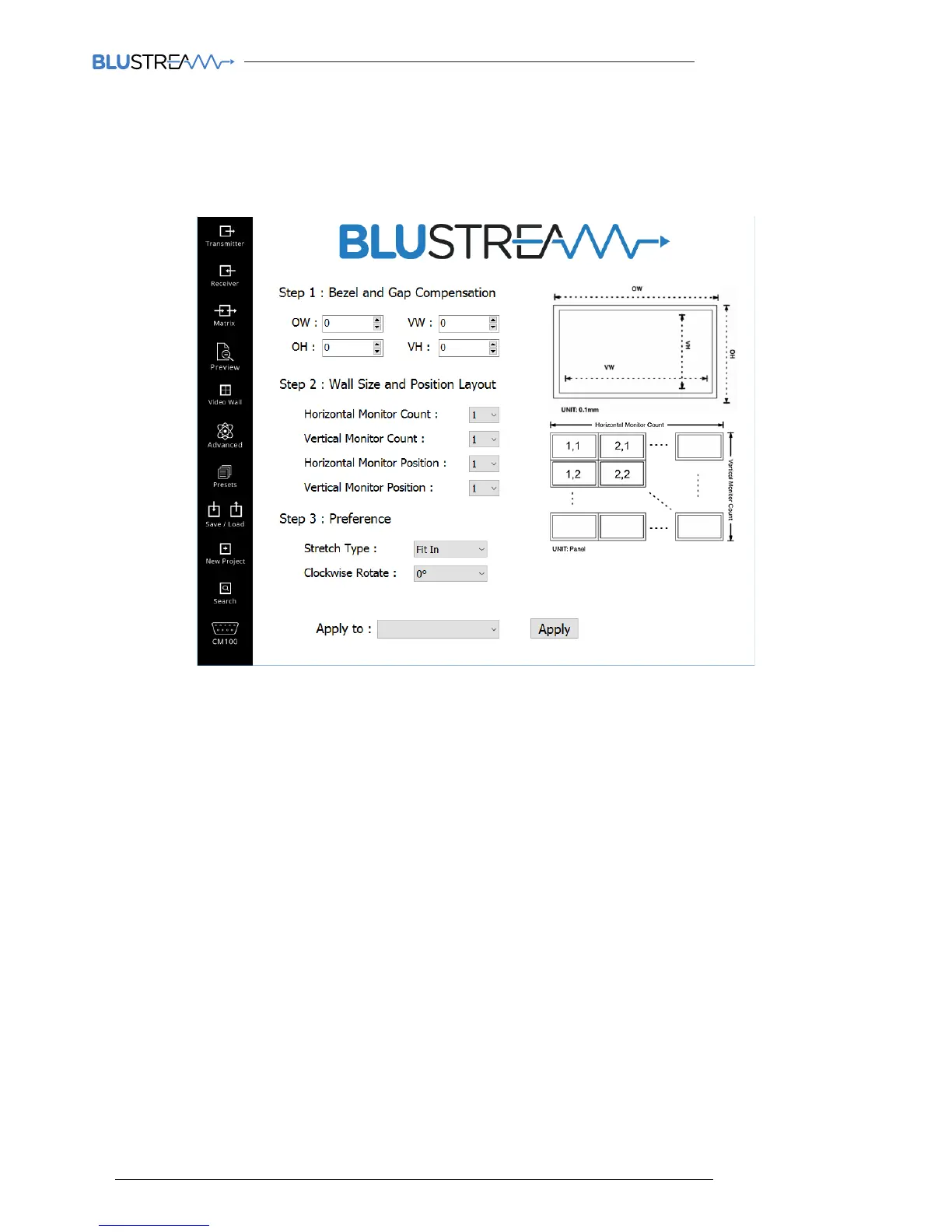
Blustream Multicast receivers can be setup to be part of a video wall array. Each system can contain mulitple video
wall arrays of diering sizes. Each video wall can be assigned a number of screens and dierent layouts that range from
1x2 up to 16x16.
Features of the Video Wall setup page include:
1. Bezel and Gap Compensation - this allows you to alter the overall size (OW) and visable image (VW) displayed per
screen. This allows you to compensate for the size of each screen bezel, alternatively any gaps in-between screens.
2. Wall Size and Position - this is broken down into 4 settings:
Vertical Monitor Count = how many screens there are vertically (overall video wall array size)
Horizontal Monitor Count = how many screens there are horizontally (overall video wall array size)
Vertical Monitor Position = assigns the vertical location of one individual IP100UHD-RX Receiver.
For example the top row of screens are all vertical location 1.
Horizontal monitor position = assigns the horizontal location of one individual IP100UHD-RX Receiver.
For example the le column of screens are all horizontal location 1.
3. Stretch Type - adjusts the picture to fit to new video wall confuration size. There are 2 modes:
Fit In - displays the normal aspect ratio of the image as output by the source (usually 16:9)
Stretch Out - will ‘stretch-to-fit’ the image into the video wall array area
4. Clockwise Rotation - each screen image can be adjusted to rotate through 0, 90, 180 & 270 degrees.
5. ‘Apply To’ - once you have made changes to video wall configuration you can select the Receiver that you wish to
apply the changes to from the drop-down box and click ‘Apply’
Please note: each Multicast Receiver must be configured individually to be part of a video wall configuration. When
being controlled via a third party control system each IP100UHD Receiver needs to be sent the relevant video wall
switching command individually.



 To Next Page