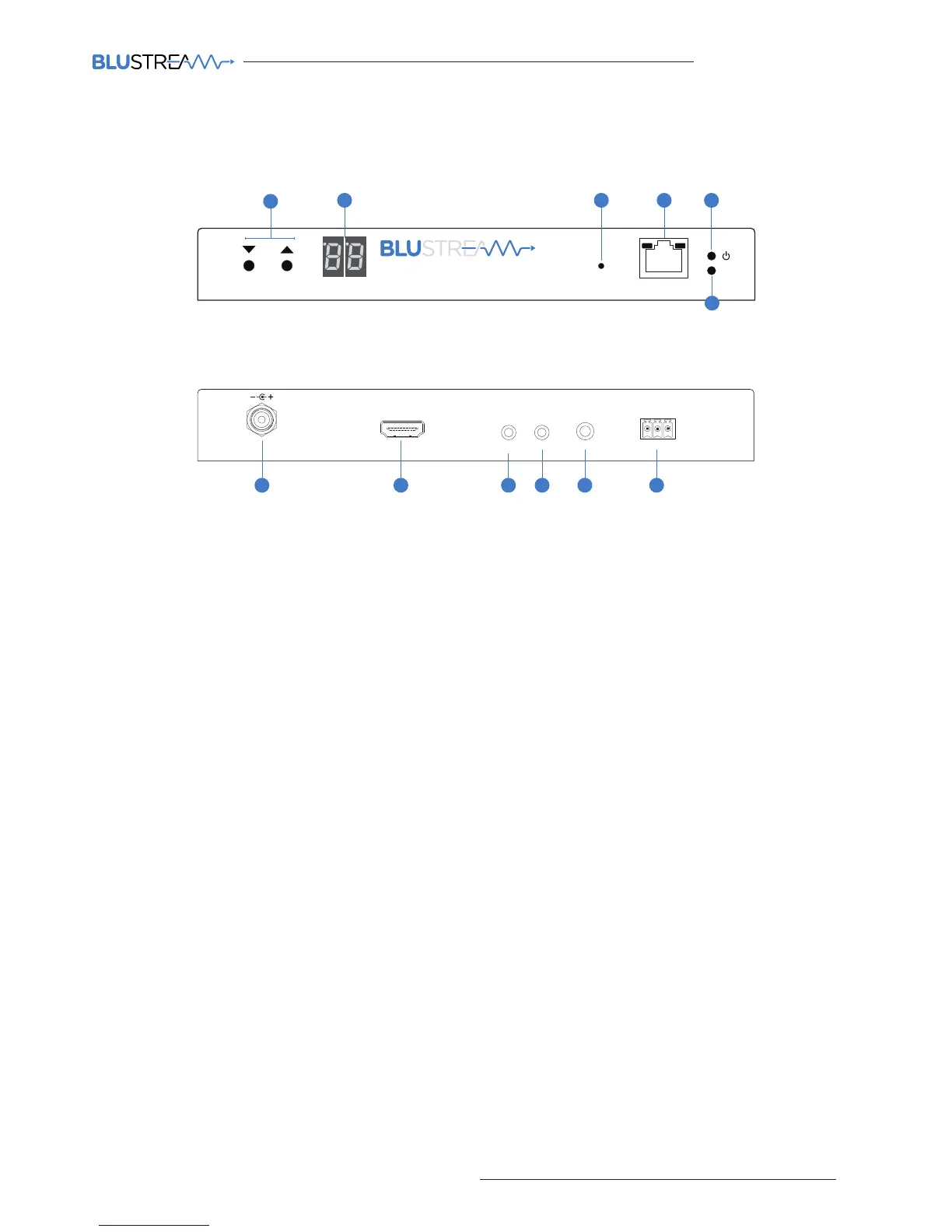
IP100UHD-TX Front Panel
Rx
Tx
Line IN
HDMI IN
DC IN
IRIR
RX
TX
RS-232
24 56V~
Gnd
TX
121110987
Link
PoE PWR
CH
CH Select
Lan
IP100UHD-TXMULTICAST UHD
2
1
3 4 5
6
1 Channel select UP/Down - Used to setup IP100UHD-TX manually and apply ‘Programming mode’
2 Channel status window - Displays product information
3 Reset button - Press and hold for 5 seconds to factory reset the product
4 LAN Connection (PoE) - Connect to Layer 3 Managed switch for HDMI video distribution
5 Power LED indicator
6 Link LED indicator - Solid status light indicates a stable connection to the network switch
7 Power port – Use 24-56V 1A DC adaptor (sold separately) if not using a PoE network switch
8 HDMI input – Connect to a HDMI source
9 IR RX (IR input) – 3.5mm stereo jack. Transmits IR to any IP100UHD-RX receiver currently viewing the IP100UHD-TX.
Please use supplied Blustream IRR 5V IR Receiver. When using the Blustream IRCAB cable (optional) ensure cable
direction is correct
q IR TX - (IR output) - 3.5mm mono jack – Routed IR from any IP100UHD-RX (zone output) allowing source control.
Use supplied Blustream 5V IR emitters
w L/R Analogue audio line input - Used to embed Analogue audio onto HDMI signal
e Assignable bi-directional RS-232 ports – Connect to third party control device to extend RS-232 commands to any/
multiple IP100UHD Multicast product RS-232 port
IP100UHD-TX Rear Panel
Panel Description - IP100UHD-TX Transmitter



 To Next Page