Solution 6000-IP
48
Bosch Security Systems 10/22 BLCC615R
Quick Start Guide
System > System Options >
Site Name
MENU 7-7-7
1 Characters 32
M y A l a r m
Use the [] and [] keys to scroll cursor left and right.
Use the [0] – [9] keys or the [] and [] keys to scroll
characters, then press [OK] to save. Press [OFF] to clear
text from the current cursor position.
System > System Options >
Custom Text Line 1
MENU 7-7-8
Use the [] and [] keys to scroll cursor left and right.
Use the [0] – [9] keys or the [] and [] keys to scroll
characters, then press [OK] to save. Press [OFF] to clear
text from the current cursor position.
System > System Options >
Custom Text Line 2
MENU 7-7-9
Use the [] and [] keys to scroll cursor left and right.
Use the [0] – [9] keys or the [] and [] keys to scroll
characters, then press [OK] to save. Press [OFF] to clear
text from the current cursor position.
Custom Text Line 1
Custom Text Line 2
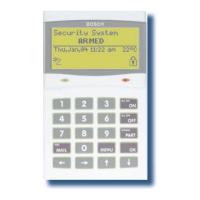
Figure 29: Custom Installer Baner Sample
System > System Testing >
Walk Test All Zones
MENU 7-9-0
Battery Test
MENU 7-9-1
Testing The System
You will need to be in programming mode before accessing
the test functions listed below.
Walk Test
Use the walk test command MENU 3-9-0 to test and verify
that all zones work correctly.
External Audible Test
Use MENU 4-9-0 to test and verify that all horn speakers
operate. This test will sound the horn speaker for two
seconds.
Internal Audible Test
Use MENU 4-9-1 to test and verify that all 12 VDC sirens
operate. This test will sound the siren for two seconds.
Strobe Test
Use MENU 4-9-2 To test and verify that the strobe operates.
This test will turn on the strobe until you manually stop the
test.
Fire Audible Test
Use MENU 4-9-3 to test and verify that all 12 VDC sirens
operate. This test will sound the siren for two seconds.
Battery Test
Use MENU 7-9-1 to test the back-up battery that is
connected to the control panel.
Communication Test
Use MENU 5-9-0 to test the reporting capability of the
control panel. You can also activate a communication test
by holding down the Test / Mail key on the keypad.









 To Next Page