9
Power Source
Loading the Lithium Ion Battery Pack
BMP
®
21-PLUS/BMP
®
21-LAB User’s Manual
Loading the Lithium Ion Battery Pack
When using a BMP21-PLUS-BATT Lithium Ion battery pack, please consult the instructions
enclosed with the battery pack for the charging procedure. The BMP21-PLUS-BATT battery
pack is NOT compatible with the BMP21 printer.
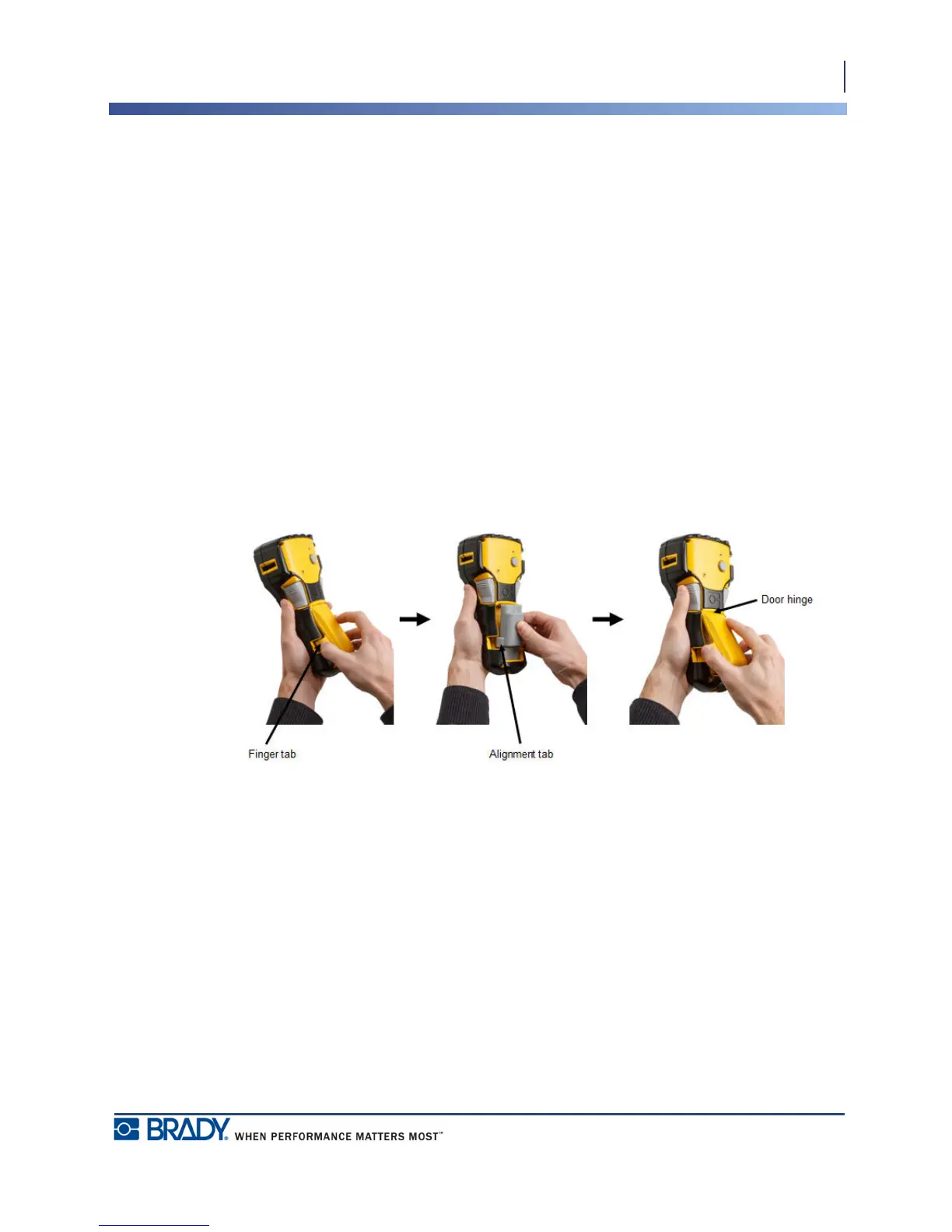
1. On the back of the printer,
squeeze the finger tabs
located on both sides of the
battery compartment door,
then swing the battery
compartment door up and
out. (The door will come
off.)
2. With the battery label
facing down, insert the the
elongated portion of the
battery (just below the
alignment tabs) into the
slot at the bottom of the
battery compartment; then
push the top part of the
battery down until it snaps
into place. (The battery
alignment tabs fit into the
cutout finger tab grooves.)
3. Re-insert the battery door
hinge at the top of the
compartment and push
down on the battery
compartment door,
snapping it into place.



 To Next Page