Banner Portrait Label Type
Selecting a Label Type
56
BMP
®
21-PLUS/BMP
®
21-LAB User’s Manual
Banner Portrait Label Type
Banner Portrait label type is used for creating basic labels, with no specific formatting. Banner
portrait supports all media except SelfLam and Permasleeve.
When you are using a specific label type, clearing the data removes the data you entered but
the specific label type parameters remain. To exit out of the specific label type and return to the
general editing mode of the BMP
®
21-PLUS/BMP
®
21-LAB Label Printer, select the Banner
Portrait label type.
1. Press LABEL TYPE .
2. Using navigation keys, choose Banner Portrait, then press Enter .
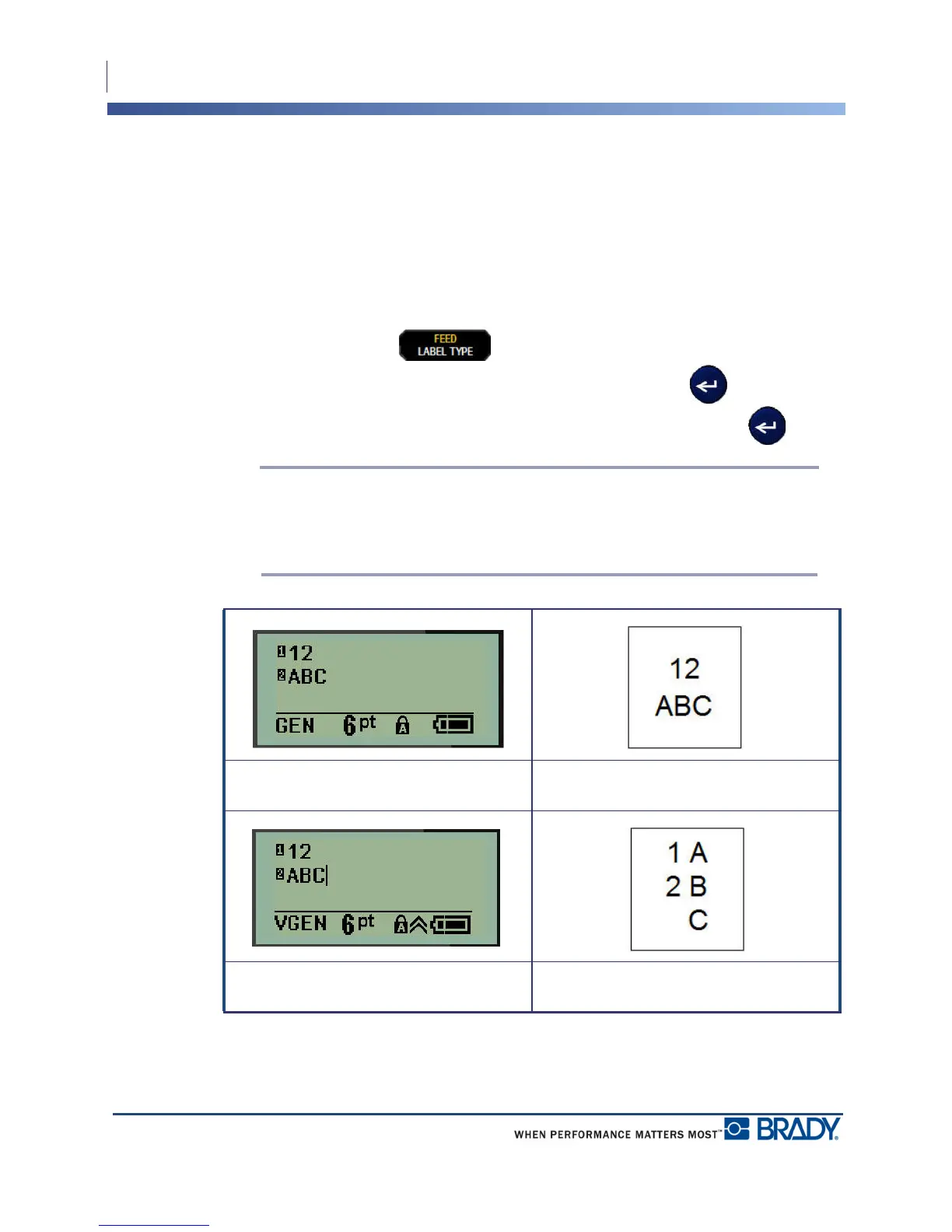
3. Using navigation keys, choose Horizontal or Vertical text, then press Enter .
Note: When using Horizontal Text on a Banner Portrait label type, you are limited
to four lines of text and the message “Cannot Fit” displays if each individual line of
text is too long. However, if using Vertical Text on a Banner Portrait label, while
you are limited to four lines of text, each individual line is unlimited in length.
The parameters of the previous label type in use are removed from the screen and you are
returned to the general editing mode.
Banner Portrait label type - horizontal text
on screen
Banner Portrait label type - horizontal text
printed out
Banner Portrait label type - vertical text on
screen (limited to four lines)
Banner Portrait label type - vertical text
printed out



 To Next Page